Skip to content
SecPod  – Documentation
  • Docs Home
  • Categories
    • Saner Platform
    • Saner Cloud
    • Saner CVEM
    • Security Intelligence
  • More
    • About SecPod
    • Blog
    • Security & Privacy
    • Support Center
    • Resources
  • SCHEDULE A DEMO
  • Toggle website search
Search this website
Menu Close
  • Docs Home
  • Categories
    • Saner Platform
    • Saner Cloud
    • Saner CVEM
    • Security Intelligence
  • More
    • About SecPod
    • Blog
    • Security & Privacy
    • Support Center
    • Resources
  • SCHEDULE A DEMO
  • Toggle website search
  • Docs Home
  • Categories
    • Saner Platform
    • Saner Cloud
    • Saner CVEM
    • Security Intelligence
  • More
    • About SecPod
    • Blog
    • Security & Privacy
    • Support Center
    • Resources
  • SCHEDULE A DEMO

Saner Platform

  • Saner Platform Release Notes
    • Saner Platform Integration Release: ServiceNow Integration Introduced, Freshservice Enhanced
    • Release Notes Saner 6.4.1
    • Release Notes SanerNow 6.4
    • Release Notes SanerNow 6.3.1
    • Release Notes SanerNow 6.3
    • Release Notes SanerNow 6.2.1
    • Release Notes SanerNow 6.2.0.3
    • Release Notes SanerNow 6.2.0.1
    • Release Notes SanerNow 6.2
    • Release Notes SanerNow 6.1.1
    • Release Notes SanerNow 6.1
    • Release Notes SanerNow 6.0
    • Release Notes SanerNow 5.3.1
    • Release Notes SanerNow 5.3
    • Release Notes SanerNow 5.2
    • Release Notes SanerNow 5.1
    • Release Notes SanerNow 5.0
    • Release Notes SanerNow 4.8.0.0
    • Release Notes SanerNow 4.7.0.0
    • Release Notes SanerNow 4.6.0.0
    • Release Notes SanerNow 4.5.0.0
    • Release Notes SanerNow 4.4.0.0
    • Release Notes SanerNow 4.3.0.0
    • Release Notes SanerNow 4.2.2.1
    • Release Notes SanerNow 4.2.2.0
    • Release Notes SanerNow 4.2.1.0
    • Release Notes SanerNow 4.2.0.0
    • Release Notes SanerNow 4.1.1.0
    • Release Notes SanerNow 4.0.0.5
  • Saner Platform Guide
    • Saner Administration Guide
    • Saner Device Management User Guide
    • Saner Platform and ServiceNow Integration Guide
    • Saner Platform and Freshservice Integration Guide
    • Saner Platform Function Guides
  • FAQs
    • Saner CVEM Technical FAQs
  • How Tos
    • General
      • How to increase the subscription count for an Account in Saner CVEM
      • How to increment license count for an Organization in Saner CVEM
      • How to provision Saner tools for an Organization
      • How to change subscription type in Saner CVEM
      • How to sign-up with Saner CVEM?
      • How to create a new account in Saner CVEM?
      • How to enable SSO authentication policy in Saner CVEM?
      • How to set alerts in Saner?
      • How to view, download and filter the audit logs?
      • How to designate Saner Agent to perform network scan?
      • How to Co-Brand with your logo?
      • How to fetch the details of the mandatory fields from the Okta account?
      • How to create MFA policy for Okta?
      • How to fetch the details of the mandatory fields from the PingID account?
      • How to create MFA policy for PingID?
      • How to fetch the details of the mandatory fields from the PingOne account?
      • How to create MFA policy for PingOne?
      • How to download and install Saner Agent in Mac?
      • How to download and install Saner agent in Linux?
      • How to download and install the Saner agent in Windows?
      • How to update the expiry date of an existing subscription?
      • How to manage users and their preferences using role-based access?
      • How to uninstall Saner Agent using Saner Offline deployer tool.
      • How to onboard a new organization?
      • How to deploy Saner Agent using Saner Offline deployer tool.
      • How to install a Saner agent through the command line?
      • How to uninstall the Saner agent through command line?
    • Saner Reports
      • How to configure mail settings to email Report PDF?
      • How to create a custom report in Saner?
      • How to schedule for the report back up?
    • Saner Device Management
      • How to create custom groups in Saner CVEM
    • Saner Mail Settings
      • How to create new mail settings in Saner?
      • How to use OAuth-enabled authentication in Saner mail settings
      • How to create OAuth Client ID and Client Secret for Gmail
      • How to create OAuth Client ID and Client Secret for Microsoft 365.
  • Supported OSs and Platforms
    • Operating Systems and Platforms Supported
    • Supported Third-party Applications for Patching

Saner Cloud

  • Before You Begin
    • Glossary of Terms
    • Read me First
  • Get Started
    • Prerequisites For Saner SaaS Platform Deployment
    • Saner Cloud Deployment Guides
      • GCP OAuth Scopes for Saner CNAPP
      • Onboarding a GCP Organization to Saner Cloud(CLI)
      • Onboarding a GCP Project to Saner Cloud (CLI)
      • Onboarding a GCP Organization to Saner Cloud(Manual)
      • Onboarding a GCP Project to Saner Cloud(Manual)
      • Azure Onboarding
      • Troubleshooting
      • Get Started with Saner CNAPP AWS Cloud Deployment V1.0
      • Onboarding with AWS Credentials(Least Recommended Method)
      • Onboarding with AWS Role(Manual)
      • Onboarding with AWS Role CloudFormation (Automatic): Recommended
    • Roles and Permissions
      • Roles and Permissions for AWS Remediation Access
      • Roles and Permissions for Azure Onboarding, Detection, and Remediation
  • Learn About
    • Saner CNAPP Best Practices
    • Secure Your IAM entities with Cloud Infrastructure Entitlement Management (CIEM)
    • Critical Events to Monitor in GCP
    • Saner CSRP Classification Based on Scoring Decision
    • Cloud Cyber Hygiene Scoring(CCHS) Approach
    • Remediation Rollback
    • Automation and Job-driven Remediation
    • Cost and Usage
    • Excessive Permission Categories Evaluated Across Different Cloud Services
    • Publicly Accessible Resources
    • Patch Aging and Patch Impact
    • SecPod Default Benchmarks
    • Watchlists
    • Cloud Workload Protection Platform(CWPP)
    • Overview of Report Views in Saner Cloud
    • Whitelisting Resources
    • Saner Plasma AI Assistant for Seamless User Interaction
    • Critical Events to Monitor in AWS
    • High-Privilege Actions in Critical Activity Logs for AWS
    • Audit Logs in Saner Cloud
    • Excessive Permissions
    • Alerts in SanerCloud
  • User Guides
    • GCP Cloud Infrastructure Entitlement Management (CIEM) User Guide
    • Azure Cloud Infrastructure Entitlement Management(CIEM) User Guide
    • Cloud Security Risk Prioritization(CSRP) User guide
    • Cloud Cyber Hygiene Score(CCHS) User Guide
    • Cloud Security Remediation Management(CSRM) User Guide
    • AWS Cloud Infrastructure Entitlement Management(CIEM) User Guide
    • Cloud Security Posture Anomaly(CSPA) User Guide
    • Cloud Security Asset Exposure(CSAE) User Guide
    • Cloud Security Posture Management(CSPM) User Guide
  • Tell Me How
    • How to Remediate in Saner Cloud?
    • How to Configure Automation Rule to Remediate Misconfigurations?
    • How to Manage Report Views at Organization-level in Saner Cloud?
    • How to Get a Cohesive View from Saner Cloud Unified Dashboard?
    • How to Use Tags to Quickly Filter Resources?
    • How to Troubleshoot Issues with Audit Logs?
    • How to Manage Groups and Tags in Saner Cloud?
    • How to Manage Report Views for a User Account in Saner Cloud?
    • How to Troubleshoot or Analyze with Critical Activity Logs?
    • How to Setup Alerts Across SanerCloud Tools?
    • How to Take Action on Alert Notifications from SanerCloud?
    • CCHS
      • How to Monitor Resource Risk Trends for CHS?
      • How to Assess Resource Health through Severity Distribution?
      • How to Evaluate Service-Level Risks Using CHS Scores?
      • How to Analyze Cyber Hygiene Scores through Trend Chart?
      • How to Identify High-Risk Resources by Geo Location?
      • How to Get an Overview of Cyber Hygiene for Cloud Resources?
      • How to Review Organization-Level Cyber Hygiene Across Accounts?
      • How to Assess Risk Distribution for Different Cloud Providers?
      • How to Review Major Issues Contributing to the Drop of Cyber Hygiene Score at Account-Level?
      • How to Analyze Module-wise Risk through CHS Distribution?
      • How to View the Cyber Hygiene Score Distributed Across Cloud Environments?
      • How to Track Security Posture with Cyber Hygiene Score?
      • How to Configure Account Weightage?
    • CSRP
      • How to Monitor and Analyze Audit Logs for Risk Prioritization?
      • How to Configure Risk Based Cloud Security Alerts?
      • How to Generate Reports and Visualizations?
      • How to Filter Risks by Tags for Targeted Analysis?
      • How to Manage Prioritized Risks at Account-level?
      • How to View the Detailed Breakdown of a Specific Cloud Cyber Security Standard (CCSS) Risk Finding?
      • How to Review and Prioritize Resources Based on Associated Risks?
      • How to Assess Risk Distribution on Essential Resources?
      • How to Assess and Prioritize Risks Across Resource Categories?
      • How to Identify the Risks Affecting Essential Resources?
      • How to Assess Full Versus Limited Technical Impact of Exploiting an Anomaly?
      • How to Review the Risk Factor Distribution Based on Automatable Reliability?
      • How to Get an Overview of Exploitable Risks?
      • How to Map Risks to MITRE ATT&CK for Threat-Informed Defense?
      • How to Configure Questionnaire and Assess Security Practices Across Core Domains for an Account?
    • CSPM
      • How to Setup Benchmarks in Saner CSPM?
      • How to Use Quick Evaluation Benchmarks?
      • How to Detect Patterns over a Period with Resource Trends?
      • How to Assess System Compliance and Security Posture?
    • CSPA
      • How to Initiate Patch Remediation from CSPA Dashboard?
      • How to Quickly Identify the Detected and Remediated Anomalies for an Account?
      • How to Prioritize Remediation or Fixes based on Confidence Levels?
      • How to Examine the Overall Anomaly Information for Specific Rules or Checks?
      • How to Search and Retrieve Anomaly Data?
      • How to Whitelist Rules or Resources in Cloud Security Scans?
    • CIEM
      • How to See the Active Version for an IAM Policy?
      • How to Address Critical Activities Using Evidence?
      • How to View by Type and Usage for any Identity in CIEM?
      • How to Get Visibility into Cloud Entitlements?
      • How to Use Evidence to Address Policies with Excessive Permission?
      • How to Know the Excessive Permissions on a Specific Service?
      • How to Visually See the Relationship between Identity, Entitlement, Policy, or Permission?
      • How to Determine if a Policy has Excessive Permission?
      • How to Initiate Remediation for Different Identities from CIEM?
    • CSRM
      • Rollback an Applied Remediation
      • How to Configure Automation Rule to Remediate Misconfigurations?
      • How to Create a Patching Task for Items Currently in “Approval Pending” State?
      • How to Evaluate Remediation Effort with Patching Impact Chart?
      • How to Prioritize and Address Older or High-Risk Anomalies with Patch Aging?
      • How to Monitor the Overall Status of the Remediation Job?
      • How do I Get to Know the Regions Impacted by a Specific Rule?
      • How to View the Severity of a Missing Patch Affected by a Rule?
      • How to Address Missing Patches Via Remediation Tasks?
      • How to Quickly Access the Necessary Tool for Remediation and Begin Patching Tasks?
    • CSAE
      • How to Setup Watchlist Configuration for a Resource?
      • How to Identify Outdated Resources for Cleanup?
      • How does Resource Categorization Work in Saner CSAE?
      • How to Identify Resources Exposed to External Network?
      • How to Understand the Resource Footprint Globally Across Various Regions?
      • How to Make Informed Decisions on Your Expenditure based on Resource Usage Graph?
  • Frequently Asked Questions
    • Saner Cloud Technical FAQs
  • Saner Cloud Release Notes
    • Saner Cloud – V.3.0.1.0 Release Notes
    • Saner Cloud – V.3.0.0.0 Release Notes
    • Saner Cloud – V.2.0.0.2 Release Notes
    • Saner Cloud – V.2.0.0.1 Release Notes
    • Saner Cloud – V.2.0.0.0 Release Notes
    • Saner Cloud – V.1.2.0.1 Release Notes
    • Saner Cloud – V.1.2.0.0 Release Notes
    • Saner Cloud – V.1.1.0.0 Release Notes
    • Saner Cloud – V.1.1 Release Notes
    • Saner Cloud – V.1.0 Release Notes

Saner CVEM

  • Saner CVEM Release Notes
    • Release Notes Saner CVEM 6.6
    • Release Notes Saner 6.5
    • Saner Platform Integration Release: ServiceNow Integration Introduced, Freshservice Enhanced
    • Release Notes Saner 6.4.1
    • Release Notes SanerNow 6.4
    • Release Notes SanerNow 6.3.1
    • Release Notes SanerNow 6.3
    • Release Notes SanerNow 6.2.1
    • Release Notes SanerNow 6.2.0.3
    • Release Notes SanerNow 6.2.0.1
    • Release Notes SanerNow 6.2
    • Release Notes SanerNow 6.1.1
    • Release Notes SanerNow 6.1
    • SanerNow Risk Prioritization Launch
    • Release Notes SanerNow 6.0
    • Release Notes SanerNow 5.3.1
    • Release Notes SanerNow 5.3
    • Release Notes SanerNow 5.2
    • Release Notes SanerNow 5.1
    • Release Notes SanerNow 5.0
    • Release Notes SanerNow 4.8.0.0
    • Release Notes SanerNow 4.7.0.0
    • Release Notes SanerNow 4.6.0.0
    • Release Notes SanerNow 4.5.0.0
    • Release Notes SanerNow 4.4.0.0
    • Release Notes SanerNow 4.3.0.0
    • Release Notes SanerNow 4.2.2.1
    • Release Notes SanerNow 4.2.2.0
    • Release Notes SanerNow 4.2.1.0
    • Release Notes SanerNow 4.2.0.0
    • Release Notes SanerNow 4.1.1.0
    • Release Notes SanerNow 4.0.0.5
    • Saner CVEM
      • Release Notes Saner CVEM 6.6
  • Saner CVEM Guide
    • Prerequisites For Saner SaaS Platform Deployment
    • What’s New in Saner CVEM?
    • Getting Started with Saner CVEM
    • Pre-requisites for Saner CVEM Deployment
    • How does Saner CVEM’s deployment architecture work?
  • Saner CVEM Products
    • Overview of Saner Continuous Vulnerability and Exposure Management
    • Saner CVEM Unified Dashboard User Guide
    • Saner CVEM Asset Exposure User Guide
    • Saner CVEM Continuous Posture Anomaly Management User Guide
    • Data Points IT teams can Fetch from Saner CPAM
    • Posture Anomaly Computation Rules
    • Saner CVEM Vulnerability Management User Guide
    • Saner CVEM Compliance Management User Guide
    • Saner CVEM Risk Prioritization User Guide
    • Saner CVEM Patch Management User Guide
    • Saner CVEM Endpoint Management User Guide
    • Saner CVEM Remote Scripting User Guide
    • Saner CVEM Remote Access User Guide
    • Saner CVEM Network Scanner User Guide
    • Saner CVEM Cyber Hygiene Score User Guide
  • How Tos
    • Saner AE
      • How to blacklist and whitelist applications in Saner AE?
      • How to manage asset licenses using Saner AE?
      • How to run an asset scan using Saner AE?
    • Saner CPAM
      • How to create new response in PA tool?
      • How to build your own detection and response in PA tool?
      • How to whitelist an entire PA ID?
      • How to configure Posture Anomaly tool for custom detection?
      • How to fix Anomalies from PA dashboard?
      • How to fix anomalies detected in your account from All Anomalies Page?
      • How to fix anomalies from PA Summary page?
      • How to delete PA scan preferences?
      • How to schedule PA Scans on Daily, Weekly, and Monthly basis?
      • How to launch Posture Anomaly scans?
    • Saner CM
      • How to run a compliance scan?
      • How to custom create a security policy?
      • How to align with PCI security compliance management?
      • How to align with NIST 800-171 security compliance management?
      • How to align with NIST 800-53 security compliance management?
      • How to align with HIPAA security compliance management using Saner CM?
    • Saner VM
      • How to automate and schedule vulnerability scans?
      • How to exclude vulnerabilities in Saner VM tool
      • How to manage excluded vulnerabilities in Saner VM?
      • How to remediate vulnerabilities from vulnerability management dashboard?
    • Saner PM
      • How to fix firmware in Saner?
      • How to exclude patches in Saner PM?
      • How to manage excluded patches in Saner PM?
      • How to automate patch management in Saner PM?
      • How to roll back patches in Saner PM?
      • How to apply missing patches in Saner PM?
      • How to apply the most critical patches in Saner PM?
      • How to perform custom remediation for applications that require paid patches using Saner PM
      • How to check the status of patching activity?
    • Saner EM
      • How to collect all security events from Windows Events Log?
      • How to check password policy set in Windows systems?
      • How to check status of DEP in Windows systems?
      • How to check faulty Anti-Virus (AV) status in Windows systems?
      • How to check for Anti-Virus (AV) status in Windows systems?
      • How to check account lockout policy on Windows systems?
      • How to check if Bit-locker protection is OFF in Windows systems?
      • How to list all inactive users on Windows systems?
      • How to list all guest accounts in Windows systems?
      • How to list all Administrator accounts on Windows systems?
      • How to list last-logon details of users on Windows systems?
      • How to identify all users in Windows systems?
      • How to collect all services that are currently running in Windows systems?
      • How to list all Groups in Windows systems?
      • How to collect all keyboard and pointing devices connected to Windows systems?
      • How to collect all storage devices connected to Windows systems?
      • How to investigate total RAM or CPU threshold (greater than or equal to 80%) in Windows systems?
      • How to collect operating systems information in Windows?
      • How to investigate disks running out of space (<100 MB) in Windows systems?
      • How to collect and investigate disk information on Windows systems?
      • How to collect all installed patches in Windows systems?
      • How to collect all software patches that are hidden in the Windows Update server?
      • How to check the status of Windows Update Server (WSUS/SCCM)?
      • How to collect BIOS information such as serial number, version, manufacturer in Windows systems?
      • How to collect all the important missing patches in Windows systems?
      • How to check wireless security in Linux systems?
      • How to collect mounted disk information on Linux systems?
      • How to check wireless signal quality in Linux systems?
      • How to check all firewall policies on Linux systems?
      • How to collect all Dynamic Host Configuration Protocol (DHCP) information on Linux systems?
      • How to collect DNS information on Linux systems?
      • How to collect ARP entries that are created when a hostname is resolved to an IP address and then to a MAC addressing in Linux?
      • How to check wireless signal quality in Windows systems?
      • How to check wireless security in Windows systems?
      • How to collect all open ports in Windows systems?
      • How to collect all network interfaces in Windows systems?
      • How to investigate DNS cache on Windows systems?
      • How to check all firewall policies on Windows systems?
      • How to collect DNS information on Windows systems?
      • How to collect all the applications with an unknown publisher in Linux systems?
      • How to perform system tuning?
      • How to collect all software licenses in Windows systems?
      • How to identify potentially unwanted programs such as torrent downloaders or unnecessary toolbars running on Windows systems?
      • How to collect a list of applications that are started when you boot your computer?
      • How to collect all the applications with an unknown publisher in Windows systems?
      • How to collect all software licenses in Mac systems?
      • How to collect ARP entries that are created when a hostname is resolved to an IP address and then to a MAC addressing Windows?
      • How to collect all families of operating systems such as Windows, Unix, and macOS?
      • How to collect environment variables set in all operating systems?
      • How to collect all the applications with an unknown publisher in Mac systems?
      • How to delete and quarantine a file?
      • How to start and stop the processes in Saner?
      • How to block blacklisted applications in Saner?
      • How to enable/disable devices in Saner
      • How to manually import devices into Saner?
      • How to deploy software in Saner EM?
      • How to enable and disable firewall settings in Saner AE?
      • How to collect all shared resources on Windows systems?
      • How to collect all Dynamic Host Configuration Protocol (DHCP) information on Windows systems?
      • How to connect to a client machine graphically using Saner Remote Access
  • FAQs
    • Saner CVEM Technical FAQs

Security Intelligence for Saner CVEM

  • Overview of Security Content and Intelligence
  • Security Content Statistics
  • OVAL Definitions Platform Coverage
  • OVAL Definitions Class-wise Distribution
  • OVAL Definitions Family-wise Distribution
  • Application and OS Remediation Coverage
  • Compliance Benchmark Coverage
  • List of Vulnerability to Exploit/Malware Mapping covered in Saner
  • Network Scanner Product Support Matrix
  • Privilege levels for authenticated scans using Saner Network Scanner

Security Intelligence for Saner Cloud

  • Benchmark Compliance Rules in AWS, Azure, and GCP
    • GCP
      • CIS Rules in GCP
        • CIS Benchmark Compliance Rules in GCP: An Overview
        • Understand CIS 4.0.0 Rules in GCP
        • Understand CIS 4.0.0 Global Rules in GCP
        • Understand CIS 4.0.0 Regional Rules in GCP
      • SecPod Rules in GCP
        • SecPod Default Rules in GCP: An Overview
        • Understand SecPod Default Rules in GCP
        • Understand SecPod Global Rules in GCP
        • Understand SecPod Regional Rules in GCP
    • Azure
      • NIST 800-53 Revision Rules in Azure
        • NIST 800-53 Revision 5 Rules in Azure: An Overview
        • Understand NIST 800-53 Revision 5 Rules in Azure
        • Understand NIST 800-53 Revision 5 Global Rules in Azure
        • Understand NIST 800-53 Revision 5 Regional Rules in Azure
      • SecPod Rules in Azure
        • SecPod Default Rules in Azure: An Overview
        • Understand SecPod Global Rules in Azure
        • Understand SecPod Regional Rules in Azure
        • Understand SecPod Default Rules in Azure
      • HIPAA HITRUST Rules in Azure
        • HIPAA HITRUST Rules in Azure: An Overview
        • Understand HIPAA HITRUST 14.7.0 Rules in Azure
        • Understand HIPAA HITRUST 14.7.0 Global Rules in Azure
        • Understand HIPAA HITRUST 14.7.0 Regional Rules in Azure
      • PCI DSS Rules in Azure
        • PCI DSS 3.2.1 Rules in Azure: An Overview
        • Understand PCI DSS 4.0 Rules in Azure
        • Understand PCI DSS 4.0 Global Rules in Azure
        • Understand PCI DSS 4.0 Regional Rules in Azure
      • SOC 2 Rules in Azure
        • SOC 2 Rules in Azure: An Overview
        • Understand SOC2 Rules in Azure
        • Understand SOC2 Global Rules in Azure
        • Understand SOC2 Regional Rules in Azure
      • CIS Rules in Azure
        • CIS Rules in Azure: An Overview
        • Understand CIS 1.2.0 Rules in Azure
        • Understand CIS 2.1.0 Rules in Azure
        • Understand CIS 1.1.0 Benchmark Compliance Rules in Azure
        • Understand CIS 3.0.0 Benchmark Compliance Rules in Azure
        • Understand CIS 1.2.0 Global Benchmark Compliance Rules in Azure
        • Understand CIS 2.1.0 Global Benchmark Compliance Rules in Azure
        • Understand CIS 3.0.0 Global Benchmark Compliance Rules in Azure
        • Understand CIS 2.1.0 Regional Benchmark Compliance Rules in Azure
        • Understand CIS 3.0.0 Regional Benchmark Compliance Rules in Azure
    • AWS
      • SecPod Rules in AWS
        • SecPod Default Rules in AWS: An Overview
        • Understand SecPod Default Rules in AWS
        • Understand SecPod Global Rules in AWS
        • Understand SecPod Regional Rules in AWS
      • PCI DSS 3.2.1 Rules in AWS
        • PCI DSS 3.2.1 Rules in AWS: An Overview
        • Understand PCI DSS 3.2.1 Rules in AWS
        • Understand PCI DSS 3.2.1 Global Rules in AWS
        • Understand PCI DSS 3.2. 1 Regional in AWS
      • CIS Rules in AWS
        • CIS Rules in AWS: An Overview
        • Understand CIS Rules in AWS
        • Understand CIS 3.0.0 Rules in AWS
        • Understand CIS 4.0.1 Rules in AWS
        • Understand CIS 4.0.0 Rules in AWS
        • Understand CIS 3.0.0 Global Rules in AWS
        • Understand CIS 4.0.0 Global Rules in AWS
        • Understand CIS 3.0.0 Regional Rules in AWS
        • Understand CIS 4.0.0 Regional Rules in AWS
      • HIPAA HITRUST Rules in AWS
        • HIPAA HITRUST Rules in AWS: An Overview
        • Understand HIPAA HITRUST Rules in AWS
        • Understand HIPAA HITRUST Global Rules in AWS
        • Understand HIPAA HITRRUST Regional Rules in AWS
      • NIST 800-53 Revision 5 Rules in AWS
        • NIST 800-53 Revision 5 Rules in AWS: An Overview
        • Understand NIST 800-53 Revision 5 Rules in AWS
        • Understand NIST 800-53 Revision 5 Global Rules in AWS
        • Understand NIST 800-53 Revision 5 Regional Rules in AWS
      • SOC 2 Rules in AWS
        • SOC 2 Rules in AWS: An Overview
        • Understand SOC 2 Rules in AWS
        • Understand SOC 2 Global Rules in AWS
        • Understand SOC 2 Regional Rules in AWS
  • Posture Anomaly Checks in AWS and Azure
    • Implementing Posture Anomaly Checks in AWS
    • Implementing Posture Anomaly Checks in Azure
  • Infrastructure Entitlement Checks in AWS, Azure, and GCP
    • Implementing Infrastructure Entitlement Checks in AWS
    • Implementing Infrastructure Entitlement Checks in Azure
    • Implementing Infrastructure Entitlement Checks in GCP
View Categories
  • Home
  • Docs
  • Saner Cloud
  • Learn About
  • Saner CNAPP Best Practices

Saner CNAPP Best Practices

Print Friendly, PDF & Email

Getting Started

Purpose and audience

This document is intended for security, cloud, DevOps, and IT operations teams using Saner CNAPP to gain unified visibility across cloud environments like AWS, Azure, GCP and identify misconfigurations and vulnerabilities, prioritize risks, and drive remediation. It focuses on day-to-day operational best practices for securing cloud infrastructure, resources and identities, rather than just initial setup.

How to use this guide

Use the sections for a first-time CNAPP rollout, then adopt them as part of your ongoing cloud security operations. Each section includes practical actions, recommended cadences, and reporting guidance to enable continuously identify, prioritize, and remediate risks across cloud environments with minimal manual effort.

Prerequisites

  • Access to the Saner CNAPP console with appropriate roles (view, scan, remediate, and report).
  • Cloud account onboarding completed with required permissions (read-only for discovery and additional permissions for remediation where applicable) across supported platforms (e.g., AWS, Azure, GCP).
  • Proper IAM role and access configuration to enable secure integration between Saner and cloud environments.
  • Notification channels (email, ticketing or chat) configured for alerts and reports.
  • A simple ownership model for remediation: who triages, who fixes, who approves exceptions, and who validates closure.

Glossary

  • CNAPP: Cloud Native Application Protection Platform.
  • CCHS: Cloud Cyber Hygiene Score.
  • CSAE: Cloud Security Asset Exposure module.
  • CSPM: Cloud Security Posture Management module.
  • CIEM: Cloud Infrastructure Entitlement module
  • CSPA: Cloud Security Posture Anomaly module.
  • CSRP: Cloud Security Risk Prioritization module.
  • CSRM: Cloud Security Remediation Management module.

Saner Cloud Native Application Protection Platform (CNAPP) Best Practices

Saner Cloud-Native Application Protection Platform (CNAPP) provides unified capabilities to discover cloud resources, identify misconfigurations, and identity risks, prioritize security issues, and remediate them through automated and guided actions, all from a single centralized console.

In this document, let us discuss the best practices in Saner CNAPP to help you maximize visibility, strengthen cloud security posture, and effectively reduce risk across your cloud environments.

Measuring and Maintaining Cloud Cyber Hygiene

It is critical to quantify the security posture risk of your cloud environments, as it provides multiple advantages. From having a baseline on which you can see the impact of your security measures, a hygiene score can also help you communicate risk with the management. Here’s how you can make the best use of Saner’s Cloud Cyber Hygiene Score (CCHS).

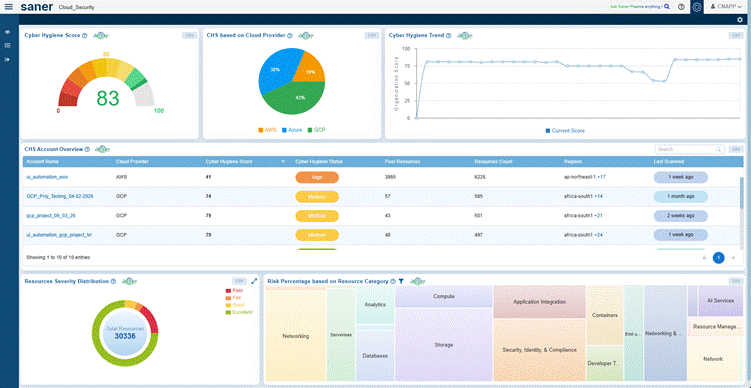
  • Use the CCHS dashboard to track cloud cyber hygiene trends across accounts, subscriptions, and projects. Treat 80 as a practical benchmark for production environments but focus on consistent improvement and stability rather than targeting a single number. Regularly review the key contributors to the score, such as misconfigurations, identity risks, anomalous activities, and exposed resources, and validate improvements using trend views.
  • Leverage the CCHS trend dashboard to monitor the effectiveness of your remediation efforts over time. For deeper insights, refer to account-level and resource-level views to identify high-risk environments and prioritize remediation based on severity and service impact.
Gaining Visibility Over Cloud Asset Exposure

Saner CNAPP’s Cloud Security Asset Exposure (CSAE) module provides continuous and real-time visibility into your cloud environment. With Saner, you can discover and monitor cloud resources such as compute instances, storage services, databases, serverless functions, and networking components across multiple accounts and regions. It helps identify publicly exposed resources, shadow assets, and misconfigured services that may increase your attack surface. The following are the best practices to gain complete visibility and control over your cloud assets.

  • The first step in securing your cloud environment is to establish complete visibility across all resources. Activate continuous discovery to identify assets spanning accounts, projects, and regions. Conduct regular monitoring to detect newly created, publicly accessible, outdated, or unassigned resources. Act promptly by applying unique tags and organizing resources into logical groups across all Saner CNAPP modules.

This process delivers clear visibility into the inventory of deployed cloud assets, enabling better understanding of resource distribution and helping to identify redundant or unnecessary resources.
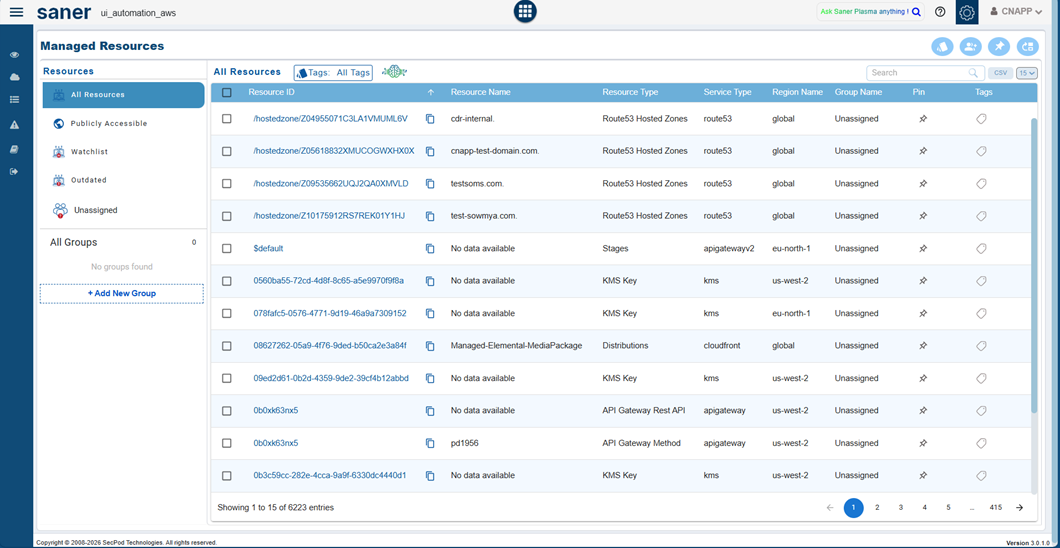
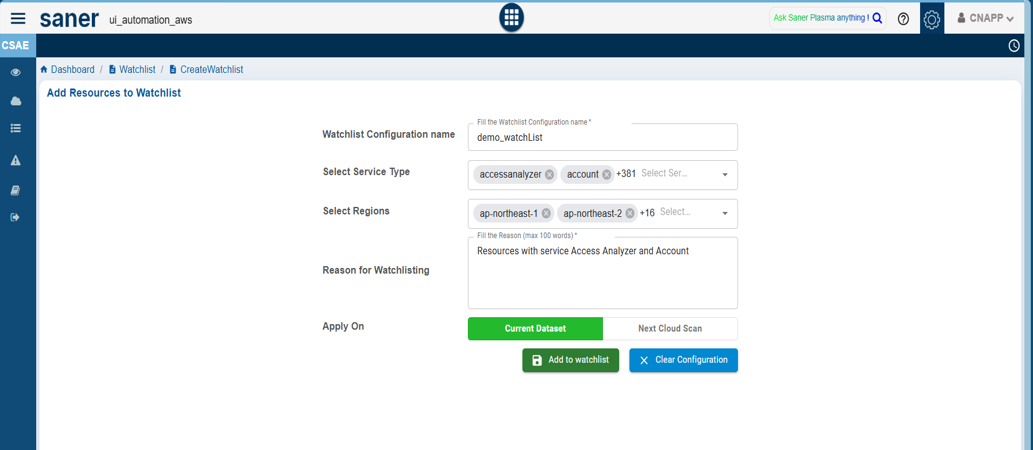
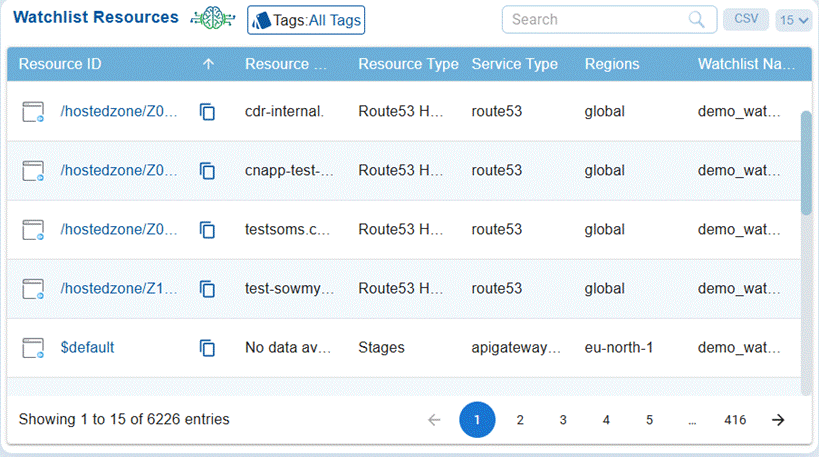
  • Exposed and misconfigured cloud resources pose significant security risks. Use Saner’s aggregated resources view to identify publicly accessible resources, high-risk configurations, and shadow resources. Prioritize and remediate these risks using CSRP and CSRM respectively and leverage the Watchlist feature to continuously monitor critical cloud services across AWS, Azure, and GCP for improved visibility and faster response.
     

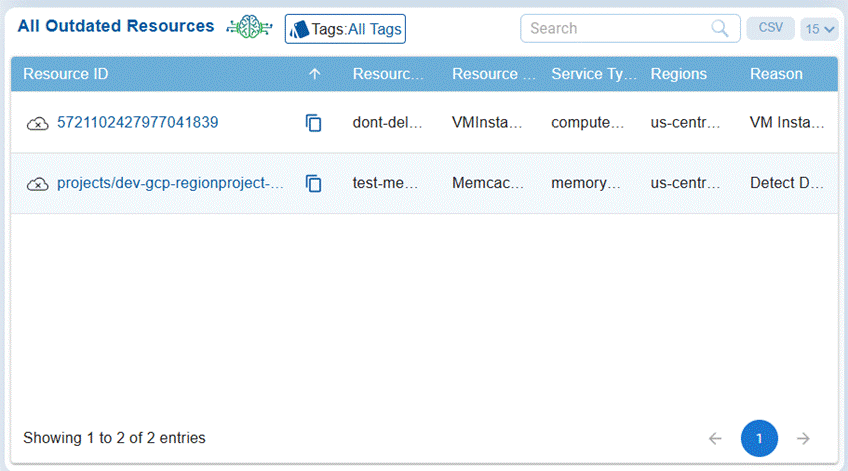
Outdated or deprecated cloud resources can introduce security risks, compatibility issues, and unnecessary costs. Using Saner, identify such resources from the saner CNAPP dashboard and take appropriate actions such as upgrading, replacing, or deleting them to maintain a secure and optimized cloud environment.
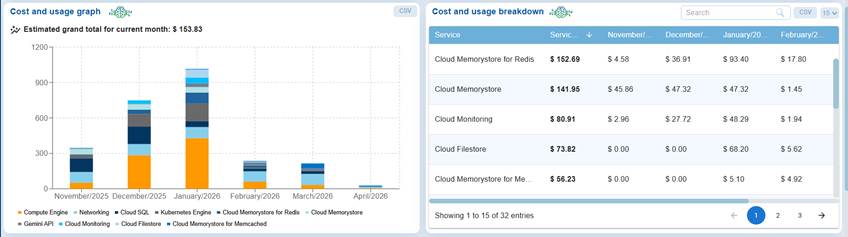
  • Unused or misconfigured cloud resources can lead to unnecessary costs and inefficient resource utilization. Use Saner’s cost and usage dashboard to monitor spending across services, identify high-cost or underutilized resources, and take appropriate actions such as rightsizing, optimizing, or decommissioning them to improve cost efficiency and maintain a secure cloud environment.
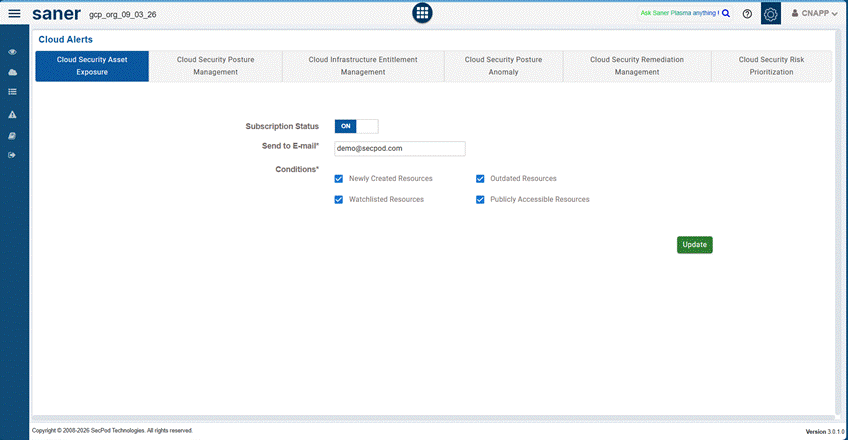
In the left-hand panel, cloud alerts to get instantly notified of newly created resources, outdated resources, watchlisted resources, and publicly accessible resources. This helps you stay on top of any changes in your cloud security asset exposure and respond to risks proactively.
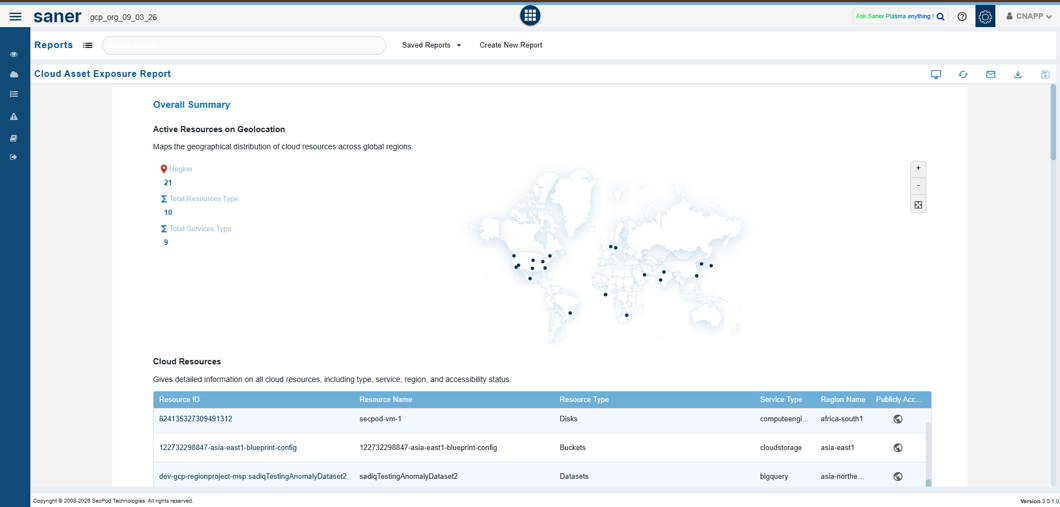
  • Automate weekly Cloud Asset report and configure them to your mailbox and assess your organization’s vulnerability posture regularly. To configure the report to your mailbox, Select the email icon from the right-hand side and specify the email address to view the report.
     

Detecting and Managing Anomalous Deviations

A key differentiator of Saner CNAPP is that it can detect and manage posture anomalies in users’ cloud infrastructure to provide broad security coverage from potential risks that other scanners don’t even recognize. With Saner CNAPP’s Posture Anomaly Management module, users can achieve comprehensive security coverage and ensure that no risks can be exploited by hackers.

Common posture anomaly examples to operationalize early:

  • Publicly accessible storage resources (e.g., open buckets or blobs) without proper access restrictions.
  • Excessive IAM permissions or privilege escalations beyond defined policies.  
  • Unusual or unexpected exposure of services such as open ports or unrestricted network access.
  • Misconfigured security groups, firewall rules, or network policies allowing broad access.
  • Resources deployed outside approved regions or without proper tagging and governance controls.
  • Inactive or orphaned resources that may still be accessible and pose security risks.

Here’s how you can best use the posture anomaly management module:

  • With Saner CNAPP, posture anomalies are detected as part of the unified full scan across your cloud environment. These scans run continuously to provide up-to-date visibility into misconfigurations, identity risks, and anomalous behaviors. Ensure that regular scans are enabled and aligned with your organization’s requirements to maintain continuous monitoring and quickly identify deviations in your cloud security posture.
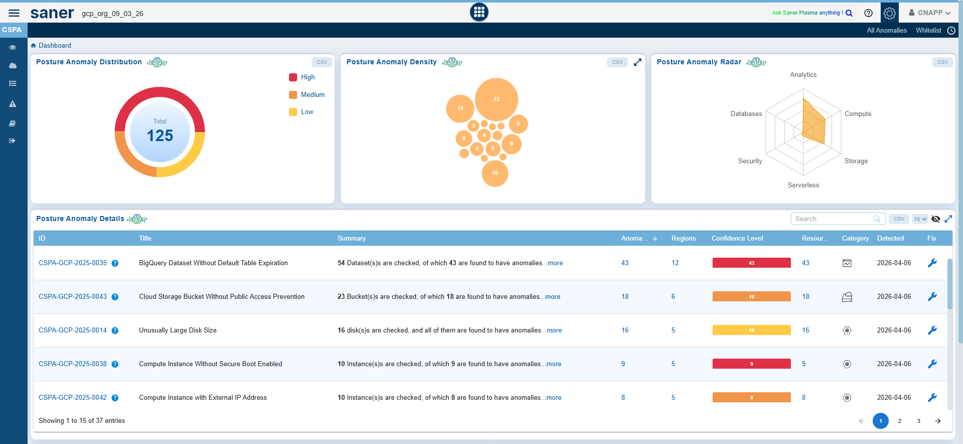

  • Beyond just detecting these anomalies, it is critical to fix them too. In Saner, you can fix anomalous posture with built-in remediation, with an array of built-in actions. You can also create your own detection rules to identify the anomalies and remediate them instantly from the same console to secure your IT environment. In the Posture Anomaly dashboard, you can click on the wrench icon and follow the instructions based on the pop-up. The controls can also be implemented through other modules, namely Endpoint Management.


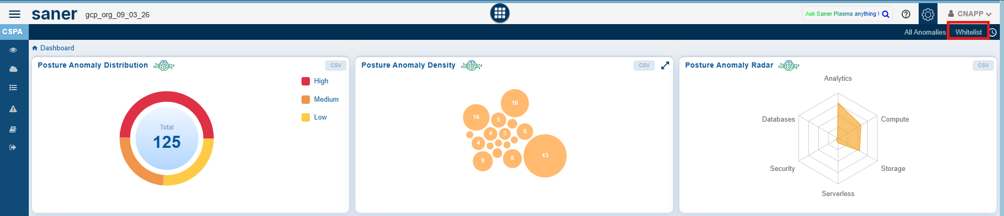
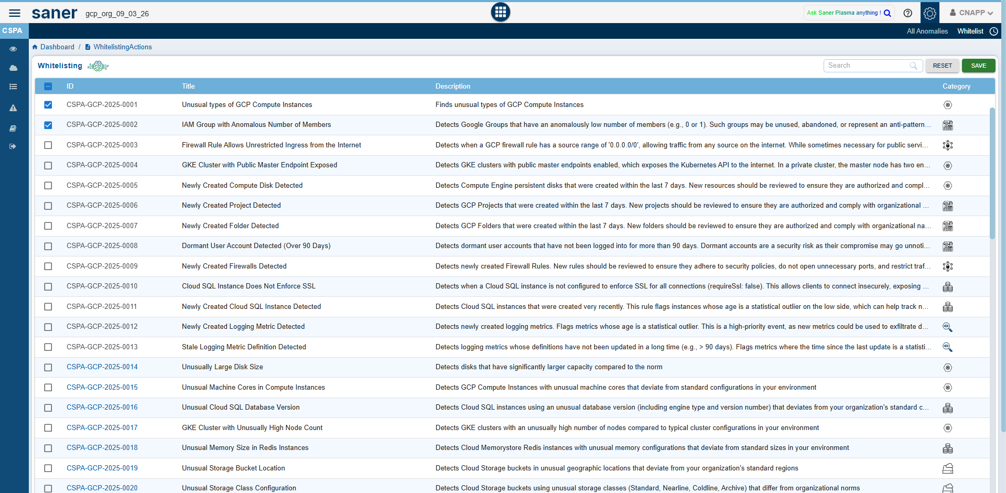
  • Some posture anomalies might not be a risk for your organization’s setup and environment, so you whitelist them as necessary to make it known-good. This step will ensure that it is not detected as a potential risk in the next scan. Here’s how to do it. In the PA dashboard, you can click on the whitelist button on the menu bar and go to the whitelist page. On the page, you can select the anomaly rules that you want to whitelist and click on save. These steps will whitelist the controls, and they won’t show up in the next scan results.


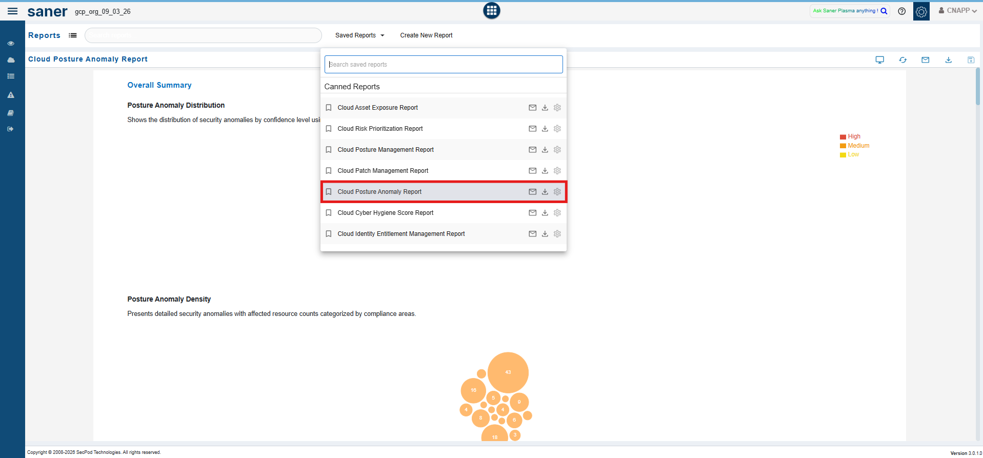
  • Examine your security posture with an insightful dashboard and reports. These dashboards and reports help you get a better understanding of the risk your network might be in and ensure you take action on these risks. Here’s how you can generate the reports: Click the Reports button on the left side menu bar, click on Saved Reports, and select Posture Anomaly Report to get a comprehensive report of the account.
Prioritizing Security Risks (CSRP)

Scanning for security risks is just the 1st step of the misconfiguration management process. But when the number of detected vulnerabilities are in millions, it is critical to prioritize risks to maximize the attack surface reduction and improve the efficiency of the IT Security teams. With Saner Cloud’s Risk Prioritization module, this process becomes significantly easier. Here are some best practices to prioritize security risks effectively with Saner Cloud.

  • It is always suggested to categorize risks based on criticality and other metrics to prioritize risks effectively. When choosing which vulnerability to remediate first, Saner Cloud simplifies the process by categorizing risks into ACT, ATTEND, TRACK, and TRACK* to help users focus on which security risk to remediate first.
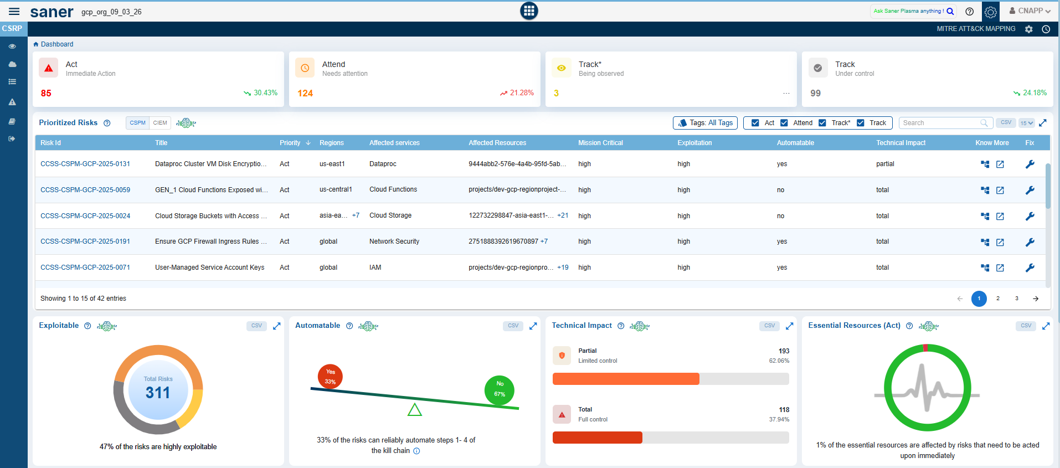
Recommended actions for each bucket (adjust SLAs to your operating model):

  • TRACK*: Track as an exception. Document the business reason, compensating controls, and a review date.
  • TRACK: Monitor and mitigate for lower-risk findings or items awaiting fixes. Reasses periodically based on risk changes.
  • ATTEND: Plan and remediate soon for high-impact items that need coordination or testing. Suggested SLA: 7-14 days.
  • ACT: Remediate immediately for exploitable, internet-facing, or business-critical assets. Suggested SLA: 24-72 hours.
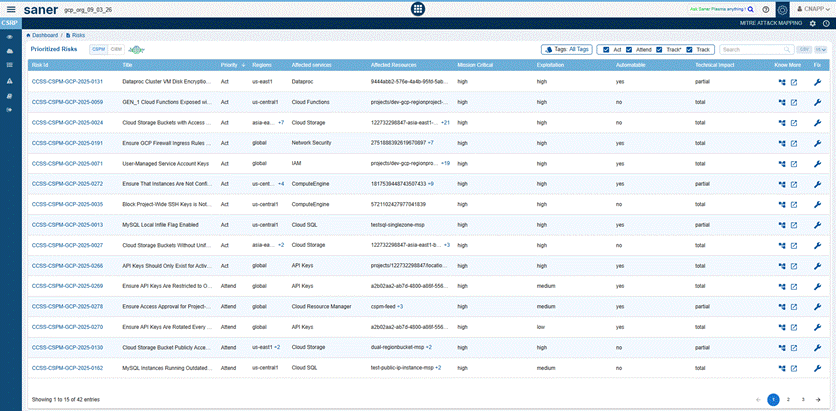
  • Remediating risks should be closely tied to risk prioritization. It becomes simple and routine with Saner to remediate risks with a click of a button. By selecting risks that are already categorized based on priority, you can just click on the wrench icon for remediating and mitigating the security risks.
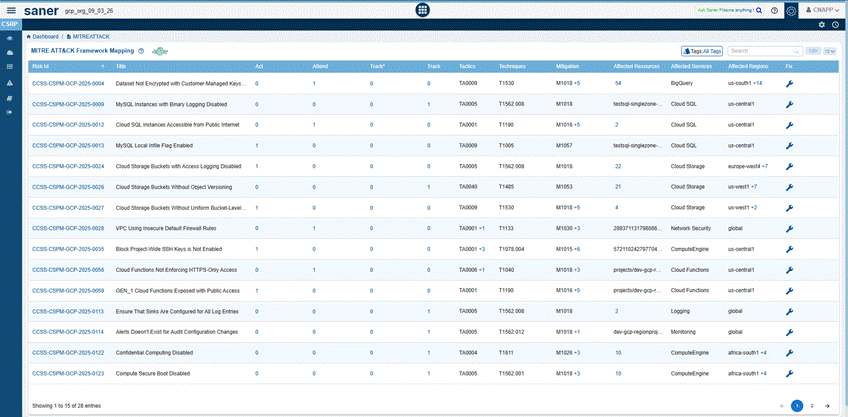
  • You can also leverage MITRE ATT&CK Mapping to understand the prioritization logic and sort based on criticality in the MITRE ATT&CK Mapping tab in the top menu. Once clicked, you can also select and remediate risks with integrated remediation.
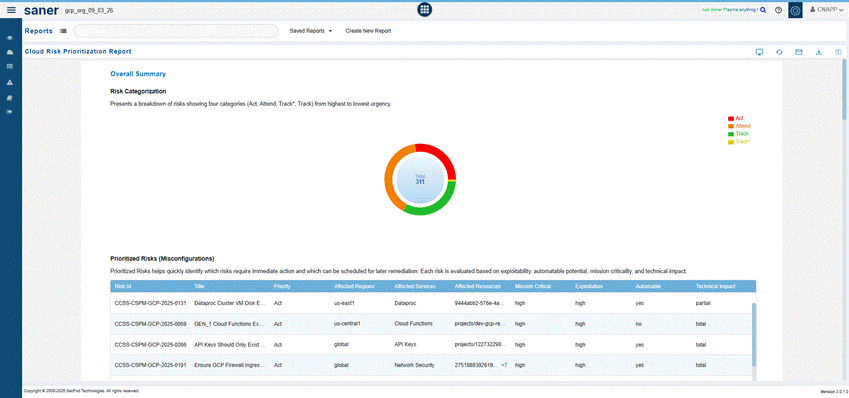
  • Examine your prioritized security risks through insightful dashboards and reports. These dashboards provide a clear understanding of risk distribution across your cloud environments and help you take action based on priority. To generate the reports, click the Reports button on the left side menu bar, navigate to Saved Reports, and select the Risk Prioritization Report to get a comprehensive view of categorized risks across your accounts.
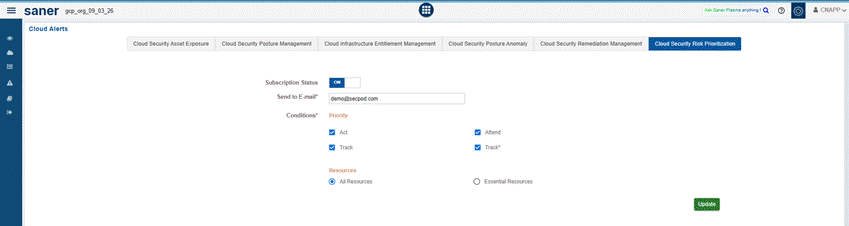
  • In the left-hand panel, configure alerts to get instantly notified of critical and high-priority risks identified by CSRP. This helps you stay on top of ACT and ATTEND category risks and enables faster response to high-impact security issues across your cloud environments.
Remediating Security Risks (CSRM)

Remediation plays a critical role in reducing cloud security risks and minimizing the attack surface. Saner Cloud Security Remediation Management (CSRM) enables you to remediate misconfigurations, identity risks, exposed resources, and vulnerabilities through guided and automated actions. The following best practices will help you remediate risks efficiently and strengthen your cloud security posture.
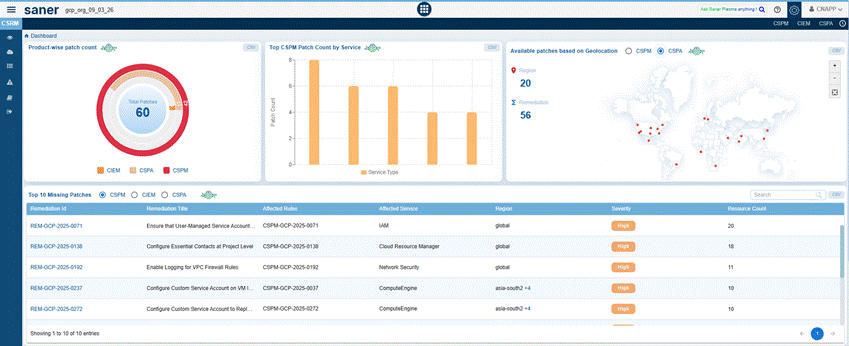
  • Remediation plays a critical role in reducing cloud security risks and minimizing the attack surface. Saner Cloud Security Remediation Management (CSRM) enables you to remediate misconfigurations, identity risks, exposed resources, and vulnerabilities through guided and automated actions across CSPM, CIEM and CSPA. The following best practices will help you remediate risks efficiently and strengthen your cloud security posture.
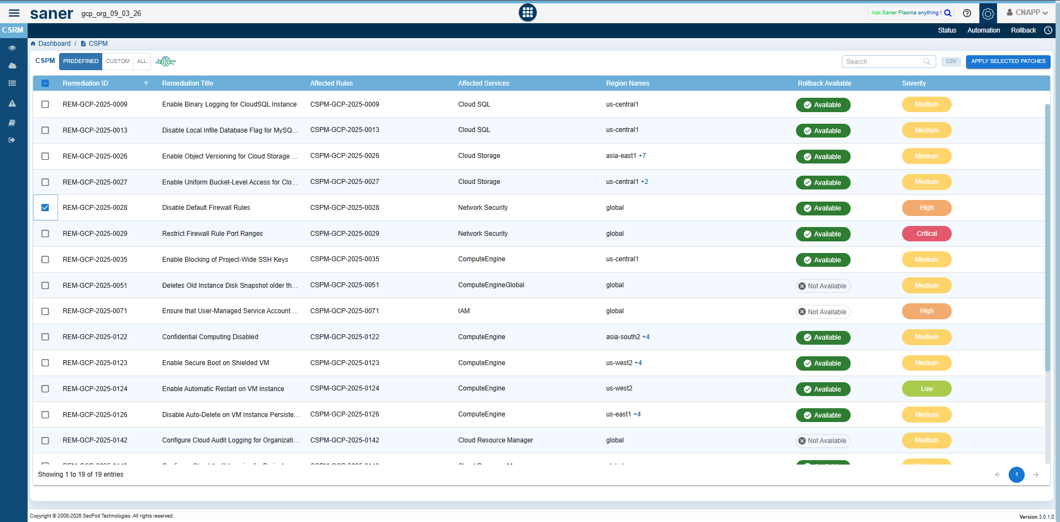
  • Predefined remediation actions help you efficiently fix misconfigurations and security risks across your cloud resources. In Saner, navigate to the respective module (CSPM, CIEM, or CSPA) to view a list of available remediations. Select the required remediation actions based on severity and affected services and apply them to enforce secure configurations across your cloud environment.

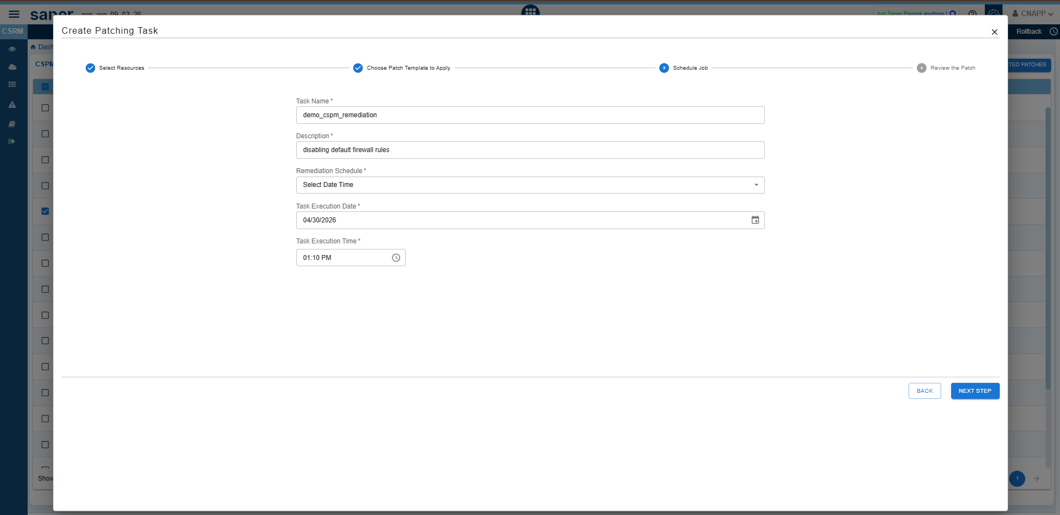
  • Scheduling remediation tasks helps ensure controlled and non-disruptive execution across cloud resources. While creating a remediation task in Saner Cloud, define the task details, select the required resources and remediation actions, and configure the execution schedule by specifying the date and time. This allows you to plan remediation activities during a suitable schedule and minimize potential impact on running services.
       
  • Manual remediation of cloud misconfigurations can be time-consuming. In Saner CNAPP, navigate to CSRM → select any module(CSPM, CSPA and CIEM) → Automation Rules, select the required remediation rules, and click on Create Automation Rule to automate remediation actions. This ensures that identified misconfigurations are automatically fixed, helping maintain a secure cloud posture continuously. Regularly monitor the automation results and validate that risks are effectively remediated across your cloud resources.
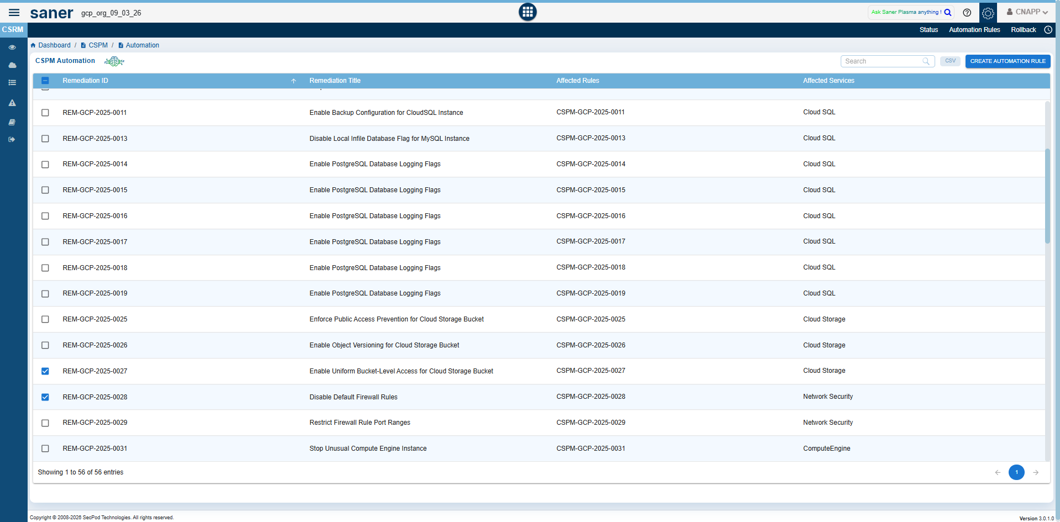
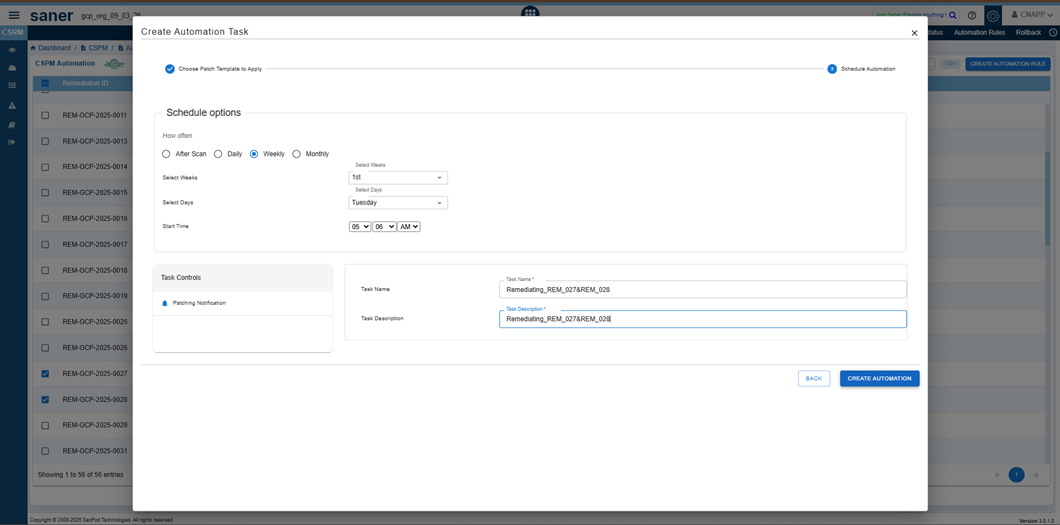
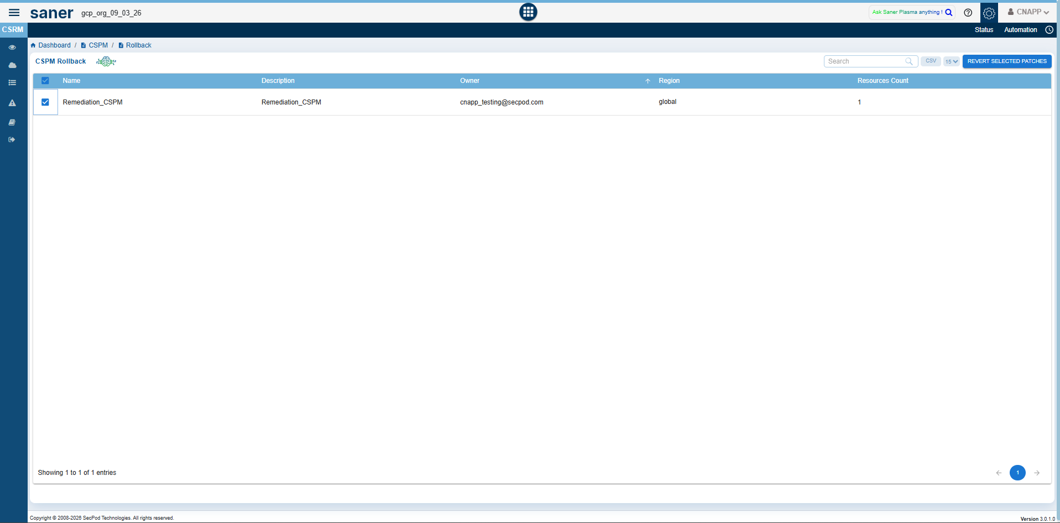
  • If a remediation action leads to unintended configuration changes, use the built-in Rollback option in CSRM (where available) to revert the resource to its previous known-good state. Before applying rollback across multiple resources, validate the impact on a limited set of resources, capture the outcome, and plan a follow-up remediation approach to ensure the risk is addressed without affecting stability.
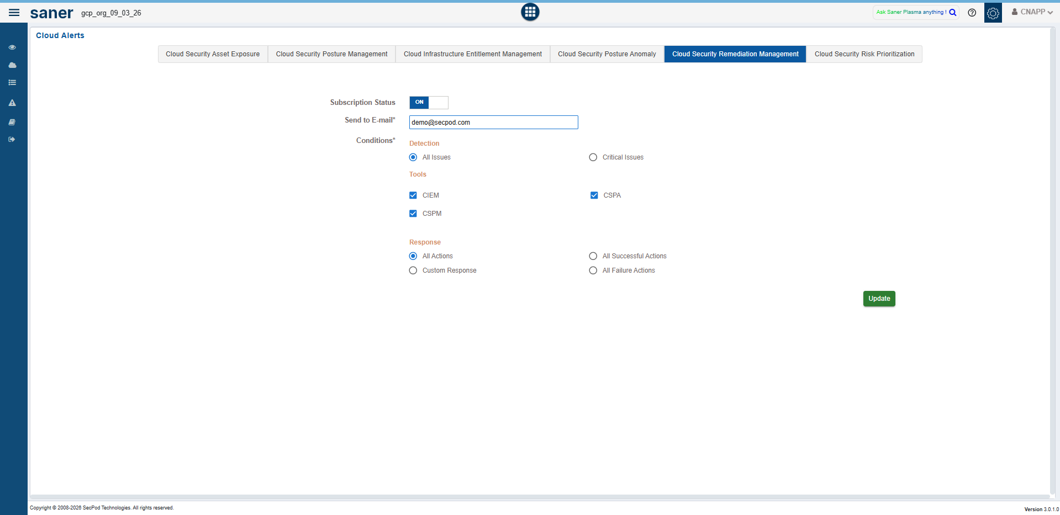
  • In the left-hand panel, Set alerts to get instantly notified when any critical or important remediations are detected and if any remediation job fails.
      

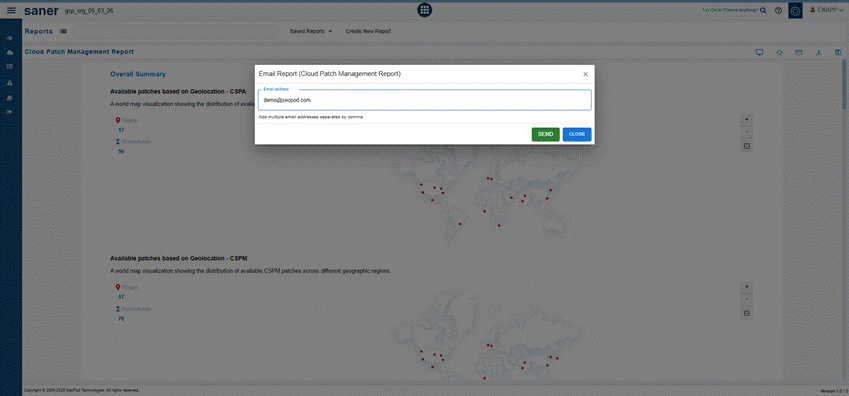
  • In the left-hand panel, navigate to reports, and from the saved reports, Automate the weekly cloud patch report and configure it to your mailbox and assess the success rate of remediations in your organization. To configure the report to your mailbox, Select the email icon from the right-hand side and specify the email address to view the report.

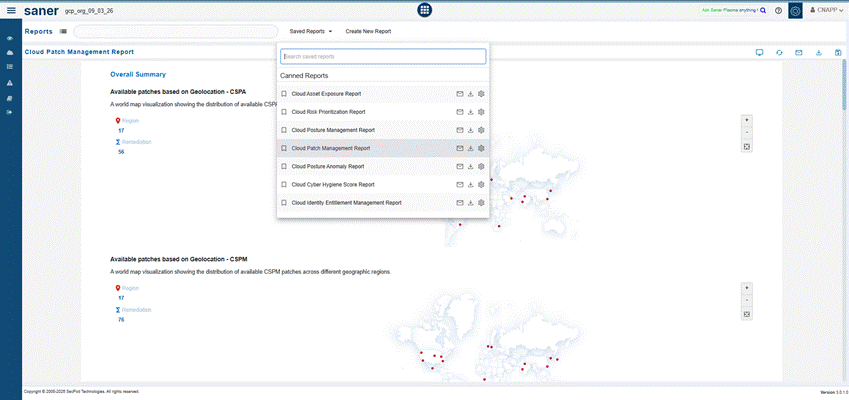
  • Measure the impact of patching and view the patches in users cloud infrastructure through an insightful cloud patch management report in Saner. You can access this report through saved reports in Saner.
Hardening Cloud Configurations & Achieving Compliance (CSPM)

Saner CNAPP enables continuous monitoring of cloud configurations to detect misconfigurations, policy violations, and compliance drifts across multi-cloud environments. It helps organizations align with industry-standard compliance frameworks such as CIS, NIST, PCI DSS, SOC 2, and HIPAA, while also allowing the use of SecPod default benchmarks. With continuous posture assessment and remediation capabilities, Saner ensures that cloud resources remain secure and compliant at all times.

  • Organizations often operate across multiple cloud providers such as AWS, Azure, and GCP. To ensure consistent security posture, leverage the predefined compliance benchmarks available in Saner for each cloud platform. Apply relevant benchmarks such as CIS Foundations Benchmarks (AWS, Azure, GCP), NIST SP 800-53 Rev. 5, PCI DSS, SOC 2, and HIPAA HITRUST, along with SecPod default benchmarks, across your cloud accounts. This helps standardize configuration policies, continuously monitor compliance, and quickly identify and remediate misconfigurations across your cloud environment.
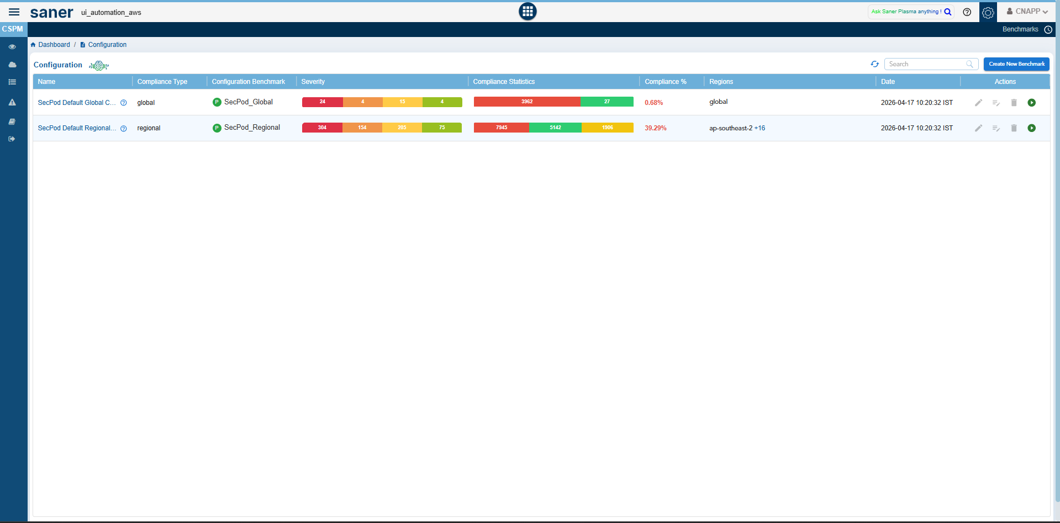
  • You can select the Create New Benchmark option from the right-hand side and create different benchmark templates.
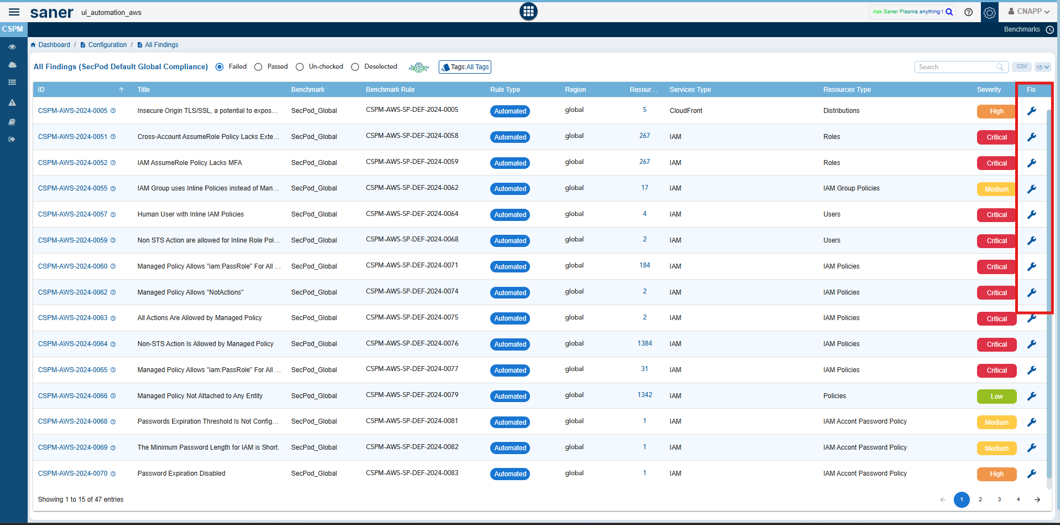
  • If a user needs to fix a compliance deviation, click on the wrench icon corresponding to the Cloud Security Posture Management Rule in the right-hand side.
         
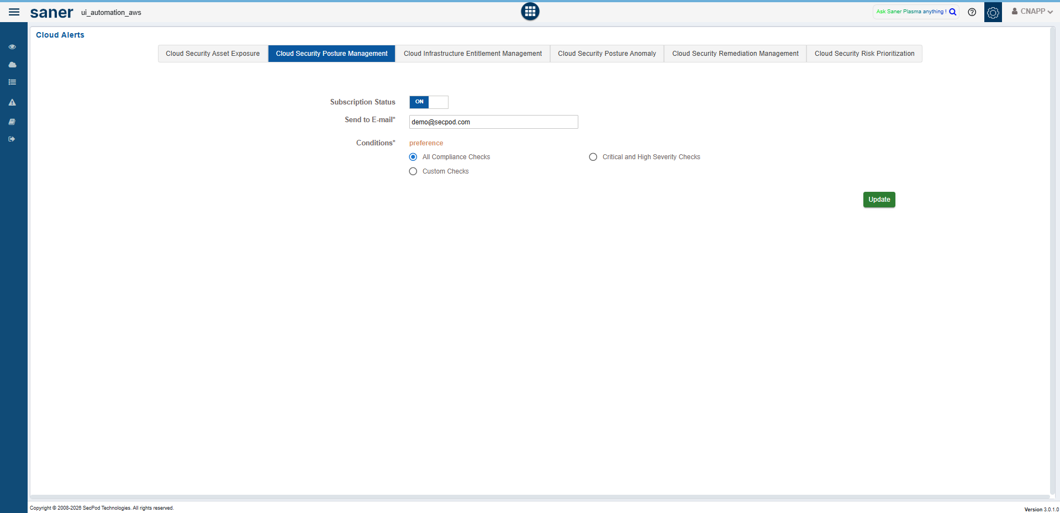
  • In the left-hand panel, Configure Alerts to get instantly notified of any deviations in compliance.


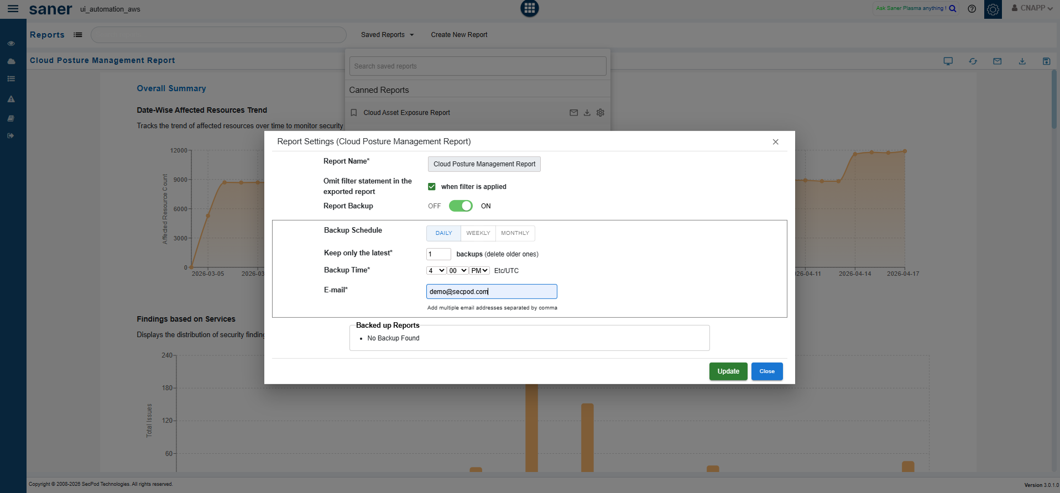
  • In the left-hand panel, navigate to reports, and from the saved reports, Automate the weekly compliance report and configure it to your mailbox to assess the compliance posture in your network continuously. To configure the report to your mailbox, Select the email icon from the right-hand side and specify the email address to view the report.
      

Managing Identities & Enforcing Least Privilege (CIEM)

Not all cloud risks originate from vulnerabilities, many arise from over-permissioned identities, misconfigured roles, and excessive access rights. These risks cannot be remediated through patching and require identity-centric security controls.

Saner CIEM enables organizations to gain visibility and control over cloud entitlements by providing capabilities to:

  • Analyse identities, roles, and permission assignments
  • Detect excessive or unused privileges
  • Identify inactive or orphaned accounts
  • Monitor policy misconfigurations and risky access patterns
  • Enforce least-privilege access across multi-cloud environments

Best Practices for Identity & Access Governance

  • Configure Continuous Entitlement Checks
    Set up checks to monitor critical identity and access parameters such as:
    • Over-privileged users, roles, and service accounts
    • Excessive or unused permissions and policies
    • Inactive or dormant identities
    • Misconfigured IAM policies and role bindings
    • High-risk actions and privilege escalation paths
    • Unused roles, groups, or applications
    • Cross-account or cross-project access exposure

Continuous monitoring helps identify deviations from least-privilege principles and enables timely remediation of identity risks.

Cloud-Specific Focus Areas

  • AWS
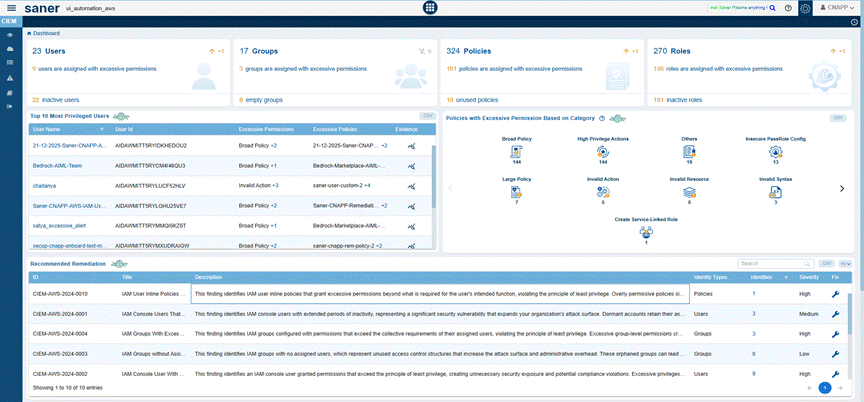
    The platform focuses on analyzing IAM configurations (users, groups), including policies, roles, and permission boundaries, to identify overly broad permissions and inactive identities. It detects misconfigurations such as excessive privileges and inactive roles and provides remediation options directly within the interface. Users can initiate remediation actions by clicking on the wrench icon associated with each finding.
  • Critical Activities section provides visibility into user actions by displaying all significant activities performed within the environment. Detailed reasoning for why an activity is considered critical can be accessed by clicking the Evidence icon on the right side of the table.
     
  • In addition, a graphical representation is provided for Users, Groups, Roles, Policies to visualize the relationships between identities, policies, services, and resources. This graph helps illustrate how permissions are granted and highlights potential risk areas, such as excessive privileges or high-risk actions.
     
  • Azure
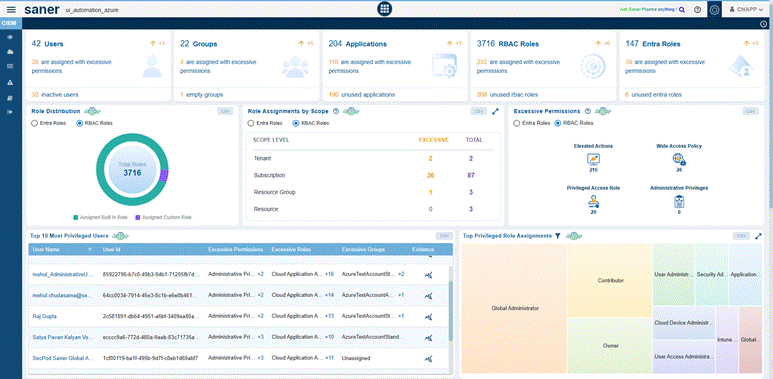
    The platform focuses on analyzing identity and access configurations within Azure, including Microsoft Entra ID users, groups, applications, and RBAC role & Entra role -assignments, to identify excessive permissions and inactive identities. It evaluates access across different scopes, such as tenant, subscription, resource group, and resource level to detect misconfigurations that violate the principle of least privilege. The system identifies risks such as over-privileged role assignments, unused applications, inactive users, and excessive group memberships.
  • CIEM also provides remediation option directly within the interface. User can remediate by clicking the wrench icon associated with each finding. Additionally, the Critical Activities section provides visibility into significant actions and activities performed within the Azure environment, including role assignments, application changes, and access modifications. Detailed insights into why an activity is considered critical can be accessed through the Evidence icon on the right side of the Critical Activities table.
  • Saner CNAPP also provides a graphical representation of Azure entities including Users, Groups, Applications, RBAC Roles, and Entra Roles along with their assignments. This visualization maps the relationships between identities, role assignments, and resources, making it easier to understand how access is granted across different levels (tenant, subscription, resource group, and resource). It further highlights potential risk areas such as excessive privileges, high-risk role assignments, or over-permissioned applications, enabling proactive remediation and stronger access governance.
  • GCP
    The platform analyzes Google Cloud IAM configurations, including Users, Groups, Service accounts, Policies and Role Assignments, to identify excessive permissions and potential security risks, which can grant broad access across resources if not properly managed.The system detects misconfigurations such as over-privileged identities, misuse of service accounts, cross-project access, and unnecessary role bindings. It also identifies inactive users and unused service accounts that could pose security risks.
    Remediation actions are provided directly within the interface, allowing users to quickly address identified issues, and enforce the principle of least privilege.
  • The Critical Activities section provides visibility into operations performed within the Google Cloud environment by analyzing data from Cloud Audit Logs. It captures high-risk actions related to IAM and resource management, such as service account key creation, policy modifications (SetIamPolicy), role assignments, and service enablement activities. Detailed insights into why a specific activity is considered critical can be accessed by clicking the Evidence icon on the right side of the table.
  • In addition, a graphical representation is provided for GCP entities such as Users, Groups, Service Accounts, IAM Roles, and Policies to visualize the relationships between identities, role bindings, and resources. This visualization illustrates how access is granted across different levels of the GCP hierarchy, including organization, folder, project, and resource levels.It helps highlight potential risk areas such as excessive privileges, misuse of primitive roles, over-permissioned service accounts, and high-risk IAM role bindings, enabling better visibility into access paths and potential privilege escalation scenarios.
  • The left-hand panel provides an option to configure alerts, enabling real-time notifications for any deviations from identity and access compliance policies.
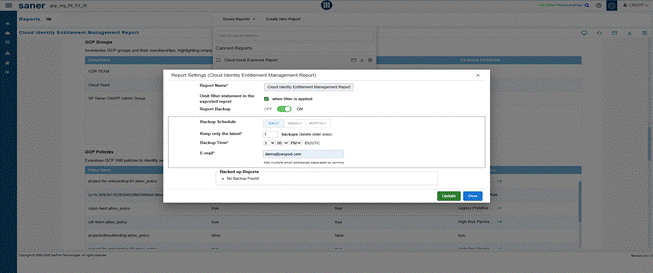
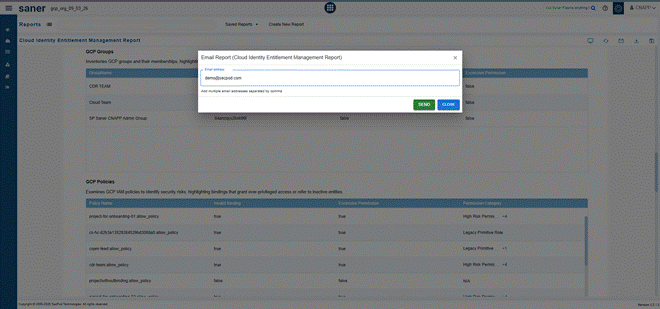
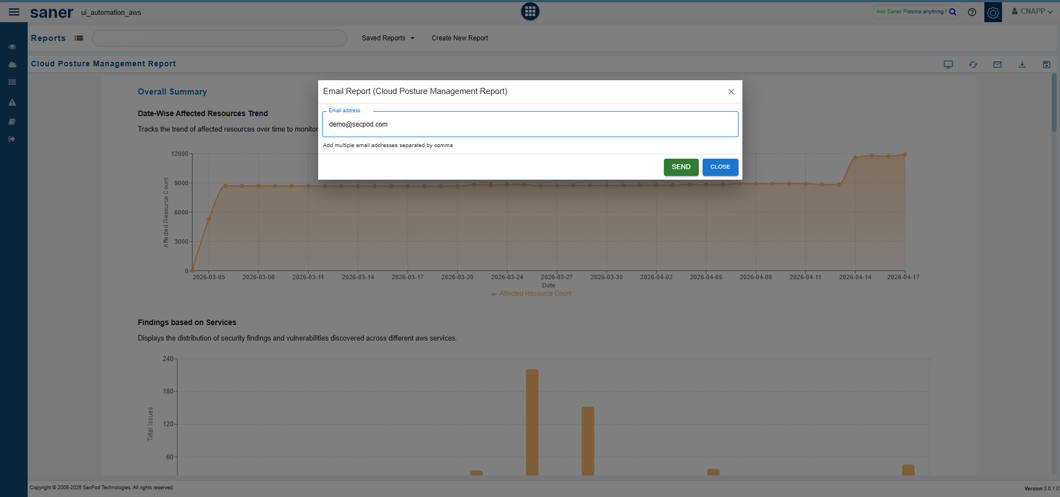
  • In the left-hand panel, navigate to reports, and from the saved reports, Automate the weekly compliance report and configure it to your mailbox to assess the compliance posture in your network continuously. To configure the report to your mailbox, Select the email icon from the right-hand side and specify the email address to view the report.

A Checklist of Saner CNAPP’s Best Practice

Use the checklist below as an operational runbook. Add owners, cadence, and evidence links so the checklist doubles as audit-ready proof.

ModuleChecklist itemOwnerCadenceEvidence or report linkLast runNotes or exceptions
CSAE(Cloud Security Asset Exposure)Continuous discovery of cloud resources across accounts, regions, and services
Identify publicly exposed resources
Track cost and usage to identify underutilized resources
Configure alerts for new, exposed or high risk resources
Automate CSAE reports
CSPA(Cloud Security Posture Anomaly)Detect posture anomalies
Investigate anomalous configurations and behavior
Whitelist necessary rules to make it known-good
Remediate posture anomalies with the help of wrench icon
Examine security posture with dashboard and reports
CSRP(Cloud Security Risk Prioritization)Prioritization and Categorization of risks
into ACT, ATTEND, TRACK, TRACK*
Prioritize risks based on exposure, severity, and impact
MITRE ATT&CK mapping of risks
Remediate high-priority risks (ACT/ATTEND) promptly
Leverage Test & Deploy of patches
Automation rules for automatic remediation management
Rolling back remediations
CSPM(Cloud Security Posture Management)
Enforce compliance and fix misconfigurations with benchmarks
Monitor configuration drifts across cloud environments through scans
Prioritize and remediate high-risk misconfigurations
Alert configuration for immediate notification
Generate audit-ready reports for any compliance policies
CIEM(Cloud Identity Entitlement Management)Discover all identities with respect to the cloud provider
Identify over-privileged and inactive identities
Enforce least privilege across cloud environments
Detect privilege escalation risks and excessive access
Monitor identity usage and anomalous access patterns
Configure alerts for immediate notification

About SecPod

SecPod builds products that help organizations continuously discover cloud assets, assess security exposure, and reduce risk across multi-cloud environment through prioritized remediation.

The Saner CNAPP platform supports cloud security programs by providing unified capabilities for cloud security asset exposure (CSAE), cloud security posture management (CSPM), cloud infrastructure entitlement management (CIEM), cloud security posture anomaly(CSPA), cloud security risk prioritization(CSRP), CCHS(Cloud Cyber Hygiene Score), and remediation across AWS, Azure, and GCP.

SecPod, Inc.

303 Twin Dolphin Drive, 6th Floor, Redwood City, California 94065, USA.

Contact
Sales : [email protected]
Support: [email protected]
Phone: (+1) 918 625 3023 (US)

To learn more about SecPod, visit: www.secpod.com

Share This Article :

  • X
  • LinkedIn
Still stuck? How can we help?

Saner Documentation Feedback

Alerts in SanerCloudSecure Your IAM entities with Cloud Infrastructure Entitlement Management (CIEM)
Table of Contents
  • Getting Started
    • Purpose and audience
    • How to use this guide
    • Prerequisites
    • Glossary
    • Saner Cloud Native Application Protection Platform (CNAPP) Best Practices
    • Measuring and Maintaining Cloud Cyber Hygiene
    • Gaining Visibility Over Cloud Asset Exposure
    • Detecting and Managing Anomalous Deviations
    • Prioritizing Security Risks (CSRP)
    • Remediating Security Risks (CSRM)
    • Hardening Cloud Configurations & Achieving Compliance (CSPM)
Copyright 2026 - SecPod. All Rights Reserved. Privacy Policy.
SanerNow Version 6.5.x