
Skip to content
SecPod  – Documentation
  • Docs Home
  • Categories
    • Saner Platform
    • Saner Cloud
    • Saner CVEM
    • Security Intelligence
  • More
    • About SecPod
    • Blog
    • Security & Privacy
    • Support Center
    • Resources
  • SCHEDULE A DEMO
  • Toggle website search
Search this website
Menu Close
  • Docs Home
  • Categories
    • Saner Platform
    • Saner Cloud
    • Saner CVEM
    • Security Intelligence
  • More
    • About SecPod
    • Blog
    • Security & Privacy
    • Support Center
    • Resources
  • SCHEDULE A DEMO
  • Toggle website search
  • Docs Home
  • Categories
    • Saner Platform
    • Saner Cloud
    • Saner CVEM
    • Security Intelligence
  • More
    • About SecPod
    • Blog
    • Security & Privacy
    • Support Center
    • Resources
  • SCHEDULE A DEMO

Saner Platform

  • Saner Platform Release Notes
    • Saner Platform Integration Release: ServiceNow Integration Introduced, Freshservice Enhanced
    • Release Notes Saner 6.4.1
    • Release Notes SanerNow 6.4
    • Release Notes SanerNow 6.3.1
    • Release Notes SanerNow 6.3
    • Release Notes SanerNow 6.2.1
    • Release Notes SanerNow 6.2.0.3
    • Release Notes SanerNow 6.2.0.1
    • Release Notes SanerNow 6.2
    • Release Notes SanerNow 6.1.1
    • Release Notes SanerNow 6.1
    • Release Notes SanerNow 6.0
    • Release Notes SanerNow 5.3.1
    • Release Notes SanerNow 5.3
    • Release Notes SanerNow 5.2
    • Release Notes SanerNow 5.1
    • Release Notes SanerNow 5.0
    • Release Notes SanerNow 4.8.0.0
    • Release Notes SanerNow 4.7.0.0
    • Release Notes SanerNow 4.6.0.0
    • Release Notes SanerNow 4.5.0.0
    • Release Notes SanerNow 4.4.0.0
    • Release Notes SanerNow 4.3.0.0
    • Release Notes SanerNow 4.2.2.1
    • Release Notes SanerNow 4.2.2.0
    • Release Notes SanerNow 4.2.1.0
    • Release Notes SanerNow 4.2.0.0
    • Release Notes SanerNow 4.1.1.0
    • Release Notes SanerNow 4.0.0.5
  • Saner Platform Guide
    • Prerequisites For Saner SaaS Platform Deployment
    • Saner Administration Guide
    • Saner Device Management User Guide
    • Saner Platform and ServiceNow Integration Guide
    • Saner Platform and Freshservice Integration Guide
    • Saner Platform Function Guides
  • FAQs
    • Saner CVEM Technical FAQs
  • How Tos
    • General
      • How to increase the subscription count for an Account in Saner CVEM
      • How to increment license count for an Organization in Saner CVEM
      • How to provision Saner tools for an Organization
      • How to change subscription type in Saner CVEM
      • How to sign-up with Saner CVEM?
      • How to create a new account in Saner CVEM?
      • How to create a new user in Saner CVEM?
      • How to enable SSO authentication policy in Saner CVEM?
      • How to set alerts in Saner?
      • How to view, download and filter the audit logs?
      • How to designate Saner Agent to perform network scan?
      • How to Co-Brand with your logo?
      • How to fetch the details of the mandatory fields from the Okta account?
      • How to create MFA policy for Okta?
      • How to fetch the details of the mandatory fields from the PingID account?
      • How to create MFA policy for PingID?
      • How to fetch the details of the mandatory fields from the PingOne account?
      • How to create MFA policy for PingOne?
      • How to download and install Saner Agent in Mac?
      • How to download and install Saner agent in Linux?
      • How to download and install the Saner agent in Windows?
      • How to update the expiry date of an existing subscription?
      • How to manage users and their preferences using role-based access?
      • How to uninstall Saner Agent using Saner Offline deployer tool.
      • How to onboard a new organization?
      • How to deploy Saner Agent using Saner Offline deployer tool.
      • How to install a Saner agent through the command line?
      • How to uninstall the Saner agent through command line?
    • Saner Reports
      • How to configure mail settings to email Report PDF?
      • How to create a custom report in Saner?
      • How to schedule for the report back up?
    • Saner Device Management
      • How to create custom groups in Saner CVEM
    • Saner Mail Settings
      • How to create new mail settings in Saner?
      • How to use OAuth-enabled authentication in Saner mail settings
      • How to create OAuth Client ID and Client Secret for Gmail
      • How to create OAuth Client ID and Client Secret for Microsoft 365.
  • Supported OSs and Platforms
    • Operating Systems and Platforms Supported
    • Supported Third-party Applications for Patching

Saner Cloud

  • Before You Begin
    • Glossary of Terms
    • Read me First
  • Get Started
    • Prerequisites For Saner SaaS Platform Deployment
    • Saner Cloud Deployment Guides
      • Azure Onboarding
      • Troubleshooting
      • Get Started with Saner CNAPP AWS Cloud Deployment V1.0
      • Onboarding with AWS Credentials(Least Recommended Method)
      • Onboarding with AWS Role(Manual)
      • Onboarding with AWS Role CloudFormation (Automatic): Recommended
    • Roles and Permissions
      • Roles and Permissions for AWS Remediation Access
      • Roles and Permissions for Azure Onboarding, Detection, and Remediation
  • Learn About
    • Saner CSRP Classification Based on Scoring Decision
    • Cloud Cyber Hygiene Scoring(CCHS) Approach
    • Remediation Rollback
    • Automation and Job-driven Remediation
    • Cost and Usage
    • Excessive Permission Categories Evaluated Across Different Cloud Services
    • Publicly Accessible Resources
    • Patch Aging and Patch Impact
    • SecPod Default Benchmarks
    • Watchlists
    • Cloud Workload Protection Platform(CWPP)
    • Overview of Report Views in Saner Cloud
    • Whitelisting Resources
    • Saner Plasma AI Assistant for Seamless User Interaction
    • Critical Events to Monitor in AWS
    • High-Privilege Actions in Critical Activity Logs for AWS
    • Audit Logs in Saner Cloud
    • Excessive Permissions
    • Alerts in SanerCloud
  • User Guides
    • Cloud Security Risk Prioritization(CSRP) User guide
    • Cloud Cyber Hygiene Score(CCHS) User Guide
    • Cloud Security Remediation Management(CSRM) User Guide
    • AWS Cloud Infrastructure Entitlement Management(CIEM) User Guide
    • Cloud Security Posture Anomaly(CSPA) User Guide
    • Cloud Security Asset Exposure(CSAE) User Guide
    • Cloud Security Posture Management(CSPM) User Guide
  • Tell Me How
    • How to Remediate in Saner Cloud?
    • How to Configure Automation Rule to Remediate Misconfigurations?
    • How to Manage Report Views at Organization-level in Saner Cloud?
    • How to Get a Cohesive View from Saner Cloud Unified Dashboard?
    • How to Use Tags to Quickly Filter Resources?
    • How to Troubleshoot Issues with Audit Logs?
    • How to Manage Groups and Tags in Saner Cloud?
    • How to Manage Report Views for a User Account in Saner Cloud?
    • How to Troubleshoot or Analyze with Critical Activity Logs?
    • How to Setup Alerts Across SanerCloud Tools?
    • How to Take Action on Alert Notifications from SanerCloud?
    • CCHS
      • How to Monitor Resource Risk Trends for CHS?
      • How to Assess Resource Health through Severity Distribution?
      • How to Evaluate Service-Level Risks Using CHS Scores?
      • How to Analyze Cyber Hygiene Scores through Trend Chart?
      • How to Identify High-Risk Resources by Geo Location?
      • How to Get an Overview of Cyber Hygiene for Cloud Resources?
      • How to Review Organization-Level Cyber Hygiene Across Accounts?
      • How to Assess Risk Distribution for Different Cloud Providers?
      • How to Review Major Issues Contributing to the Drop of Cyber Hygiene Score at Account-Level?
      • How to Analyze Module-wise Risk through CHS Distribution?
      • How to View the Cyber Hygiene Score Distributed Across Cloud Environments?
      • How to Track Security Posture with Cyber Hygiene Score?
      • How to Configure Account Weightage?
    • CSRP
      • How to Monitor and Analyze Audit Logs for Risk Prioritization?
      • How to Configure Risk Based Cloud Security Alerts?
      • How to Generate Reports and Visualizations?
      • How to Filter Risks by Tags for Targeted Analysis?
      • How to Manage Prioritized Risks at Account-level?
      • How to View the Detailed Breakdown of a Specific Cloud Cyber Security Standard (CCSS) Risk Finding?
      • How to Review and Prioritize Resources Based on Associated Risks?
      • How to Assess Risk Distribution on Essential Resources?
      • How to Assess and Prioritize Risks Across Resource Categories?
      • How to Identify the Risks Affecting Essential Resources?
      • How to Assess Full Versus Limited Technical Impact of Exploiting an Anomaly?
      • How to Review the Risk Factor Distribution Based on Automatable Reliability?
      • How to Get an Overview of Exploitable Risks?
      • How to Map Risks to MITRE ATT&CK for Threat-Informed Defense?
      • How to Configure Questionnaire and Assess Security Practices Across Core Domains for an Account?
    • CSAE
      • How to Setup Watchlist Configuration for a Resource?
      • How to Identify Outdated Resources for Cleanup?
      • How does Resource Categorization Work in Saner CSAE?
      • How to Identify Resources Exposed to External Network?
      • How to Understand the Resource Footprint Globally Across Various Regions?
      • How to Make Informed Decisions on Your Expenditure based on Resource Usage Graph?
    • CSPM
      • How to Setup Benchmarks in Saner CSPM?
      • How to Use Quick Evaluation Benchmarks?
      • How to Detect Patterns over a Period with Resource Trends?
      • How to Assess System Compliance and Security Posture?
    • CSPA
      • How to Initiate Patch Remediation from CSPA Dashboard?
      • How to Quickly Identify the Detected and Remediated Anomalies for an Account?
      • How to Prioritize Remediation or Fixes based on Confidence Levels?
      • How to Examine the Overall Anomaly Information for Specific Rules or Checks?
      • How to Search and Retrieve Anomaly Data?
      • How to Whitelist Rules or Resources in Cloud Security Scans?
    • CIEM
      • How to See the Active Version for an IAM Policy?
      • How to Address Critical Activities Using Evidence?
      • How to View by Type and Usage for any Identity in CIEM?
      • How to Get Visibility into Cloud Entitlements?
      • How to Use Evidence to Address Policies with Excessive Permission?
      • How to Know the Excessive Permissions on a Specific Service?
      • How to Visually See the Relationship between Identity, Entitlement, Policy, or Permission?
      • How to Determine if a Policy has Excessive Permission?
      • How to Initiate Remediation for Different Identities from CIEM?
    • CSRM
      • Rollback an Applied Remediation
      • How to Configure Automation Rule to Remediate Misconfigurations?
      • How to Create a Patching Task for Items Currently in “Approval Pending” State?
      • How to Evaluate Remediation Effort with Patching Impact Chart?
      • How to Prioritize and Address Older or High-Risk Anomalies with Patch Aging?
      • How to Monitor the Overall Status of the Remediation Job?
      • How do I Get to Know the Regions Impacted by a Specific Rule?
      • How to View the Severity of a Missing Patch Affected by a Rule?
      • How to Address Missing Patches Via Remediation Tasks?
      • How to Quickly Access the Necessary Tool for Remediation and Begin Patching Tasks?
  • Frequently Asked Questions
    • Saner Cloud Technical FAQs
  • Saner Cloud Release Notes
    • Protected: Saner Cloud – V.2.0.0.2 Release Notes
    • Saner Cloud – V.2.0.0.1 Release Notes
    • Saner Cloud – V.2.0.0.0 Release Notes
    • Saner Cloud – V.1.2.0.1 Release Notes
    • Saner Cloud – V.1.2.0.0 Release Notes
    • Saner Cloud – V.1.1.0.0 Release Notes
    • Saner Cloud – V.1.1 Release Notes
    • Saner Cloud – V.1.0 Release Notes

Saner CVEM

  • Saner CVEM Release Notes
    • Release Notes Saner CVEM 6.6
    • Release Notes Saner 6.5
    • Saner Platform Integration Release: ServiceNow Integration Introduced, Freshservice Enhanced
    • Release Notes Saner 6.4.1
    • Release Notes SanerNow 6.4
    • Release Notes SanerNow 6.3.1
    • Release Notes SanerNow 6.3
    • Release Notes SanerNow 6.2.1
    • Release Notes SanerNow 6.2.0.3
    • Release Notes SanerNow 6.2.0.1
    • Release Notes SanerNow 6.2
    • Release Notes SanerNow 6.1.1
    • Release Notes SanerNow 6.1
    • SanerNow Risk Prioritization Launch
    • Release Notes SanerNow 6.0
    • Release Notes SanerNow 5.3.1
    • Release Notes SanerNow 5.3
    • Release Notes SanerNow 5.2
    • Release Notes SanerNow 5.1
    • Release Notes SanerNow 5.0
    • Release Notes SanerNow 4.8.0.0
    • Release Notes SanerNow 4.7.0.0
    • Release Notes SanerNow 4.6.0.0
    • Release Notes SanerNow 4.5.0.0
    • Release Notes SanerNow 4.4.0.0
    • Release Notes SanerNow 4.3.0.0
    • Release Notes SanerNow 4.2.2.1
    • Release Notes SanerNow 4.2.2.0
    • Release Notes SanerNow 4.2.1.0
    • Release Notes SanerNow 4.2.0.0
    • Release Notes SanerNow 4.1.1.0
    • Release Notes SanerNow 4.0.0.5
    • Saner CVEM
      • Release Notes Saner CVEM 6.6
  • Saner CVEM Guide
    • What’s New in Saner CVEM?
    • Getting Started with Saner CVEM
    • Pre-requisites for Saner CVEM Deployment
    • How does Saner CVEM’s deployment architecture work?
  • Saner CVEM Products
    • Overview of Saner Continuous Vulnerability and Exposure Management
    • Saner CVEM Unified Dashboard User Guide
    • Saner CVEM Asset Exposure User Guide
    • Saner CVEM Continuous Posture Anomaly Management User Guide
    • Data Points IT teams can Fetch from Saner CPAM
    • Posture Anomaly Computation Rules
    • Saner CVEM Vulnerability Management User Guide
    • Saner CVEM Compliance Management User Guide
    • Saner CVEM Risk Prioritization User Guide
    • Saner CVEM Patch Management User Guide
    • Saner CVEM Endpoint Management User Guide
    • Saner CVEM Remote Scripting User Guide
    • Saner CVEM Remote Access User Guide
    • Saner CVEM Network Scanner User Guide
    • Saner CVEM Cyber Hygiene Score User Guide
  • How Tos
    • Saner AE
      • How to blacklist and whitelist applications in Saner AE?
      • How to manage asset licenses using Saner AE?
      • How to run an asset scan using Saner AE?
    • Saner CPAM
      • How to create new response in PA tool?
      • How to build your own detection and response in PA tool?
      • How to whitelist an entire PA ID?
      • How to configure Posture Anomaly tool for custom detection?
      • How to fix Anomalies from PA dashboard?
      • How to fix anomalies detected in your account from All Anomalies Page?
      • How to fix anomalies from PA Summary page?
      • How to delete PA scan preferences?
      • How to schedule PA Scans on Daily, Weekly, and Monthly basis?
      • How to launch Posture Anomaly scans?
    • Saner VM
      • How to automate and schedule vulnerability scans?
      • How to exclude vulnerabilities in Saner VM tool
      • How to manage excluded vulnerabilities in Saner VM?
      • How to remediate vulnerabilities from vulnerability management dashboard?
    • Saner CM
      • How to run a compliance scan?
      • How to custom create a security policy?
      • How to align with PCI security compliance management?
      • How to align with NIST 800-171 security compliance management?
      • How to align with NIST 800-53 security compliance management?
      • How to align with HIPAA security compliance management using Saner CM?
    • Saner PM
      • How to fix firmware in Saner?
      • How to exclude patches in Saner PM?
      • How to manage excluded patches in Saner PM?
      • How to automate patch management in Saner PM?
      • How to roll back patches in Saner PM?
      • How to specify Service Level Agreement (SLA) using Remediation SLA in Saner PM?
      • How to apply missing patches in Saner PM?
      • How to apply the most critical patches in Saner PM?
      • How to perform custom remediation for applications that require paid patches using Saner PM
      • How to check the status of patching activity?
    • Saner EM
      • How to collect all security events from Windows Events Log?
      • How to check password policy set in Windows systems?
      • How to check status of DEP in Windows systems?
      • How to check faulty Anti-Virus (AV) status in Windows systems?
      • How to check for Anti-Virus (AV) status in Windows systems?
      • How to check account lockout policy on Windows systems?
      • How to check if Bit-locker protection is OFF in Windows systems?
      • How to list all inactive users on Windows systems?
      • How to list all guest accounts in Windows systems?
      • How to list all Administrator accounts on Windows systems?
      • How to list last-logon details of users on Windows systems?
      • How to identify all users in Windows systems?
      • How to collect all services that are currently running in Windows systems?
      • How to list all Groups in Windows systems?
      • How to collect all keyboard and pointing devices connected to Windows systems?
      • How to collect all storage devices connected to Windows systems?
      • How to investigate total RAM or CPU threshold (greater than or equal to 80%) in Windows systems?
      • How to collect operating systems information in Windows?
      • How to investigate disks running out of space (<100 MB) in Windows systems?
      • How to collect and investigate disk information on Windows systems?
      • How to collect all installed patches in Windows systems?
      • How to collect all software patches that are hidden in the Windows Update server?
      • How to check the status of Windows Update Server (WSUS/SCCM)?
      • How to collect BIOS information such as serial number, version, manufacturer in Windows systems?
      • How to collect all the important missing patches in Windows systems?
      • How to check wireless security in Linux systems?
      • How to collect mounted disk information on Linux systems?
      • How to check wireless signal quality in Linux systems?
      • How to check all firewall policies on Linux systems?
      • How to collect all Dynamic Host Configuration Protocol (DHCP) information on Linux systems?
      • How to collect DNS information on Linux systems?
      • How to collect ARP entries that are created when a hostname is resolved to an IP address and then to a MAC addressing in Linux?
      • How to check wireless signal quality in Windows systems?
      • How to check wireless security in Windows systems?
      • How to collect all open ports in Windows systems?
      • How to collect all network interfaces in Windows systems?
      • How to investigate DNS cache on Windows systems?
      • How to check all firewall policies on Windows systems?
      • How to collect DNS information on Windows systems?
      • How to collect all the applications with an unknown publisher in Linux systems?
      • How to perform system tuning?
      • How to collect all software licenses in Windows systems?
      • How to identify potentially unwanted programs such as torrent downloaders or unnecessary toolbars running on Windows systems?
      • How to collect a list of applications that are started when you boot your computer?
      • How to collect all the applications with an unknown publisher in Windows systems?
      • How to collect all software licenses in Mac systems?
      • How to collect ARP entries that are created when a hostname is resolved to an IP address and then to a MAC addressing Windows?
      • How to collect all families of operating systems such as Windows, Unix, and macOS?
      • How to collect environment variables set in all operating systems?
      • How to collect all the applications with an unknown publisher in Mac systems?
      • How to delete and quarantine a file?
      • How to start and stop the processes in Saner?
      • How to block blacklisted applications in Saner?
      • How to enable/disable devices in Saner
      • How to manually import devices into Saner?
      • How to deploy software in Saner EM?
      • How to enable and disable firewall settings in Saner AE?
      • How to collect all shared resources on Windows systems?
      • How to collect all Dynamic Host Configuration Protocol (DHCP) information on Windows systems?
      • How to connect to a client machine graphically using Saner Remote Access
  • FAQs
    • Saner CVEM Technical FAQs

Security Intelligence for Saner CVEM

  • Overview of Security Content and Intelligence
  • Security Content Statistics
  • OVAL Definitions Platform Coverage
  • OVAL Definitions Class-wise Distribution
  • OVAL Definitions Family-wise Distribution
  • Application and OS Remediation Coverage
  • Compliance Benchmark Coverage
  • List of Vulnerability to Exploit/Malware Mapping covered in Saner
  • Network Scanner Product Support Matrix
  • Privilege levels for authenticated scans using Saner Network Scanner

Security Intelligence for Saner Cloud

  • Benchmark Compliance Rules in AWS and Azure
    • AWS
      • SecPod Rules in AWS
        • SecPod Default Rules in AWS: An Overview
        • Understand SecPod Default Rules in AWS
        • Understand SecPod Global Rules in AWS
        • Understand SecPod Regional Rules in AWS
      • PCI DSS 3.2.1 Rules in AWS
        • PCI DSS 3.2.1 Rules in AWS: An Overview
        • Understand PCI DSS 3.2.1 Rules in AWS
        • Understand PCI DSS 3.2.1 Global Rules in AWS
        • Understand PCI DSS 3.2. 1 Regional in AWS
      • CIS Rules in AWS
        • CIS Rules in AWS: An Overview
        • Understand CIS Rules in AWS
        • Understand CIS 3.0.0 Rules in AWS
        • Understand CIS 4.0.1 Rules in AWS
        • Understand CIS 4.0.0 Rules in AWS
        • Understand CIS 3.0.0 Global Rules in AWS
        • Understand CIS 4.0.0 Global Rules in AWS
        • Understand CIS 3.0.0 Regional Rules in AWS
        • Understand CIS 4.0.0 Regional Rules in AWS
      • SOC 2 Rules in AWS
        • SOC 2 Rules in AWS: An Overview
        • Understand SOC 2 Rules in AWS
        • Understand SOC 2 Global Rules in AWS
        • Understand SOC 2 Regional Rules in AWS
      • HIPAA HITRUST Rules in AWS
        • HIPAA HITRUST Rules in AWS: An Overview
        • Understand HIPAA HITRUST Rules in AWS
        • Understand HIPAA HITRUST Global Rules in AWS
        • Understand HIPAA HITRRUST Regional Rules in AWS
      • NIST 800-53 Revision 5 Rules in AWS
        • NIST 800-53 Revision 5 Rules in AWS: An Overview
        • Understand NIST 800-53 Revision 5 Rules in AWS
        • Understand NIST 800-53 Revision 5 Global Rules in AWS
        • Understand NIST 800-53 Revision 5 Regional Rules in AWS
    • Azure
      • CIS Rules in Azure
        • CIS Rules in Azure: An Overview
        • Understand CIS 1.2.0 Rules in Azure
        • Understand CIS 2.1.0 Rules in Azure
        • Understand CIS 1.1.0 Benchmark Compliance Rules in Azure
        • Understand CIS 3.0.0 Benchmark Compliance Rules in Azure
        • Understand CIS 1.2.0 Global Benchmark Compliance Rules in Azure
        • Understand CIS 2.1.0 Global Benchmark Compliance Rules in Azure
        • Understand CIS 3.0.0 Global Benchmark Compliance Rules in Azure
        • Understand CIS 2.1.0 Regional Benchmark Compliance Rules in Azure
        • Understand CIS 3.0.0 Regional Benchmark Compliance Rules in Azure
      • NIST 800-53 Revision Rules in Azure
        • NIST 800-53 Revision 5 Rules in Azure: An Overview
        • Understand NIST 800-53 Revision 5 Rules in Azure
        • Understand NIST 800-53 Revision 5 Global Rules in Azure
        • Understand NIST 800-53 Revision 5 Regional Rules in Azure
      • SecPod Rules in Azure
        • SecPod Default Rules in Azure: An Overview
        • Understand SecPod Global Rules in Azure
        • Understand SecPod Regional Rules in Azure
        • Understand SecPod Default Rules in Azure
      • HIPAA HITRUST Rules in Azure
        • HIPAA HITRUST Rules in Azure: An Overview
        • Understand HIPAA HITRUST 14.7.0 Rules in Azure
        • Understand HIPAA HITRUST 14.7.0 Global Rules in Azure
        • Understand HIPAA HITRUST 14.7.0 Regional Rules in Azure
      • PCI DSS Rules in Azure
        • PCI DSS 3.2.1 Rules in Azure: An Overview
        • Understand PCI DSS 4.0 Rules in Azure
        • Understand PCI DSS 4.0 Global Rules in Azure
        • Understand PCI DSS 4.0 Regional Rules in Azure
      • SOC 2 Rules in Azure
        • SOC 2 Rules in Azure: An Overview
        • Understand SOC2 Rules in Azure
        • Understand SOC2 Global Rules in Azure
        • Understand SOC2 Regional Rules in Azure
  • Posture Anomaly Checks in AWS and Azure
    • Implementing Posture Anomaly Checks in AWS
    • Implementing Posture Anomaly Checks in Azure
  • Infrastructure Entitlement Checks in AWS and Azure
    • Implementing Infrastructure Entitlement Checks in Azure
    • Implementing Infrastructure Entitlement Checks in AWS
View Categories
  • Home
  • Docs
  • Saner CVEM
  • Saner CVEM Release Notes
  • Saner CVEM
  • Release Notes Saner CVEM 6.6

Release Notes Saner CVEM 6.6

Print Friendly, PDF & Email

Published Date: January 17, 2026

We are excited to announce a major release, Saner CVEM 6.6, that introduces powerful enhancements across Network Scanning, Vulnerability Management, Patch & Compliance Management, Endpoint Management, and Platform Administration functions. This release focuses on scalability, operational efficiency, improved risk prioritization, and better user control.

1. Global Shared Network Scanner Service Pool

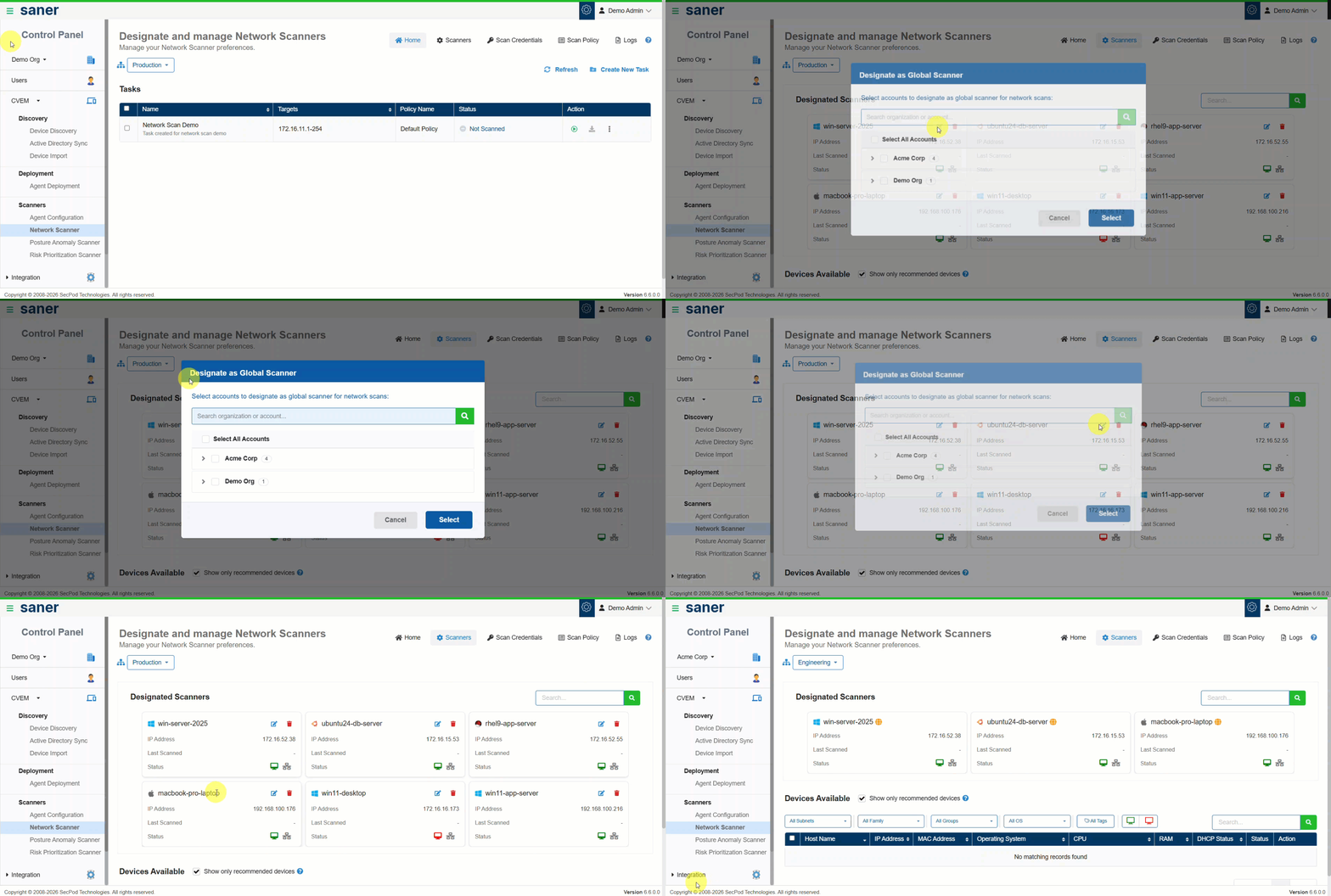
Network scanning is now more flexible and scalable with the introduction of a Global Shared Scanner Service Pool.

  • Network scanners can be designated to a shared pool accessible across Organizations and Sites/Accounts within an Organization.
  • Scanners in the pool are no longer bound to a single Site or Account and can be dynamically used wherever scanning services are required.
  • Scan results are automatically published to the respective Site or Account where the scan was initiated.
  • This is especially useful for scanning public-facing resources distributed across multiple Sites, Accounts, or even Organizations.

Benefit: Optimized scanner utilization and simplified scanning of distributed environments.
2. Distributed Network Scanning with Multi-Scanner Tasks

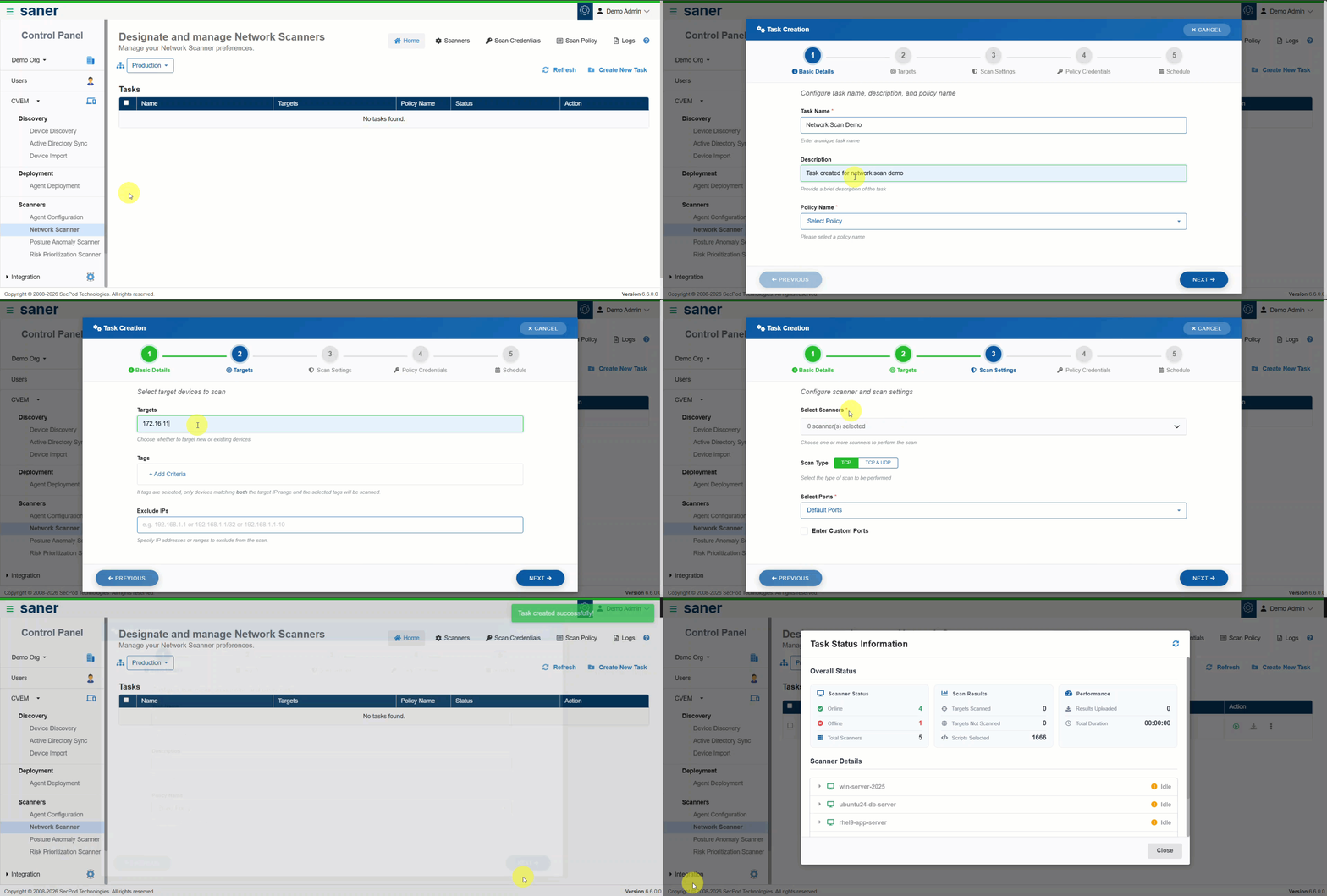
Network scanners can now participate in multiple scanning tasks.

  • A single scanner can be associated with multiple scan schedules running at different times.
  • Each scanning task supports its own scan policy and configuration.
  • Scanners function as shared utilities rather than being locked to a single scan task.

Benefit: Improved efficiency, reduced idle time, and better resource utilization.
3. Remediation SLA for Vulnerabilities and Misconfigurations

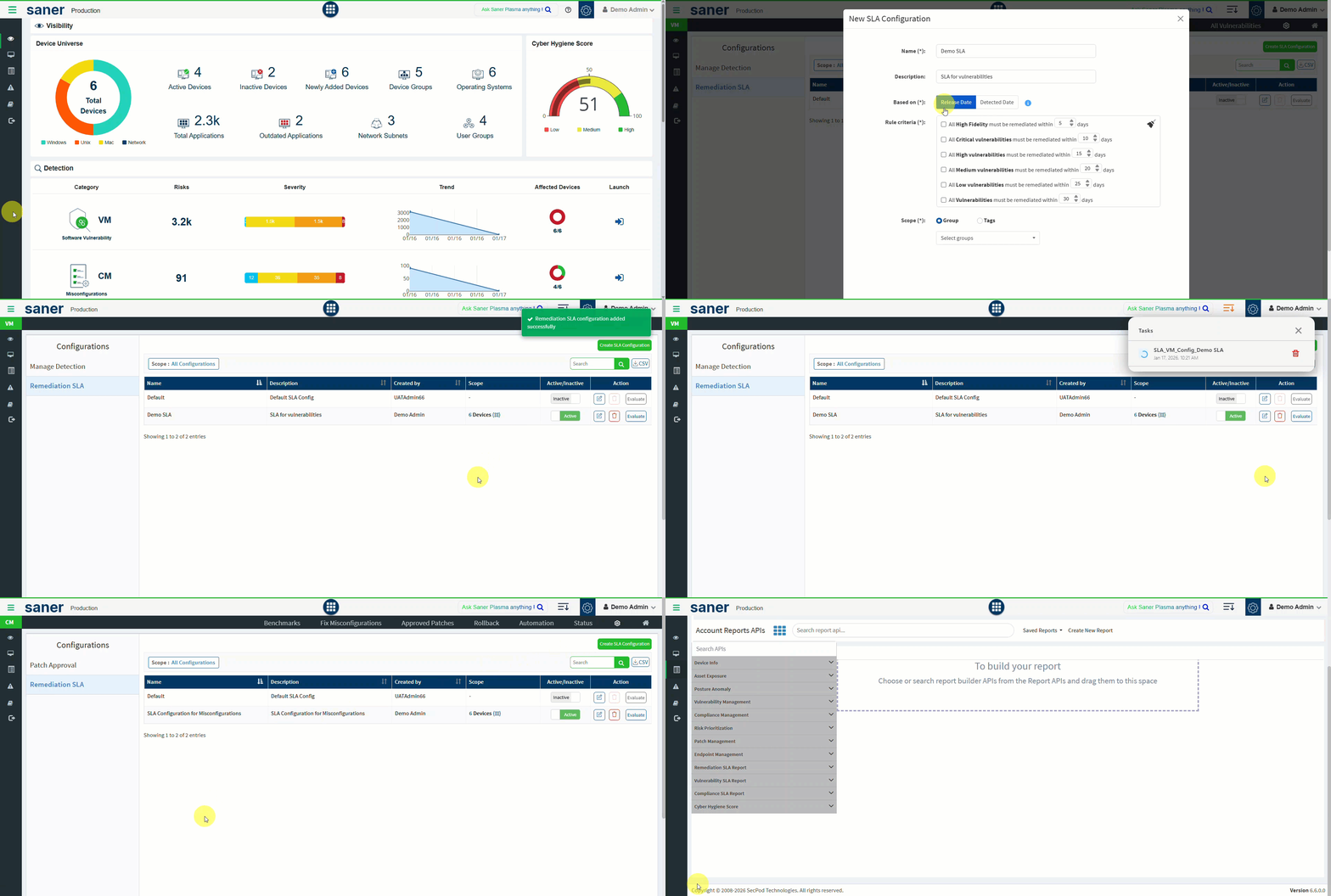
Organizations can now define Remediation Service Level Agreements (SLAs).

  • Create SLAs to track and enforce remediation timelines for vulnerabilities and misconfigurations.
  • Vulnerabilities are traced from discovery through remediation.
  • Track Mean Time to Remediate (MTTR) based on severity.
  • Enables prioritization and clear remediation goals for operations teams.
  • Reports provide visibility into SLA adherence and violations.

Benefit: Stronger accountability and measurable security outcomes aligned with organizational expectations.
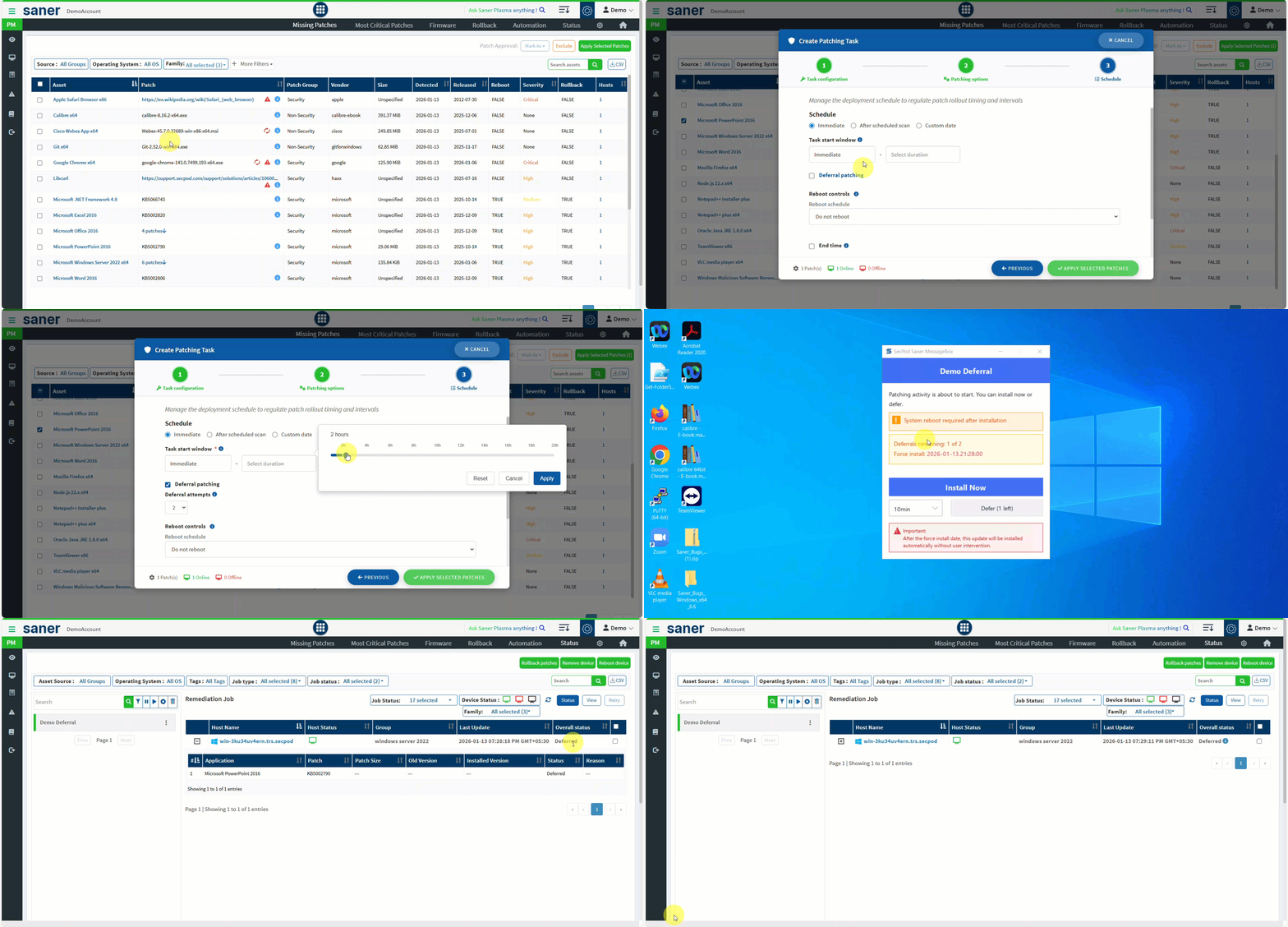
4. End-User Patch Deferral Support (Patch & Compliance Management)

End users now have controlled flexibility during remediation.

  • Users can postpone patching and remediation activities until a defined deadline.
  • Helps avoid unplanned downtime and interruptions during active work.
  • Users retain control over patch installation and reboot timing within allowed limits.

Benefit: Reduced productivity impact while maintaining compliance.
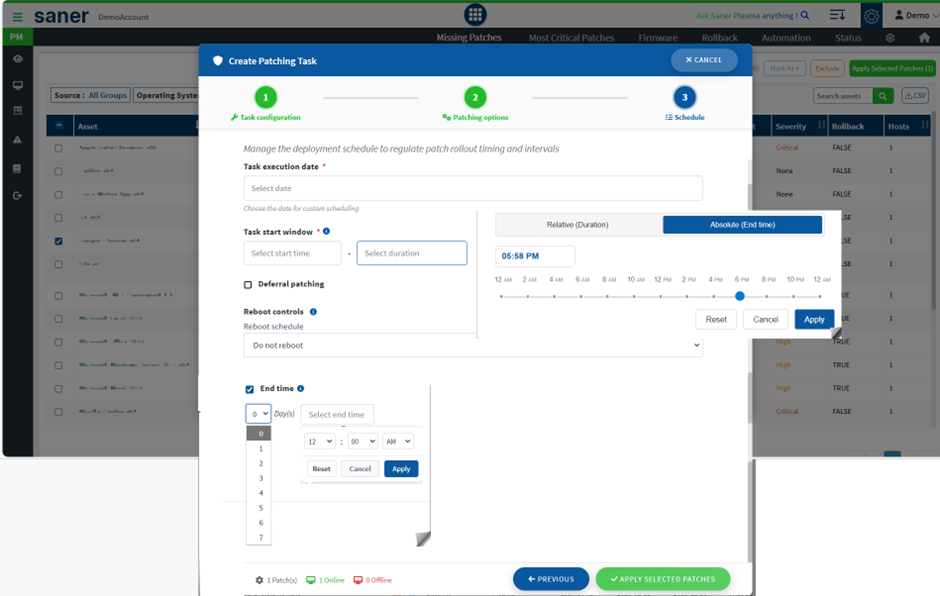
5. Enhanced Reboot and End-Time Scheduling Controls (Patch & Compliance Management)

Remediation jobs and automation rules now offer enhanced scheduling controls.

  • Greater control over reboot behavior and job end times.
  • Helps align remediation activities with maintenance windows and operational constraints.

Benefit: More predictable and user-friendly remediation execution.
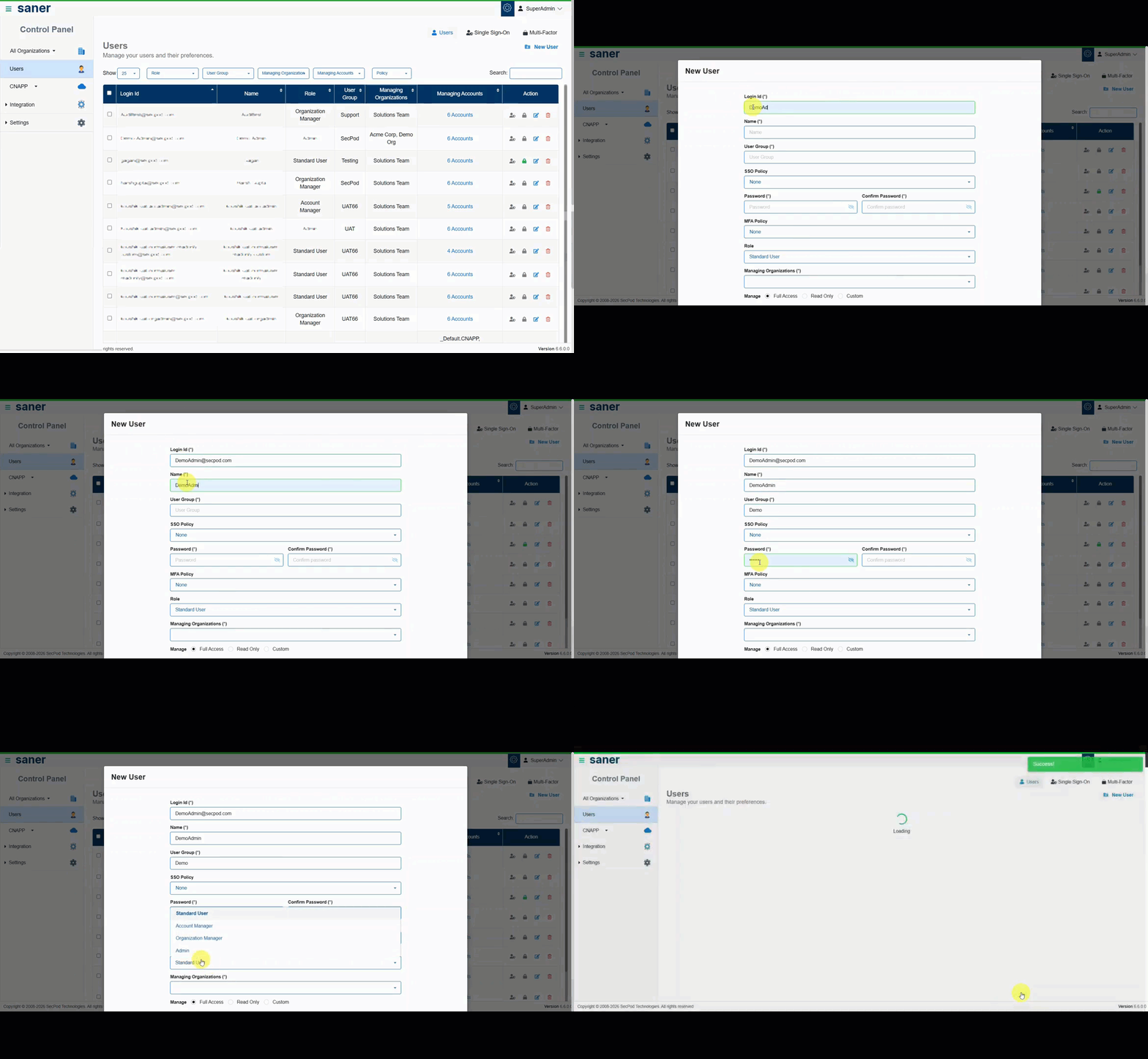
6. Multi-Admin Support

Administrative responsibilities can now be safely delegated.

  • Super Admins can designate multiple administrators within the organization.
  • Administrative privileges can be delegated or revoked at any time.

Benefit: Improved operational resilience and reduced dependency on a single administrator.
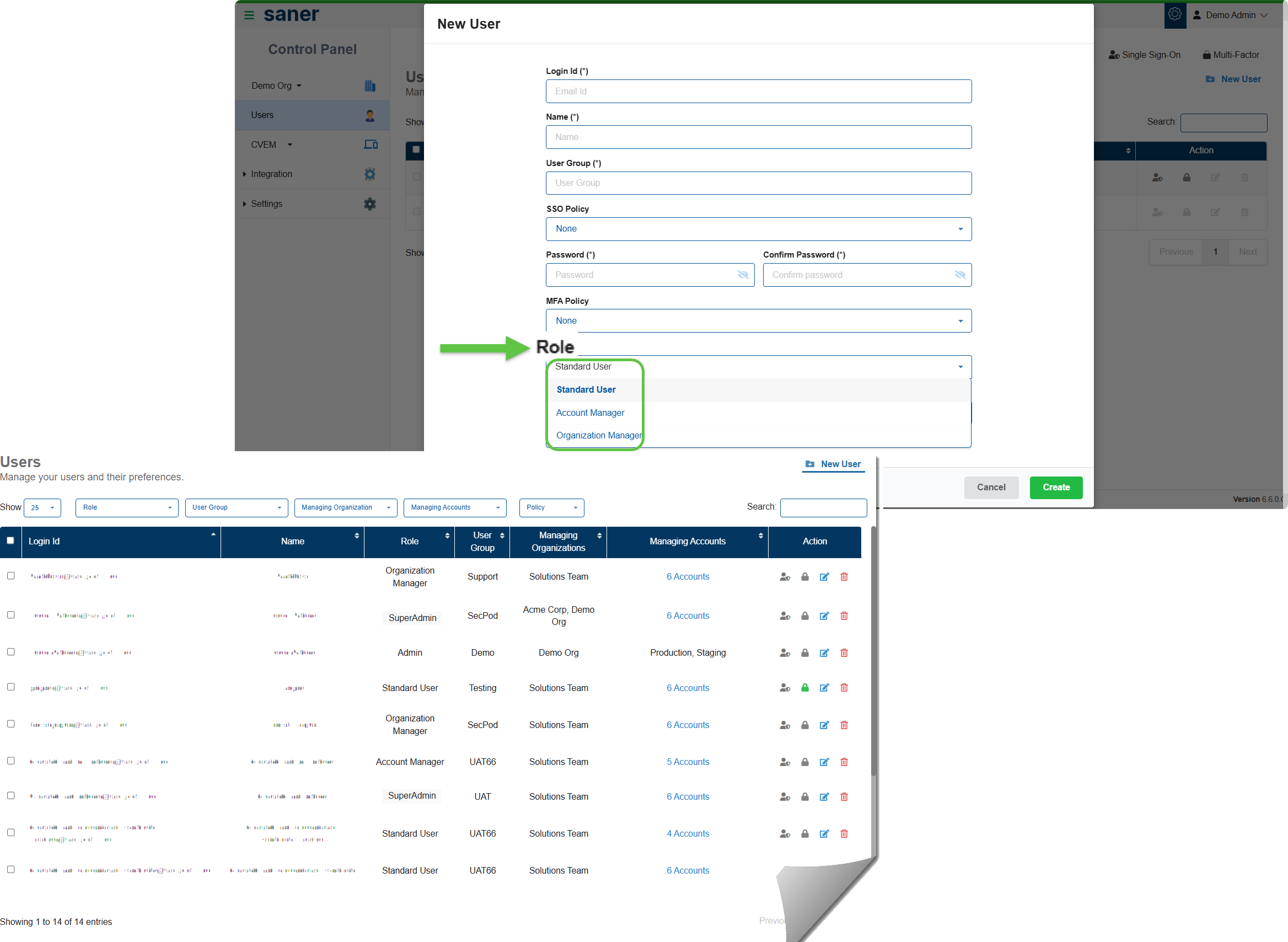
7. User Role Renaming for Improved Clarity

User roles have been renamed to better reflect responsibilities and hierarchy:

  • Admin → Super Admin
  • Modified role definition: Admin, designated by Super Admin
  • Org Admin → Organization Manager
  • Account Admin → Account Manager
  • Normal User → Standard User

Benefit: Clearer role definitions and easier access management.
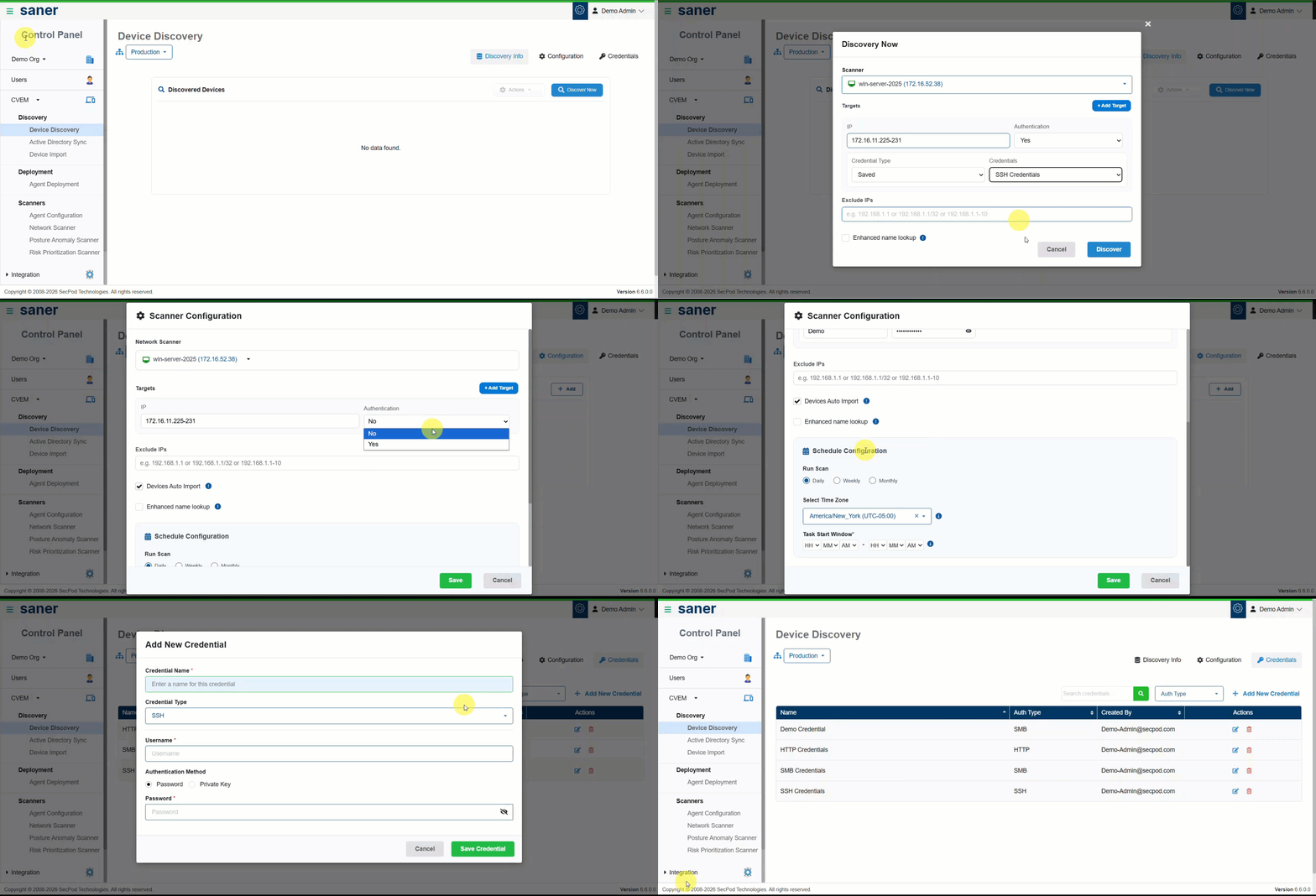
8. Authenticated Device Discovery

Device discovery is now more accurate and powerful with authenticated scanning.

  • Support for multiple authentication schemes: SMB, SSH, HTTP
  • Centralized credential management for reuse across discovery tasks
  • Credentials can be assigned per device, device group, or via device tags
  • Enhanced scheduling with time zone awareness and configurable scan start times
  • Improved overall device discovery user experience

Benefit: Higher discovery accuracy and easier credential management at scale.
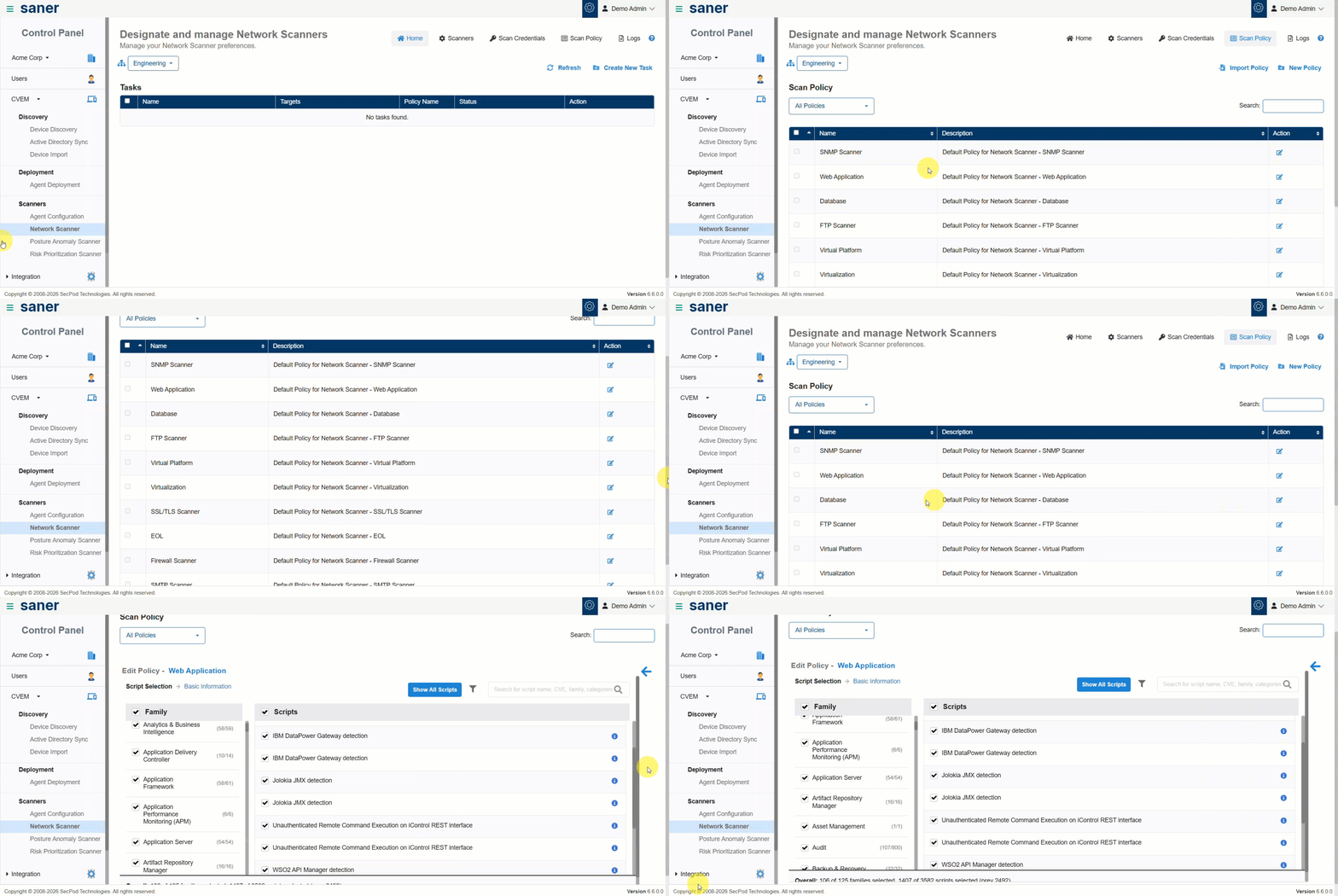
9. New Scan Policies and Expanded Detection Coverage

New scan policies extend coverage across modern and legacy environments.

  • New scanning support for:
    • Web Applications
    • Virtualization platforms
    • End-of-Life (EOL) applications and devices
    • Databases
    • SSL/TLS, SNMP, FTP, and SMTP misconfigurations
  • Added detection for Backdoor and Malware instances.

Benefit: Broader visibility into security risks across diverse infrastructure.
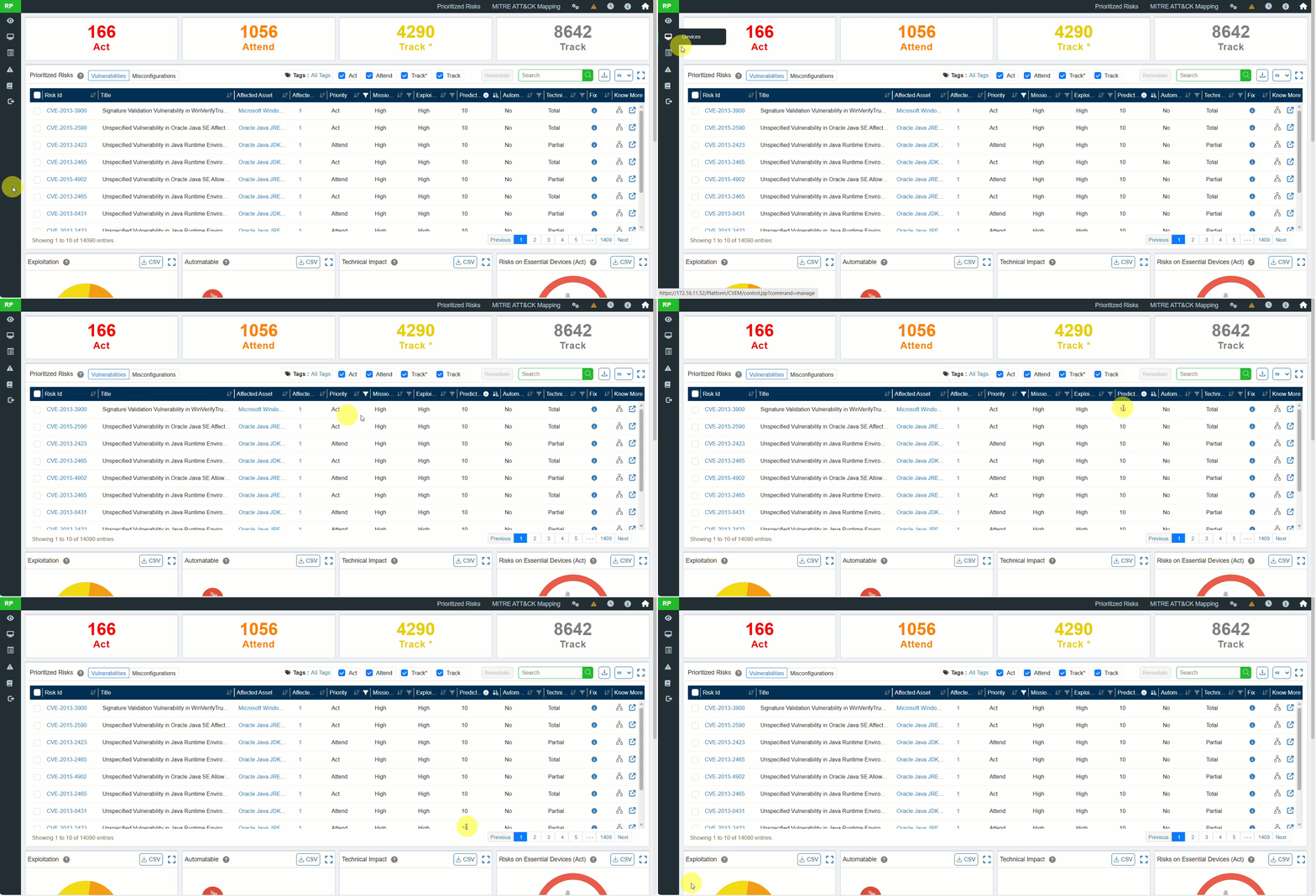
10. Saner Predicted Score (Advanced Risk Prioritization)

A new risk scoring system, Saner Predicted Score, is introduced.

  • Modeled after EPSS (Exploit Prediction Scoring System).
  • Provides better insight into real-world exploitability than traditional CVSS.
  • Available for all identified vulnerabilities and misconfigurations.

Benefit: More accurate risk prioritization and smarter remediation decisions.
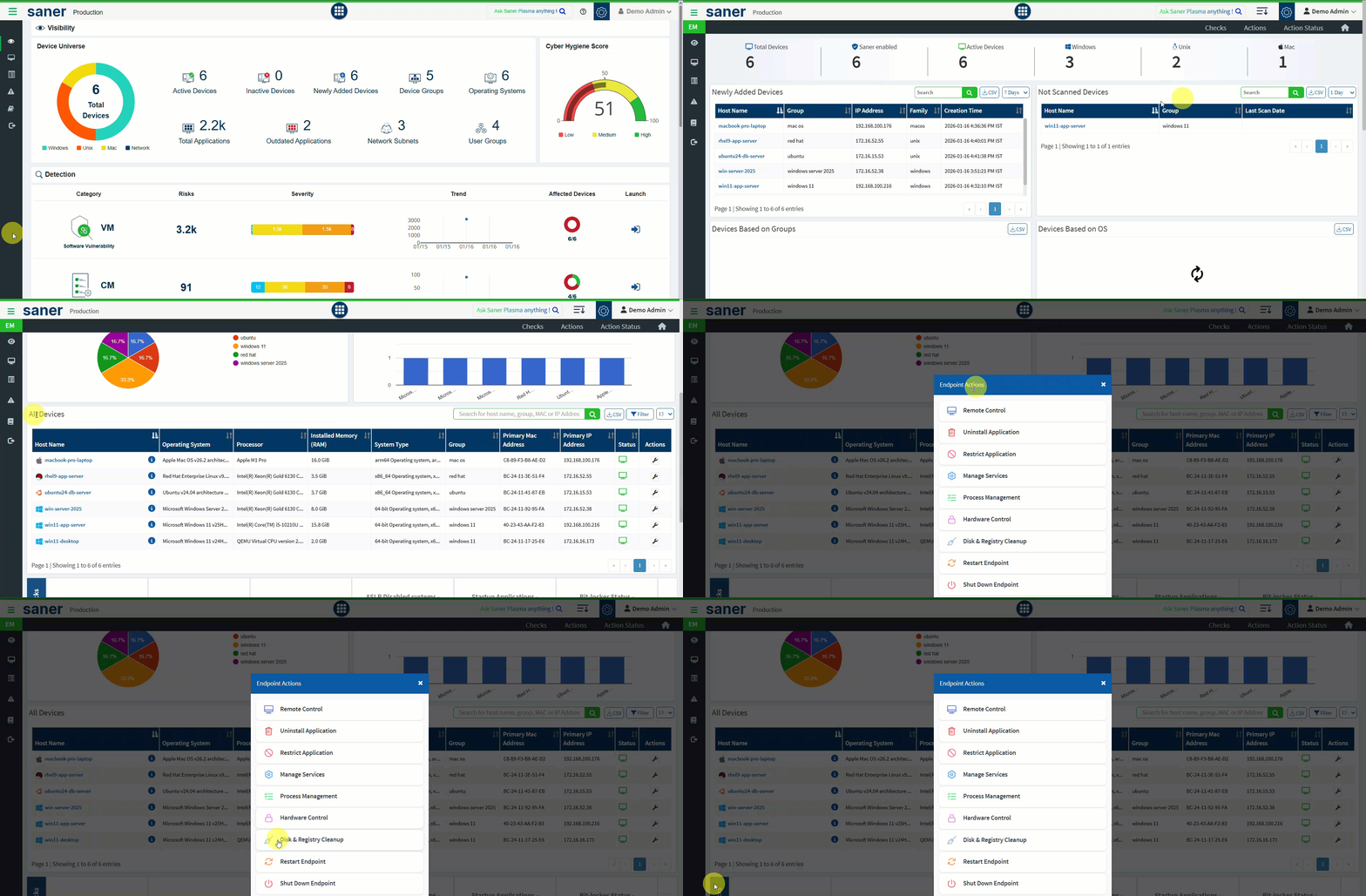
11. Endpoint Management: Device-Level Quick Actions

Administrators can now perform quick actions directly from the Endpoint Management dashboard.

  • Reboot or shutdown devices
  • Deploy or uninstall applications
  • Execute actions at an individual device level

Benefit: Faster response and simplified day-to-day device management.
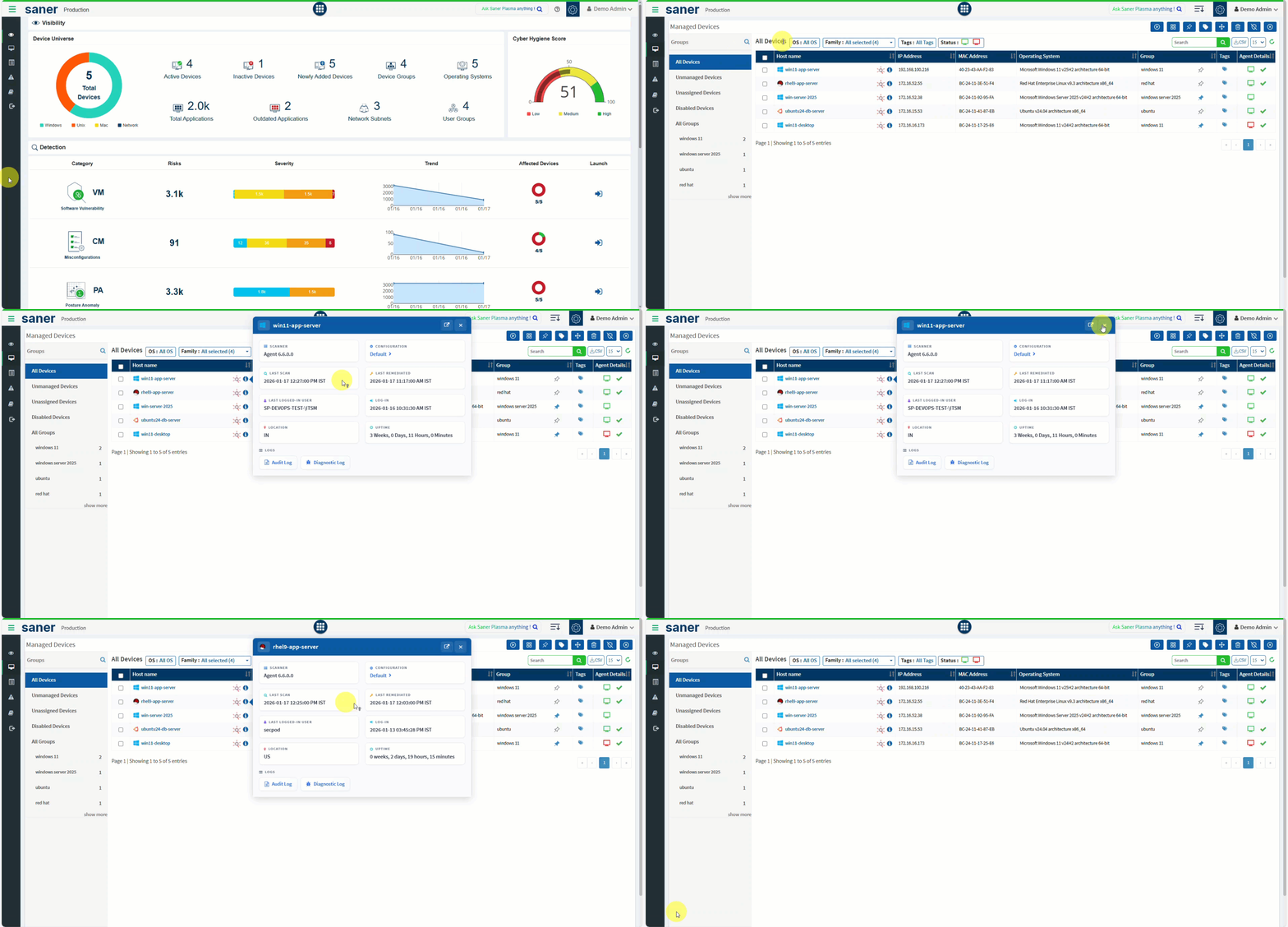
12. Enhanced Device Information

Device visibility has been significantly improved with enriched metadata.

Newly added details include:

  • Last logged-in user
  • Login time
  • Last scan time
  • System uptime
  • Device location

Benefit: Better identity-to-device correlation for informed administrative decisions.
13. Zero-Day Vulnerability Visibility and Alerting

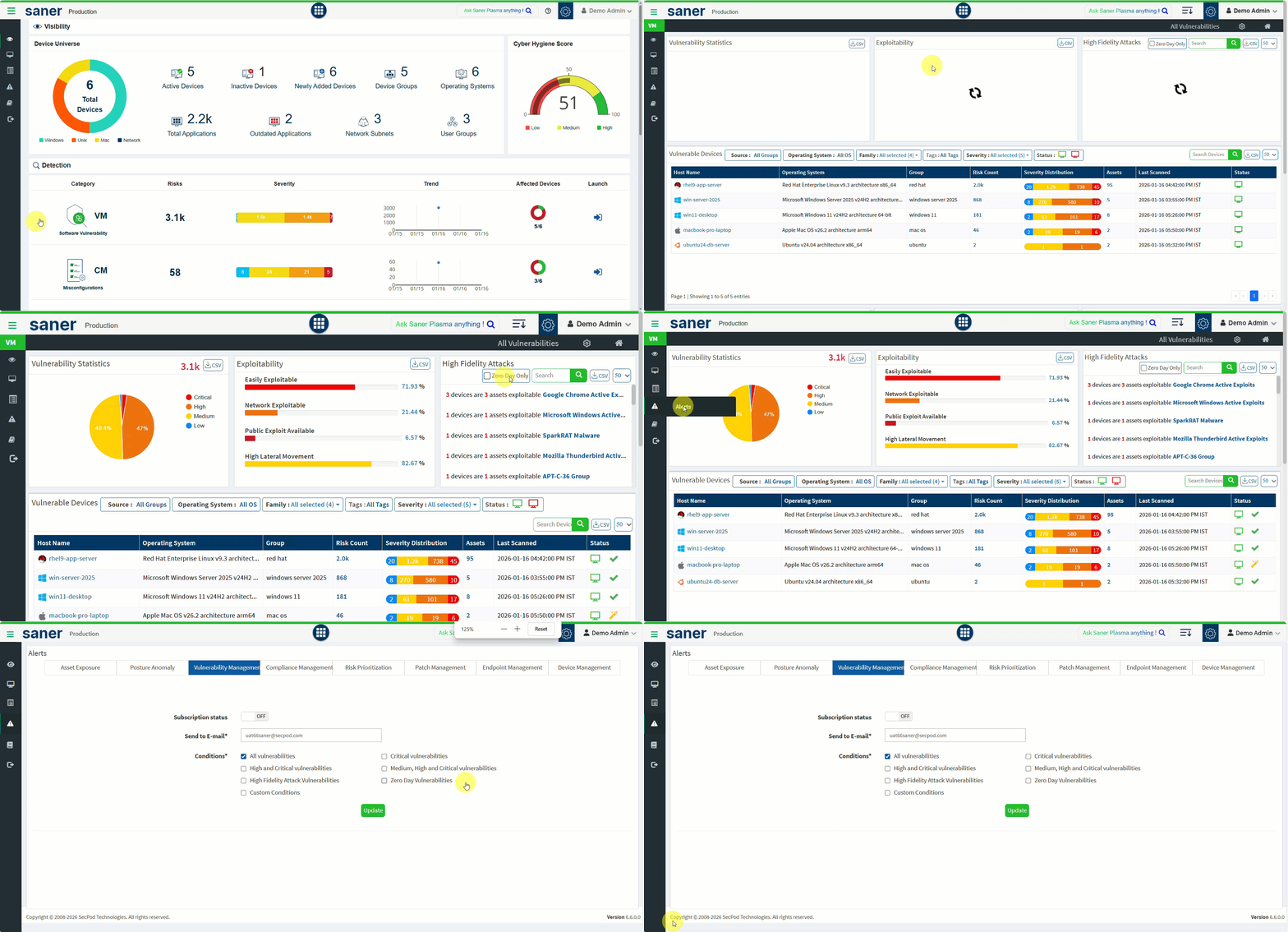
Zero-day vulnerabilities are now first-class citizens in Vulnerability Management.

  • VM dashboard provides visibility into zero-day vulnerabilities.
  • Enables faster awareness and initiation of remediation actions.

Benefit: Improved readiness and response to emerging threats.
14. Remote Diagnostic Log Collection for Saner Agents (Linux & macOS)

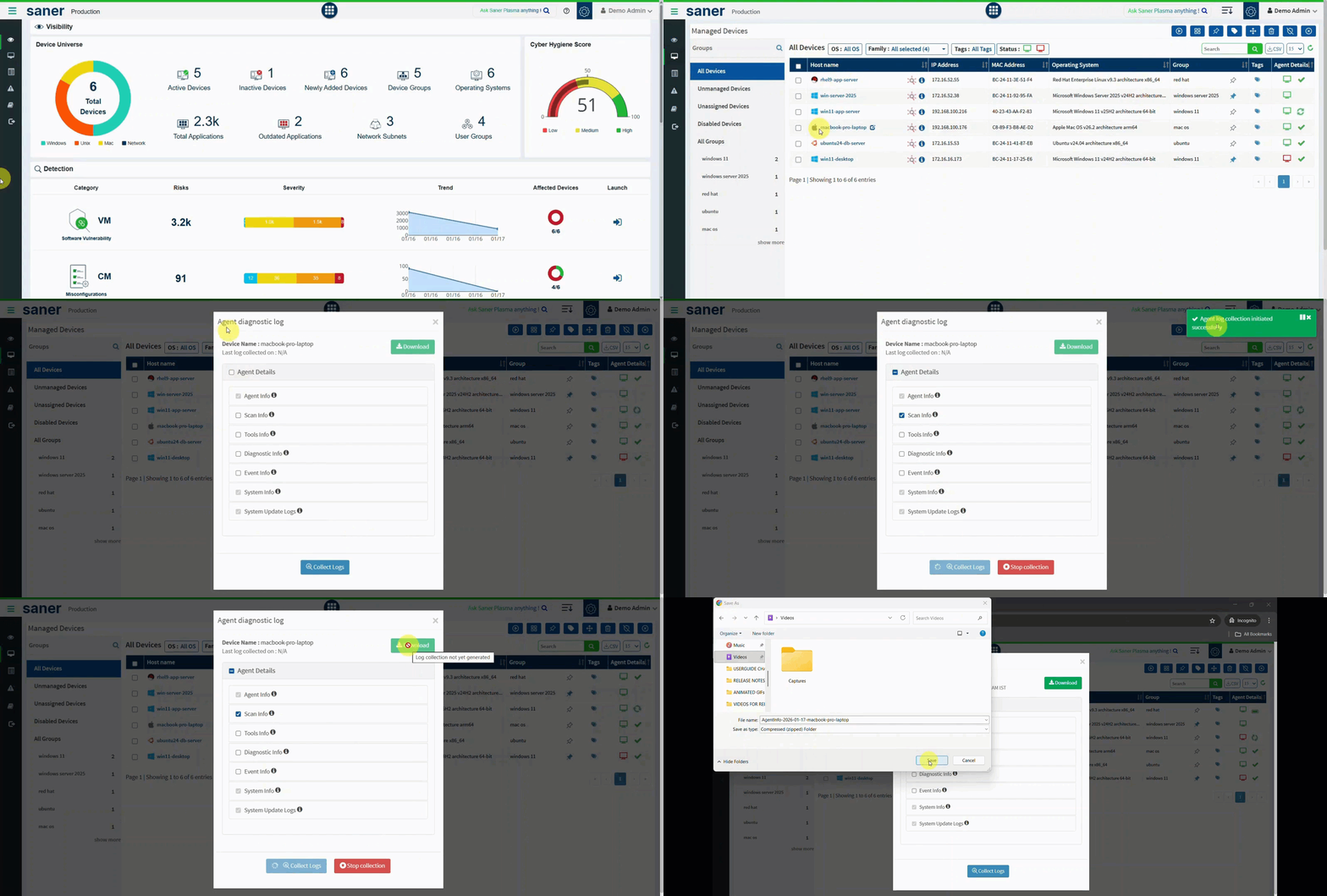
Remote diagnostic capabilities are expanded beyond Windows.

  • Detailed diagnostic logs can now be collected from Linux and macOS systems.
  • Previously available only for Windows agents.

Benefit: Faster troubleshooting and consistent support across platforms.
New Platform Support

Starting with Saner Agent version 6.6, support has been added for the following platforms:

  • ARM 64bit support for all flavors of Linux
  • ARM 64bit support for Mac systems

End of Support

Support for the following operating systems has been discontinued starting with Saner Agent version 6.6, as these operating systems have reached end of life (EOL).

  • Linux RPM: RHEL 7.x, Oracle Linux 7.x, Amazon Linux 2.x, SUSE Linux Enterprise Server 12 SP5
  • Linux Debian: Ubuntu 16.04, 18.04, Debian 8, 9
  • macOS: 10.x, 11.x, 12.x
  • Windows (32-bit)
  • AIX: 7.1

Older Saner Agents (6.5.0.x and below) will continue to support the above operating systems.

REST and Report API Changes

This section outlines the REST and Report API enhancements included in this release.

Newly Added APIs

  • Pin and Unpin Device:
    The pinandunpindevice API allows administrators to pin a device to a specific group, ensuring it remains associated with that group irrespective of the configured group criteria (such as hostname, IP address, operating system, family, device type, or tags). When the device is unpinned, the grouping criteria are reapplied and the device is automatically reassigned based on the configured group rules.
  • Move Device:
    The movedevice API allows administrators to move one or more devices to a different group, account, or organization. Devices can be moved within the same organization or across organizations and accounts. Optionally, devices can be pinned to the target group after the move, ensuring they remain associated with the selected group irrespective of the configured grouping criteria.
  • Exclude Vulnerability:
    The excludevulnerability API allows administrators to exclude vulnerabilities,  patches, or assets from remediation and visibility based on the specified scope. Exclusions can be applied at the account, group, or device level when remediation or visibility is not required, risk is accepted, or remediation is temporarily deferred. Exclusions are enforced for the configured duration and are automatically removed once the exclusion period expires.
  • Add Blacklisted Assets:
    The addBlackListedAssets API allows administrators to mark applications or assets as blacklisted. Blacklisted assets represent applications that are restricted, unauthorized, or pose a security risk within the environment. When a blacklisted asset is detected on any endpoint, it is flagged in the Asset Exposure (AE) dashboard, enabling administrators to identify violations and take appropriate remediation actions.
  • Add Whitelisted Assets:
    The addWhiteListedAssets API allows administrators to mark one or more applications or assets as whitelisted. Whitelisted assets represent approved and trusted applications that are permitted within the environment. Applications added to the whitelist override any existing blacklisted status and are treated as trusted in the Asset Exposure (AE) dashboard.

Modified APIs

Pagination Support

Pagination support has been introduced to improve performance and scalability when retrieving large datasets. The following APIs now support pagination:

  • getdevice (Device Management)
  • getInstalledApplication (Asset Exposure)
  • getReportApiData (Several Reports)

The following pagination parameters are supported:

  • limit – Specifies the number of results per page
  • currentPage – Indicates the current page number
  • pageSize – Number of results returned in the current page
  • totalEntries – Total number of results available
  • isNextPage – Indicates whether a next page exists
  • isPrevPage – Indicates whether a previous page exists
  • totalPages – Total number of pages generated based on the specified limit

Report API Changes

New Canned Reports

We have added two new canned reports, ‘Vulnerability SLA Report’ and ‘Compliance SLA Report’, to provide detailed insights into the overall Service Level Agreement (SLA) compliance for vulnerabilities and misconfigurations across devices in an account. These reports help administrators track SLA adherence, identify violations, and monitor remediation progress for vulnerabilities and misconfigurations.

In addition, new custom reports have been introduced under the Vulnerability SLA Report and Compliance SLA Report categories to help monitor overall remediation SLA compliance across devices within an account.

New Custom Reports

Asset Exposure (AE)

  • Applications by Devices
    Provides a list of software assets installed on each device.

Patch Management (PM)

  • Remediation Patch Details by Task Name (Rule)
    Provides detailed patch information grouped by automation task (rule) name.

Vulnerability Management (VM)

  • Backdoor Detection by Ports
    Provides visibility into potential backdoor vulnerabilities identified based on open and listening ports.
  • Malware Detection by Ports
    Provides insights into malware-related detections identified through port based scanning.

Report Enhancements and Modifications

New Columns Added

Asset Exposure (AE) Reports
A new column, ‘Install Date’, has been added to the following reports:

  • Software License
  • Outdated Applications
  • Blacklisted Applications
  • Rarely Used Applications
  • Application Details

Asset Exposure (AE), Device Management (DM), Patch Management (PM)
New columns, ‘Logged In User’ and ‘Logged In Time’, have been added to the following reports:

  • Device Details
  • All Devices
  • Patch Compliance by Devices

Vulnerability Management (VM)

  • A new column, ‘MVE ID’, has been added to the ‘High Fidelity Attacks’ report.
  • New columns, ‘Exploitability’, ‘Zero Day’, ‘Asset Family’, and ‘Patch Type’, have been added to the ‘All Vulnerabilities’ report.

The following new columns have been added to the ‘Vulnerabilities by Devices’ report:

  • OS Name, Asset Type, Asset Outdated, Zero Day, Vulnerability Aging (in Days), Exploitable, Logged-In User, Logged-In Time

Risk Prioritization
A new column, ‘Predicted Score’ (New risk scoring system), has been added to the following reports:

  • Risks Based on Priority (Vulnerability)
  • Risks Based on Priority (Misconfiguration)
  • Top 10 Prioritized Vulnerabilities
  • Top 10 Prioritized Misconfigurations

Patch Management (PM)

  • New columns, ‘Hosts’ and ‘MVE ID’, have been added to the ‘Most Critical Patches’ report.
  • A new column, ‘InstalledBy’, has been added to the ‘Installed Patches’, ‘Patch Compliance’ and ‘Installed Patches by Devices’ report.
  • A new column, ‘Release Date’, has been added to the ‘Non-Security Patches Details’ report.

Compliance Management (CM)
New columns, ‘Risk Count’ and ‘Risks’, have been added to the ‘Top 10 Recommended CCE Remediation’ report.

Endpoint Management (EM)
A new column, ‘Last Update’, has been added to the ‘Software Deployment Jobs’ report.

New SLA Date Range Filter

A new SLA Date Range filter has been introduced for the following reports to enable refined SLA-based analysis:

  • Devices with Violations (VM, PM and CM)
  • SLA Violating Patches (VM, PM and CM)
  • Devices Approaching SLA Deadline (VM, PM and CM)
  • Vulnerabilities Requiring Attention (VM)
  • Patches Requiring Attention (PM)
  • Compliance Requiring Attention (CM)
  • SLA-Compliant Devices (VM, PM and CM)
  • SLA-Compliant Vulnerabilities (VM)
  • SLA-Compliant Patches (PM)
  • SLA-Compliant Misconfiguration (CM)

This filter allows administrators to analyze SLA compliance within a specific timeframe, supporting better tracking, reporting, and remediation planning.

We would love to hear from you! If you have any feature suggestions to help improve your experience with Saner CVEM, feel free to contact us at [email protected].

Share This Article :

  • X
  • LinkedIn
Still stuck? How can we help?

Saner Documentation Feedback

Release Notes Saner 6.5
Table of Contents
  • 1. Global Shared Network Scanner Service Pool
  • 2. Distributed Network Scanning with Multi-Scanner Tasks
  • 3. Remediation SLA for Vulnerabilities and Misconfigurations
  • 4. End-User Patch Deferral Support (Patch & Compliance Management)
  • 5. Enhanced Reboot and End-Time Scheduling Controls (Patch & Compliance Management)
  • 6. Multi-Admin Support
  • 7. User Role Renaming for Improved Clarity
  • 8. Authenticated Device Discovery
  • 9. New Scan Policies and Expanded Detection Coverage
  • 10. Saner Predicted Score (Advanced Risk Prioritization)
  • 11. Endpoint Management: Device-Level Quick Actions
  • 12. Enhanced Device Information
  • 13. Zero-Day Vulnerability Visibility and Alerting
  • 14. Remote Diagnostic Log Collection for Saner Agents (Linux & macOS)
  • New Platform Support
  • End of Support
  • REST and Report API Changes
    • Newly Added APIs
    • Modified APIs
    • Report API Changes
      • New Canned Reports
      • New Custom Reports
      • Report Enhancements and Modifications
Copyright 2026 - SecPod. All Rights Reserved. Privacy Policy.
SanerNow Version 6.5.x