
Container Orchestration Entitlement Management (COEM) tool is designed to provide visibility, control, and governance over access permissions within containerized environments, particularly in Kubernetes ecosystems. It enables organizations to systematically identify excessive permissions across various identities, including Kubernetes users, groups, service accounts, roles, and cluster roles, ensuring that access rights are aligned with the principle of least privilege.
By offering detailed permission insights, COEM helps security and operations teams review and analyze entitlement data at a granular level, making it easier to detect privilege sprawl and reduce unnecessary or risky access. It also allows continuous tracking of non-compliant or excessive permission categories over time, helping organizations understand how access risks evolve and whether remediation efforts are effective.
In addition, COEM supports monitoring of entitlement entity counts and access trends, enabling teams to observe patterns and anomalies in permission usage. It also facilitates the identification and assessment of Kubernetes cluster events, aiding in faster troubleshooting and root cause analysis. With built-in tracking of excessive permission trends and remediation outcomes, organizations can measure the impact of their security initiatives.
Finally, COEM provides actionable fix recommendations, empowering teams to remediate identified issues efficiently and maintain a secure, compliant, and well-governed container orchestration environment.
Identify Excessive Permissions Across Identities

Identity permissions in container orchestration provide complete visibility and control over how users, groups, service accounts, and roles access and interact with containerized workloads and cluster resources.
By continuously assessing permissions and identifying over-privileged identities, you can make sure that access rights align with operational needs and adhere to least-privilege principles.
The Identity Permissions Overview Dashboard in Saner COEM helps administrators quickly identify security risks from excessive or misaligned privileges across the different categories: Users, Groups, Service Accounts, Cluster Roles, and Roles.
Each block highlights where excessive permissions are concentrated, so administrators can prioritize remediation. The dashboard’s purpose is to enforce the principle of least privilege across users, groups, service accounts, and roles at both cluster and namespace levels.
The system automatically scans the account on a regular basis and displays the count of over-privileged entities across all the relevant categories.
Here’s a quick look at what each block indicates:
Users
Track individual accounts and make sure the user accounts only have the permissions necessary for their role. This view also helps prevent privilege creep where users accumulate unnecessary rights over time.
The Users section lists all individual accounts with access to the environment and highlights those with excessive permissions.
Groups
The Groups view helps manage collections of users with shared permissions. By making sure that group-level access is properly scoped you can avoid configured groups that unintentionally grants broad access to many users at once.
Groups provide a summary of all configured access groups and highlights those with permissions that exceed operational requirements.
Service Accounts
Service Accounts focus on accounts used by applications or automated services with the goal to keep these accounts tightly controlled, since they often run continuously and can be exploited if over‑privileged. It highlights service accounts with elevated privileges, which are frequently overlooked but present significant security risks if compromised.
Cluster Roles
Govern permissions that apply across the entire cluster, so the focus is on reducing excessive rights to minimize cluster-wide security risks.
Cluster Roles provides insights into access policies at the cluster level that affect multiple namespaces or services. It emphasizes roles with extensive or administrative permissions, allowing administrators to evaluate and improve security boundaries across the cluster.
Roles
Defines permissions at the namespace level to ensure fine-grained access control within specific environments, preventing unnecessary escalation of privileges beyond what’s needed locally.
Roles address access roles specific to namespaces or projects. It aids in identifying localized roles with excessive privileges, allowing for precise control over permissions and ensuring strong internal access segregation.
Review the Detailed Permission Data
You can review the detailed permission data and take corrective actions directly from the Identity Permissions Overview by clicking the View Details button in each block. This allows faster analysis and remediation of security exposures.
The table outlines the sections within each details page.
| Section | What it Highlights? |
| Header | The selected Kubernetes user’s name, unique identifier, and reference details, along with a clear security indicator that shows if the user configuration is secure or poses risks. |
| Resource Information | Provides essential metadata about the user, including the resource type, namespace association, creation details, and if it is a virtual resource or a cluster-wide resource. |
| Security and Configuration | Key security attributes, such as the user’s overall security status, if they are external to the cluster, and configuration aspects related to virtual resources. |
| Associations | Various Kubernetes entities linked to the user, including roles, cluster roles, groups, service accounts, and service account groups. This helps visualize how the user interacts with other resources in the cluster. |
| Visualization graph | Interactive view of the user’s relationships and bindings within the cluster, displaying connected entities like roles and namespaces. It uses visual indicators to represent secure configurations and provides controls to zoom, expand, or fit the graph for better navigation. |
View Detailed Configuration and Security Insights for Kubernetes Users
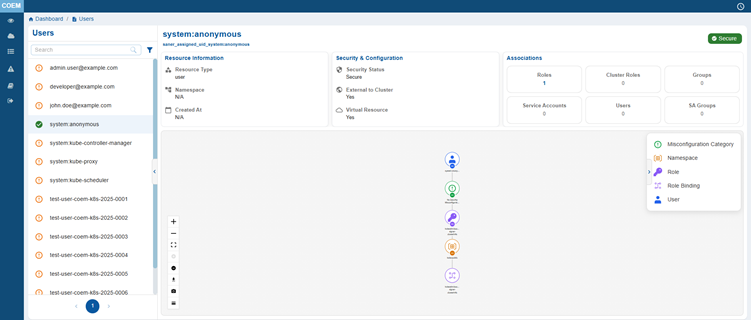
The User Details page allows you to access in-depth information about the selected user, including their security status, role associations, and a visual representation of their relationships within the cluster. This allows administrators to evaluate user permissions, identify potential misconfigurations, and ensures secure access control within the Kubernetes environment.
View Detailed Configuration and Security Insights for Kubernetes Groups
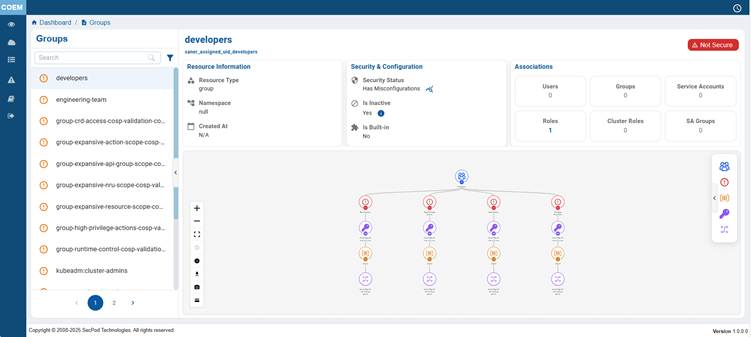
The Group Details page allows you to access in-depth information about the selected group, including their security status, role associations, and a visual representation of their relationships within the cluster. This allows administrators to evaluate group permissions, identify potential misconfigurations, and ensures secure access control within the Kubernetes environment.
The selected Kubernetes group name, unique identifier, and reference details, along with a clear security indicator shows if the group configuration is secure or poses risks.
View Detailed Configuration and Security Insights for Service Accounts
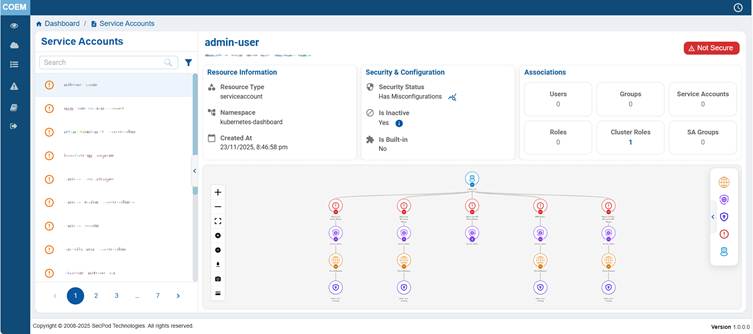
This details view provides a centralized overview of Kubernetes users, service accounts, and system components interacting with the cluster, enabling administrators to effectively monitor and manage access. It includes users, application-specific service accounts, system controllers, networking components like Calico, and bootstrap or certificate-related entities. By offering complete visibility into these service accounts, the view supports access control validation, security monitoring, and operational awareness. It helps teams identify misconfigurations, enforce least-privilege principles, and ensure that all cluster interactions are properly governed, making it essential for maintaining the security and integrity of the container orchestration environment.
View Detailed Configuration and Security Insights for Cluster Roles
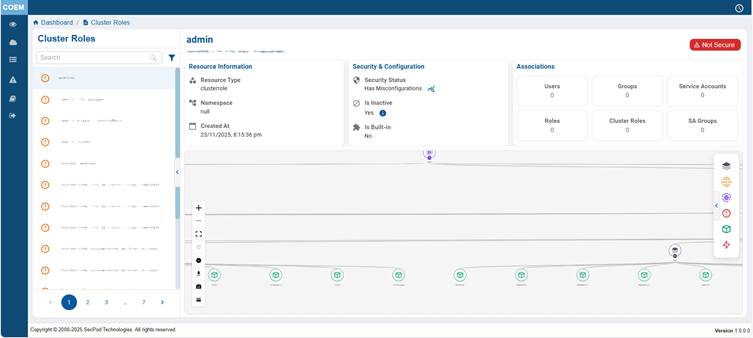
This details view provides a centralized overview of all identities within the Kubernetes cluster, including users, service accounts, and system components, enabling effective access management and security governance. It lists users, application-specific service accounts, system controllers, networking components, and cluster initialization entities, each playing a role in cluster operations. By offering complete visibility into these identities, the view helps administrators enforce role-based access control, detect over-privileged or unused accounts, and ensure secure interactions across the environment. Overall, it supports operational clarity, compliance, and adherence to least-privilege principles, making it critical for maintaining the security and integrity of the container orchestration platform.
View Detailed Configuration and Security Insights for Roles
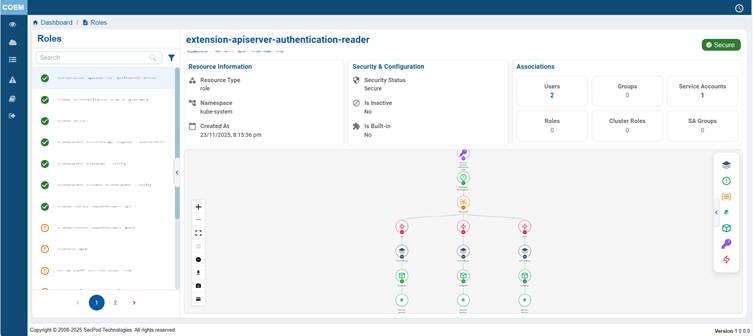
The Roles Details page allows you to access in-depth information about the selected role, including their security status, role associations, and a visual representation of their relationships within the cluster. This allows administrators to evaluate role permissions, identify potential misconfigurations, and ensures secure access control within the Kubernetes environment.
Identify Privilege Sprawl
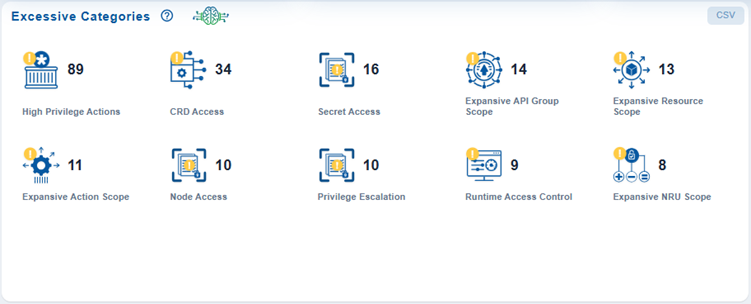
Security teams can quickly identify areas with concentrated privilege sprawl and prioritize the remediation of the most critical permission issues.
The Excessive Categories dashboard block classifies excessive permissions into key risk categories and displays the number of occurrences for each at the end of each scan.
Track the Variation in the Number of Excessive or Non-Compliant Categories Over Time
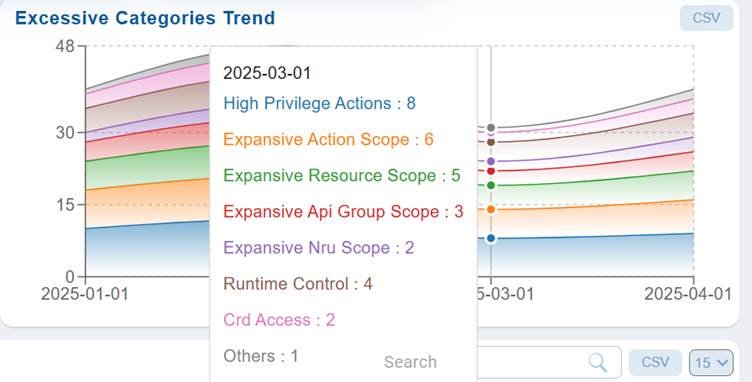
The Excessive trend analysis helps track and evaluate fluctuations, identify improvement patterns, and enable data-driven decisions to reduce excessive instances, strengthen configuration management, and maintain a secure and compliant environment.
In Saner COEM dashboard, the Excessive Categories Trend illustrates the variation in the number of excessive or non-compliant categories over time, such as assets, configurations, or permissions that exceed defined thresholds or acceptable limits. This helps monitor how these categories evolve across a given period, providing insight into the effectiveness of remediation and compliance efforts.
Identify and Assess Kubernetes Cluster Events for Troubleshooting
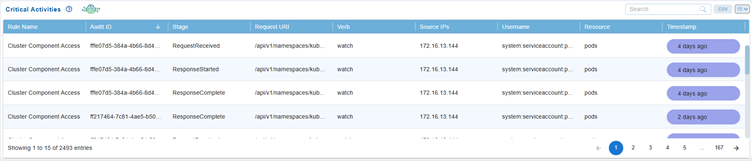
Kubernetes Events are essential for monitoring and troubleshooting activities within container orchestration environments. These events facilitate an understanding of what is happening within the cluster and help diagnose potential issues efficiently.
Saner COEM provides real-time visibility into high-severity events that impact Kubernetes workloads and resources. The Critical Events dashboard presents a tabular view of vital event details, including the name, type, reason, message, source, namespace, and timestamp for subsequent troubleshooting and resolution of critical issues.
Event Name
The name of the affected Kubernetes object such as a Pod, Deployment, or Node.
Event Types and Characteristics
| Event Type | Description | Typical Scenarios |
|---|---|---|
| Normal | Indicates successful or expected operation | Pod creation, scaling activities |
| Warning | Highlights potential issues that may need attention | Resource constraints, configuration errors |
| Error | Represents critical failures that impact system performance | Deployment failures, node unavailability |
Reason
A short reason describing why the event occurred (For example, Configuration Error, Security Breach, and so on).
Message
A detailed description of the event that helps understand the root cause or impact.
Source
Identifies the component or controller in Kubernetes that generated the event (For example, kubelet, scheduler, replica-set controller).
Source Type
Specifies the type of the source (For example, Node, Controller, API Server) that reported the event.
Namespace
Kubernetes namespace where the event occurred and allows easy isolation of issues within specific workloads.
Timestamp
Exact date and time when the event was recorded, assisting in event correlation and timeline analysis.
Monitor Entitlement Entity Counts and Access Trends Over Time
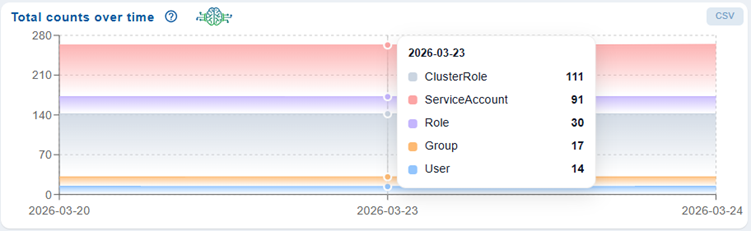
The Total Counts Over Time chart in the Container Orchestration Remediation Management (CORM) dashboard provides a time-based view of the overall number of entitlement-related entities, such as ClusterRoles, ServiceAccounts, Roles, Groups, and Users. By plotting these counts across a selected period, the chart helps users monitor trends, understand how access configurations evolve, and assess the impact of remediation activities.
The chart helps quick identification of increases or reductions in specific entity types, highlights potential security risks due to growing access footprints, and supports continuous tracking of remediation effectiveness to maintain a secure and well-managed container environment.
Track Excessive Permission Trends and Remediation Effectiveness Over Time
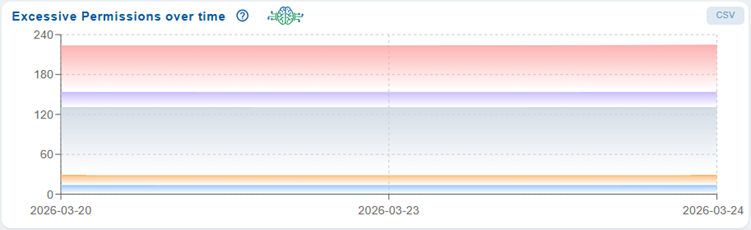
The Excessive Permissions Over Time chart in the Container Orchestration Remediation Management (CORM) dashboard provides a trend-based visualization of permission-related risks across the container environment. Its primary purpose is to help you monitor how excessive or over-privileged access configurations evolve over a selected time period, enabling better tracking of security posture and remediation effectiveness.
The chart displays time on the X-axis and the number of excessive permission instances on the Y-axis, with different colored bands representing varying severity levels (such as Critical, High, Medium, and Low). This layered visualization allows users to quickly assess the distribution and volume of risks over time.
By analyzing this chart, you can:
- Identify if excessive permissions are increasing, decreasing, or remaining constant.
- Evaluate the impact of remediation efforts by observing reductions in higher severity issues.
- Detect persistent or recurring permission risks that require further investigation.
Overall, this chart helps to track remediation progress, identify trends in entitlement risks, and ensure continuous improvement in access control security within containerized environments.
Fix Recommendations

The Fix Recommendations table in the Container Orchestration Entitlement Management (COEM) dashboard provides a detailed view of identified entitlement and access control misconfigurations, along with recommended remediation actions. This table helps users analyze non-compliant Kubernetes RBAC configurations and take corrective measures efficiently.
You can use this table to quickly identify high-risk permission issues, understand their impact, and apply appropriate fixes to ensure secure and compliant access control within the container environment.
Each row in the table represents a specific rule violation and includes the following details:
Rule ID
Unique identifier for the detected issue.
Rule Title
Brief description of the entitlement misconfiguration.
Rule Description
Detailed explanation of the rule and the associated risk.
Not Compliant Resources
Lists the resources that do not adhere to the defined policy.
Namespaces
Indicates the Kubernetes namespace where the issue is present.
Affected Type
Specifies the type of resource impacted (e.g., Group, ServiceAccount).
Severity
Categorizes the risk level (Critical, High, Medium) to help prioritize remediation.
Fix
Provides an option to initiate or view recommended remediation actions. Click the Fix(wrench) icon corresponding to a rule id and follow the wizard that guides you through the process of selecting and applying the necessary patches.
Commonly Asked Questions
What Kubernetes components does COEM analyze?
COEM analyzes:
- Service Accounts
- Roles
- ClusterRoles
- RoleBindings
- ClusterRoleBindings
- Namespace-level permissions
- Cluster-wide access permissions
What types of risks can COEM identify?
COEM can identify:
- Over-privileged service accounts
- Wildcard permissions
- Excessive cluster-admin access
- Privilege escalation paths
- Unused or dormant permissions
- Broad namespace access
- Risky RBAC configurations
Why is entitlement management important in Kubernetes?
Kubernetes environments often accumulate excessive permissions over time. Misconfigured RBAC policies or overly permissive service accounts can increase the attack surface and enable privilege escalation. COEM helps organizations implement least-privilege access and reduce entitlement risks.
Does COEM support namespace-level entitlement analysis?
Yes. COEM evaluates permissions at both:
- namespace scope
- cluster scope
This helps organizations understand localized as well as global privilege exposure.
Can COEM visualize relationships between identities and permissions?
Yes. COEM helps visualize relationships between:
- identities
- permissions
- policies
- entitlements
- Kubernetes resources
This simplifies entitlement investigation and access-path analysis.
How does COEM detect excessive permissions?
COEM continuously evaluates Kubernetes RBAC objects and maps identities to their effective permissions. It analyzes granted permissions against actual access scope and identifies permissions that exceed operational requirements.
Can COEM detect unused or dormant permissions?
Yes. COEM helps identify permissions and entitlements that are assigned but rarely or never used, enabling organizations to clean up stale access configurations.
How frequently are entitlement scans performed?
Entitlement analysis is refreshed during scheduled or continuous scan cycles, ensuring visibility into newly introduced RBAC changes and permission updates.
How does COEM help during security audits?
COEM provides centralized entitlement visibility, access analysis, and privilege mapping that support:
- compliance reviews
- security audits
- forensic investigations
- governance reporting
Does COEM support investigation of access paths?
Yes. COEM helps trace how identities inherit permissions through:
- RoleBindings
- ClusterRoleBindings
- inherited RBAC relationships
- namespace associations
Does COEM help reduce attack surface?
Yes. By identifying excessive privileges, stale permissions, and risky access configurations, COEM helps organizations minimize privilege exposure and reduce potential attack paths.
Can COEM identify wildcard permissions in RBAC policies?
Yes. COEM detects wildcard actions such as:
- unrestricted API groups
- unrestricted resources
Does COEM support investigation of access paths?
Yes. COEM helps trace how identities inherit permissions through:
- RoleBindings
- ClusterRoleBindings
- inherited RBAC relationships
- namespace associations
Why are some entitlements not visible in COEM?
Possible reasons include:
- insufficient Kubernetes RBAC permissions
- incomplete onboarding
- restricted namespace visibility
- scan synchronization delays
What permissions are required to onboard a cluster into COEM?
Cluster onboarding typically requires:
- Kubernetes cluster-admin privileges
- access to the cluster master node CLI
- permissions to create:
- ServiceAccount
- ClusterRole
- ClusterRoleBinding
Does COEM support multi-cluster visibility?
Yes. Multiple Kubernetes clusters can be onboarded and monitored centrally for unified entitlement analysis.
Can COEM help during security audits?
Yes. COEM provides centralized entitlement visibility, access analysis, and privilege mapping that support:
- compliance reviews
- security audits
- forensic investigations
- governance reporting

