Skip to content
SecPod  – Documentation
  • Docs Home
  • Categories
    • Saner Platform
    • Saner Cloud
    • Saner CVEM
    • Security Intelligence
  • More
    • About SecPod
    • Blog
    • Security & Privacy
    • Support Center
    • Resources
  • SCHEDULE A DEMO
  • Toggle website search
Search this website
Menu Close
  • Docs Home
  • Categories
    • Saner Platform
    • Saner Cloud
    • Saner CVEM
    • Security Intelligence
  • More
    • About SecPod
    • Blog
    • Security & Privacy
    • Support Center
    • Resources
  • SCHEDULE A DEMO
  • Toggle website search
  • Docs Home
  • Categories
    • Saner Platform
    • Saner Cloud
    • Saner CVEM
    • Security Intelligence
  • More
    • About SecPod
    • Blog
    • Security & Privacy
    • Support Center
    • Resources
  • SCHEDULE A DEMO

Saner Platform

  • Saner Platform Release Notes
    • Saner Platform Integration Release: ServiceNow Integration Introduced, Freshservice Enhanced
    • Release Notes Saner 6.4.1
    • Release Notes SanerNow 6.4
    • Release Notes SanerNow 6.3.1
    • Release Notes SanerNow 6.3
    • Release Notes SanerNow 6.2.1
    • Release Notes SanerNow 6.2.0.3
    • Release Notes SanerNow 6.2.0.1
    • Release Notes SanerNow 6.2
    • Release Notes SanerNow 6.1.1
    • Release Notes SanerNow 6.1
    • Release Notes SanerNow 6.0
    • Release Notes SanerNow 5.3.1
    • Release Notes SanerNow 5.3
    • Release Notes SanerNow 5.2
    • Release Notes SanerNow 5.1
    • Release Notes SanerNow 5.0
    • Release Notes SanerNow 4.8.0.0
    • Release Notes SanerNow 4.7.0.0
    • Release Notes SanerNow 4.6.0.0
    • Release Notes SanerNow 4.5.0.0
    • Release Notes SanerNow 4.4.0.0
    • Release Notes SanerNow 4.3.0.0
    • Release Notes SanerNow 4.2.2.1
    • Release Notes SanerNow 4.2.2.0
    • Release Notes SanerNow 4.2.1.0
    • Release Notes SanerNow 4.2.0.0
    • Release Notes SanerNow 4.1.1.0
    • Release Notes SanerNow 4.0.0.5
  • Saner Platform Guide
    • Saner Administration Guide
    • Saner Device Management User Guide
    • Saner Platform and ServiceNow Integration Guide
    • Saner Platform and Freshservice Integration Guide
    • Saner Platform Function Guides
  • FAQs
    • Saner CVEM Technical FAQs
  • How Tos
    • General
      • How to increase the subscription count for an Account in Saner CVEM
      • How to increment license count for an Organization in Saner CVEM
      • How to provision Saner tools for an Organization
      • How to change subscription type in Saner CVEM
      • How to sign-up with Saner CVEM?
      • How to create a new account in Saner CVEM?
      • How to enable SSO authentication policy in Saner CVEM?
      • How to set alerts in Saner?
      • How to view, download and filter the audit logs?
      • How to designate Saner Agent to perform network scan?
      • How to Co-Brand with your logo?
      • How to fetch the details of the mandatory fields from the Okta account?
      • How to create MFA policy for Okta?
      • How to fetch the details of the mandatory fields from the PingID account?
      • How to create MFA policy for PingID?
      • How to fetch the details of the mandatory fields from the PingOne account?
      • How to create MFA policy for PingOne?
      • How to download and install Saner Agent in Mac?
      • How to download and install Saner agent in Linux?
      • How to download and install the Saner agent in Windows?
      • How to update the expiry date of an existing subscription?
      • How to manage users and their preferences using role-based access?
      • How to uninstall Saner Agent using Saner Offline deployer tool.
      • How to onboard a new organization?
      • How to deploy Saner Agent using Saner Offline deployer tool.
      • How to install a Saner agent through the command line?
      • How to uninstall the Saner agent through command line?
    • Saner Reports
      • How to configure mail settings to email Report PDF?
      • How to create a custom report in Saner?
      • How to schedule for the report back up?
    • Saner Device Management
      • How to create custom groups in Saner CVEM
    • Saner Mail Settings
      • How to create new mail settings in Saner?
      • How to use OAuth-enabled authentication in Saner mail settings
      • How to create OAuth Client ID and Client Secret for Gmail
      • How to create OAuth Client ID and Client Secret for Microsoft 365.
  • Supported OSs and Platforms
    • Operating Systems and Platforms Supported
    • Supported Third-party Applications for Patching

Saner Cloud

  • Before You Begin
    • Glossary of Terms
    • Read me First
  • Get Started
    • Prerequisites For Saner SaaS Platform Deployment
    • Saner Cloud Deployment Guides
      • GCP OAuth Scopes for Saner CNAPP
      • Onboarding a GCP Organization to Saner Cloud(CLI)
      • Onboarding a GCP Project to Saner Cloud (CLI)
      • Onboarding a GCP Organization to Saner Cloud(Manual)
      • Onboarding a GCP Project to Saner Cloud(Manual)
      • Azure Onboarding
      • Troubleshooting
      • Get Started with Saner CNAPP AWS Cloud Deployment V1.0
      • Onboarding with AWS Credentials(Least Recommended Method)
      • Onboarding with AWS Role(Manual)
      • Onboarding with AWS Role CloudFormation (Automatic): Recommended
    • Roles and Permissions
      • Roles and Permissions for AWS Remediation Access
      • Roles and Permissions for Azure Onboarding, Detection, and Remediation
  • Learn About
    • Saner CNAPP Best Practices
    • Secure Your IAM entities with Cloud Infrastructure Entitlement Management (CIEM)
    • Critical Events to Monitor in GCP
    • Saner CSRP Classification Based on Scoring Decision
    • Cloud Cyber Hygiene Scoring(CCHS) Approach
    • Remediation Rollback
    • Automation and Job-driven Remediation
    • Cost and Usage
    • Excessive Permission Categories Evaluated Across Different Cloud Services
    • Publicly Accessible Resources
    • Patch Aging and Patch Impact
    • SecPod Default Benchmarks
    • Watchlists
    • Cloud Workload Protection Platform(CWPP)
    • Overview of Report Views in Saner Cloud
    • Whitelisting Resources
    • Saner Plasma AI Assistant for Seamless User Interaction
    • Critical Events to Monitor in AWS
    • High-Privilege Actions in Critical Activity Logs for AWS
    • Audit Logs in Saner Cloud
    • Excessive Permissions
    • Alerts in SanerCloud
  • Tell Me How
    • How to Remediate in Saner Cloud?
    • How to Configure Automation Rule to Remediate Misconfigurations?
    • How to Manage Report Views at Organization-level in Saner Cloud?
    • How to Get a Cohesive View from Saner Cloud Unified Dashboard?
    • How to Use Tags to Quickly Filter Resources?
    • How to Troubleshoot Issues with Audit Logs?
    • How to Manage Groups and Tags in Saner Cloud?
    • How to Manage Report Views for a User Account in Saner Cloud?
    • How to Troubleshoot or Analyze with Critical Activity Logs?
    • How to Setup Alerts Across SanerCloud Tools?
    • How to Take Action on Alert Notifications from SanerCloud?
    • CCHS
      • How to Monitor Resource Risk Trends for CHS?
      • How to Assess Resource Health through Severity Distribution?
      • How to Evaluate Service-Level Risks Using CHS Scores?
      • How to Analyze Cyber Hygiene Scores through Trend Chart?
      • How to Identify High-Risk Resources by Geo Location?
      • How to Get an Overview of Cyber Hygiene for Cloud Resources?
      • How to Review Organization-Level Cyber Hygiene Across Accounts?
      • How to Assess Risk Distribution for Different Cloud Providers?
      • How to Review Major Issues Contributing to the Drop of Cyber Hygiene Score at Account-Level?
      • How to Analyze Module-wise Risk through CHS Distribution?
      • How to View the Cyber Hygiene Score Distributed Across Cloud Environments?
      • How to Track Security Posture with Cyber Hygiene Score?
      • How to Configure Account Weightage?
    • CSRP
      • How to Monitor and Analyze Audit Logs for Risk Prioritization?
      • How to Configure Risk Based Cloud Security Alerts?
      • How to Generate Reports and Visualizations?
      • How to Filter Risks by Tags for Targeted Analysis?
      • How to Manage Prioritized Risks at Account-level?
      • How to View the Detailed Breakdown of a Specific Cloud Cyber Security Standard (CCSS) Risk Finding?
      • How to Review and Prioritize Resources Based on Associated Risks?
      • How to Assess Risk Distribution on Essential Resources?
      • How to Assess and Prioritize Risks Across Resource Categories?
      • How to Identify the Risks Affecting Essential Resources?
      • How to Assess Full Versus Limited Technical Impact of Exploiting an Anomaly?
      • How to Review the Risk Factor Distribution Based on Automatable Reliability?
      • How to Get an Overview of Exploitable Risks?
      • How to Map Risks to MITRE ATT&CK for Threat-Informed Defense?
      • How to Configure Questionnaire and Assess Security Practices Across Core Domains for an Account?
    • CSAE
      • How to Setup Watchlist Configuration for a Resource?
      • How to Identify Outdated Resources for Cleanup?
      • How does Resource Categorization Work in Saner CSAE?
      • How to Identify Resources Exposed to External Network?
      • How to Understand the Resource Footprint Globally Across Various Regions?
      • How to Make Informed Decisions on Your Expenditure based on Resource Usage Graph?
    • CSPM
      • How to Setup Benchmarks in Saner CSPM?
      • How to Use Quick Evaluation Benchmarks?
      • How to Detect Patterns over a Period with Resource Trends?
      • How to Assess System Compliance and Security Posture?
    • CSPA
      • How to Initiate Patch Remediation from CSPA Dashboard?
      • How to Quickly Identify the Detected and Remediated Anomalies for an Account?
      • How to Prioritize Remediation or Fixes based on Confidence Levels?
      • How to Examine the Overall Anomaly Information for Specific Rules or Checks?
      • How to Search and Retrieve Anomaly Data?
      • How to Whitelist Rules or Resources in Cloud Security Scans?
    • CIEM
      • How to See the Active Version for an IAM Policy?
      • How to Address Critical Activities Using Evidence?
      • How to View by Type and Usage for any Identity in CIEM?
      • How to Get Visibility into Cloud Entitlements?
      • How to Use Evidence to Address Policies with Excessive Permission?
      • How to Know the Excessive Permissions on a Specific Service?
      • How to Visually See the Relationship between Identity, Entitlement, Policy, or Permission?
      • How to Determine if a Policy has Excessive Permission?
      • How to Initiate Remediation for Different Identities from CIEM?
    • CSRM
      • Rollback an Applied Remediation
      • How to Configure Automation Rule to Remediate Misconfigurations?
      • How to Create a Patching Task for Items Currently in “Approval Pending” State?
      • How to Evaluate Remediation Effort with Patching Impact Chart?
      • How to Prioritize and Address Older or High-Risk Anomalies with Patch Aging?
      • How to Monitor the Overall Status of the Remediation Job?
      • How do I Get to Know the Regions Impacted by a Specific Rule?
      • How to View the Severity of a Missing Patch Affected by a Rule?
      • How to Address Missing Patches Via Remediation Tasks?
      • How to Quickly Access the Necessary Tool for Remediation and Begin Patching Tasks?
  • Saner Cloud User Guides
    • GCP Cloud Infrastructure Entitlement Management (CIEM) User Guide
    • Azure Cloud Infrastructure Entitlement Management(CIEM) User Guide
    • Cloud Security Risk Prioritization(CSRP) User guide
    • Cloud Cyber Hygiene Score(CCHS) User Guide
    • Cloud Security Remediation Management(CSRM) User Guide
    • AWS Cloud Infrastructure Entitlement Management(CIEM) User Guide
    • Cloud Security Posture Anomaly(CSPA) User Guide
    • Cloud Security Asset Exposure(CSAE) User Guide
    • Cloud Security Posture Management(CSPM) User Guide
  • Saner Cloud Release Notes
    • Saner Cloud – V.3.0.1.0 Release Notes
    • Saner Cloud – V.3.0.0.0 Release Notes
    • Saner Cloud – V.2.0.0.2 Release Notes
    • Saner Cloud – V.2.0.0.1 Release Notes
    • Saner Cloud – V.2.0.0.0 Release Notes
    • Saner Cloud – V.1.2.0.1 Release Notes
    • Saner Cloud – V.1.2.0.0 Release Notes
    • Saner Cloud – V.1.1.0.0 Release Notes
    • Saner Cloud – V.1.1 Release Notes
    • Saner Cloud – V.1.0 Release Notes
  • Saner COSP User Guides
    • Container Orchestration Entitlement Management(COEM) Userguide
    • Container Orchestration Asset Exposure(COAE) User Guide
    • Container Orchestration Posture Management(COPM) User Guide
    • Container Orchestration Remediation Management(CORM) User Guide
    • Container Orchestration Security Platform (COSP) User Guide
    • Container Orchestration Posture Anomaly(COPA) Userguide
  • Saner COSP Release Notes
    • Saner COSP – V.1.0.0.0 Release Notes
  • Frequently Asked Questions
    • Saner COSP Technical FAQs
    • Saner Cloud Technical FAQs

Saner CVEM

  • Saner CVEM Release Notes
    • Release Notes Saner CVEM 6.6.1
    • Release Notes Saner CVEM 6.6
    • Release Notes Saner 6.5
    • Saner Platform Integration Release: ServiceNow Integration Introduced, Freshservice Enhanced
    • Release Notes Saner 6.4.1
    • Release Notes SanerNow 6.4
    • Release Notes SanerNow 6.3.1
    • Release Notes SanerNow 6.3
    • Release Notes SanerNow 6.2.1
    • Release Notes SanerNow 6.2.0.3
    • Release Notes SanerNow 6.2.0.1
    • Release Notes SanerNow 6.2
    • Release Notes SanerNow 6.1.1
    • Release Notes SanerNow 6.1
    • SanerNow Risk Prioritization Launch
    • Release Notes SanerNow 6.0
    • Release Notes SanerNow 5.3.1
    • Release Notes SanerNow 5.3
    • Release Notes SanerNow 5.2
    • Release Notes SanerNow 5.1
    • Release Notes SanerNow 5.0
    • Release Notes SanerNow 4.8.0.0
    • Release Notes SanerNow 4.7.0.0
    • Release Notes SanerNow 4.6.0.0
    • Release Notes SanerNow 4.5.0.0
    • Release Notes SanerNow 4.4.0.0
    • Release Notes SanerNow 4.3.0.0
    • Release Notes SanerNow 4.2.2.1
    • Release Notes SanerNow 4.2.2.0
    • Release Notes SanerNow 4.2.1.0
    • Release Notes SanerNow 4.2.0.0
    • Release Notes SanerNow 4.1.1.0
    • Release Notes SanerNow 4.0.0.5
    • Saner CVEM
      • Release Notes Saner CVEM 6.6
  • Saner CVEM Guide
    • Prerequisites For Saner SaaS Platform Deployment
    • What’s New in Saner CVEM?
    • Getting Started with Saner CVEM
    • Pre-requisites for Saner CVEM Deployment
    • How does Saner CVEM’s deployment architecture work?
  • Saner CVEM Products
    • Overview of Saner Continuous Vulnerability and Exposure Management
    • Saner CVEM Unified Dashboard User Guide
    • Saner CVEM Asset Exposure User Guide
    • Saner CVEM Continuous Posture Anomaly Management User Guide
    • Data Points IT teams can Fetch from Saner CPAM
    • Posture Anomaly Computation Rules
    • Saner CVEM Vulnerability Management User Guide
    • Saner CVEM Compliance Management User Guide
    • Saner CVEM Risk Prioritization User Guide
    • Saner CVEM Patch Management User Guide
    • Saner CVEM Endpoint Management User Guide
    • Saner CVEM Remote Scripting User Guide
    • Saner CVEM Remote Access User Guide
    • Saner CVEM Network Scanner User Guide
    • Saner CVEM Cyber Hygiene Score User Guide
  • How Tos
    • Saner AE
      • How to blacklist and whitelist applications in Saner AE?
      • How to manage asset licenses using Saner AE?
      • How to run an asset scan using Saner AE?
    • Saner CPAM
      • How to create new response in PA tool?
      • How to build your own detection and response in PA tool?
      • How to whitelist an entire PA ID?
      • How to configure Posture Anomaly tool for custom detection?
      • How to fix Anomalies from PA dashboard?
      • How to fix anomalies detected in your account from All Anomalies Page?
      • How to fix anomalies from PA Summary page?
      • How to delete PA scan preferences?
      • How to schedule PA Scans on Daily, Weekly, and Monthly basis?
      • How to launch Posture Anomaly scans?
    • Saner VM
      • How to automate and schedule vulnerability scans?
      • How to exclude vulnerabilities in Saner VM tool
      • How to manage excluded vulnerabilities in Saner VM?
      • How to remediate vulnerabilities from vulnerability management dashboard?
    • Saner CM
      • How to run a compliance scan?
      • How to custom create a security policy?
      • How to align with PCI security compliance management?
      • How to align with NIST 800-171 security compliance management?
      • How to align with NIST 800-53 security compliance management?
      • How to align with HIPAA security compliance management using Saner CM?
    • Saner PM
      • How to fix firmware in Saner?
      • How to exclude patches in Saner PM?
      • How to manage excluded patches in Saner PM?
      • How to automate patch management in Saner PM?
      • How to roll back patches in Saner PM?
      • How to apply missing patches in Saner PM?
      • How to apply the most critical patches in Saner PM?
      • How to perform custom remediation for applications that require paid patches using Saner PM
      • How to check the status of patching activity?
    • Saner EM
      • How to collect all security events from Windows Events Log?
      • How to check password policy set in Windows systems?
      • How to check status of DEP in Windows systems?
      • How to check faulty Anti-Virus (AV) status in Windows systems?
      • How to check for Anti-Virus (AV) status in Windows systems?
      • How to check account lockout policy on Windows systems?
      • How to check if Bit-locker protection is OFF in Windows systems?
      • How to list all inactive users on Windows systems?
      • How to list all guest accounts in Windows systems?
      • How to list all Administrator accounts on Windows systems?
      • How to list last-logon details of users on Windows systems?
      • How to identify all users in Windows systems?
      • How to collect all services that are currently running in Windows systems?
      • How to list all Groups in Windows systems?
      • How to collect all keyboard and pointing devices connected to Windows systems?
      • How to collect all storage devices connected to Windows systems?
      • How to investigate total RAM or CPU threshold (greater than or equal to 80%) in Windows systems?
      • How to collect operating systems information in Windows?
      • How to investigate disks running out of space (<100 MB) in Windows systems?
      • How to collect and investigate disk information on Windows systems?
      • How to collect all installed patches in Windows systems?
      • How to collect all software patches that are hidden in the Windows Update server?
      • How to check the status of Windows Update Server (WSUS/SCCM)?
      • How to collect BIOS information such as serial number, version, manufacturer in Windows systems?
      • How to collect all the important missing patches in Windows systems?
      • How to check wireless security in Linux systems?
      • How to collect mounted disk information on Linux systems?
      • How to check wireless signal quality in Linux systems?
      • How to check all firewall policies on Linux systems?
      • How to collect all Dynamic Host Configuration Protocol (DHCP) information on Linux systems?
      • How to collect DNS information on Linux systems?
      • How to collect ARP entries that are created when a hostname is resolved to an IP address and then to a MAC addressing in Linux?
      • How to check wireless signal quality in Windows systems?
      • How to check wireless security in Windows systems?
      • How to collect all open ports in Windows systems?
      • How to collect all network interfaces in Windows systems?
      • How to investigate DNS cache on Windows systems?
      • How to check all firewall policies on Windows systems?
      • How to collect DNS information on Windows systems?
      • How to collect all the applications with an unknown publisher in Linux systems?
      • How to perform system tuning?
      • How to collect all software licenses in Windows systems?
      • How to identify potentially unwanted programs such as torrent downloaders or unnecessary toolbars running on Windows systems?
      • How to collect a list of applications that are started when you boot your computer?
      • How to collect all the applications with an unknown publisher in Windows systems?
      • How to collect all software licenses in Mac systems?
      • How to collect ARP entries that are created when a hostname is resolved to an IP address and then to a MAC addressing Windows?
      • How to collect all families of operating systems such as Windows, Unix, and macOS?
      • How to collect environment variables set in all operating systems?
      • How to collect all the applications with an unknown publisher in Mac systems?
      • How to delete and quarantine a file?
      • How to start and stop the processes in Saner?
      • How to block blacklisted applications in Saner?
      • How to enable/disable devices in Saner
      • How to manually import devices into Saner?
      • How to deploy software in Saner EM?
      • How to enable and disable firewall settings in Saner AE?
      • How to collect all shared resources on Windows systems?
      • How to collect all Dynamic Host Configuration Protocol (DHCP) information on Windows systems?
      • How to connect to a client machine graphically using Saner Remote Access
  • FAQs
    • Saner CVEM Technical FAQs

Security Intelligence for Saner CVEM

  • Overview of Security Content and Intelligence
  • Security Content Statistics
  • OVAL Definitions Platform Coverage
  • OVAL Definitions Class-wise Distribution
  • OVAL Definitions Family-wise Distribution
  • Application and OS Remediation Coverage
  • Compliance Benchmark Coverage
  • List of Vulnerability to Exploit/Malware Mapping covered in Saner
  • Network Scanner Product Support Matrix
  • Privilege levels for authenticated scans using Saner Network Scanner

Security Intelligence for Saner Cloud

  • Benchmark Compliance Rules in AWS, Azure, and GCP
    • GCP
      • SecPod Rules in GCP
        • SecPod Default Rules in GCP: An Overview
        • Understand SecPod Default Rules in GCP
        • Understand SecPod Global Rules in GCP
        • Understand SecPod Regional Rules in GCP
      • CIS Rules in GCP
        • CIS Benchmark Compliance Rules in GCP: An Overview
        • Understand CIS 4.0.0 Rules in GCP
        • Understand CIS 4.0.0 Global Rules in GCP
        • Understand CIS 4.0.0 Regional Rules in GCP
    • AWS
      • SecPod Rules in AWS
        • SecPod Default Rules in AWS: An Overview
        • Understand SecPod Default Rules in AWS
        • Understand SecPod Global Rules in AWS
        • Understand SecPod Regional Rules in AWS
      • PCI DSS 3.2.1 Rules in AWS
        • PCI DSS 3.2.1 Rules in AWS: An Overview
        • Understand PCI DSS 3.2.1 Rules in AWS
        • Understand PCI DSS 3.2.1 Global Rules in AWS
        • Understand PCI DSS 3.2. 1 Regional in AWS
      • CIS Rules in AWS
        • CIS Rules in AWS: An Overview
        • Understand CIS Rules in AWS
        • Understand CIS 3.0.0 Rules in AWS
        • Understand CIS 4.0.1 Rules in AWS
        • Understand CIS 4.0.0 Rules in AWS
        • Understand CIS 3.0.0 Global Rules in AWS
        • Understand CIS 4.0.0 Global Rules in AWS
        • Understand CIS 3.0.0 Regional Rules in AWS
        • Understand CIS 4.0.0 Regional Rules in AWS
      • SOC 2 Rules in AWS
        • SOC 2 Rules in AWS: An Overview
        • Understand SOC 2 Rules in AWS
        • Understand SOC 2 Global Rules in AWS
        • Understand SOC 2 Regional Rules in AWS
      • HIPAA HITRUST Rules in AWS
        • HIPAA HITRUST Rules in AWS: An Overview
        • Understand HIPAA HITRUST Rules in AWS
        • Understand HIPAA HITRUST Global Rules in AWS
        • Understand HIPAA HITRRUST Regional Rules in AWS
      • NIST 800-53 Revision 5 Rules in AWS
        • NIST 800-53 Revision 5 Rules in AWS: An Overview
        • Understand NIST 800-53 Revision 5 Rules in AWS
        • Understand NIST 800-53 Revision 5 Global Rules in AWS
        • Understand NIST 800-53 Revision 5 Regional Rules in AWS
    • Azure
      • CIS Rules in Azure
        • CIS Rules in Azure: An Overview
        • Understand CIS 1.2.0 Rules in Azure
        • Understand CIS 2.1.0 Rules in Azure
        • Understand CIS 1.1.0 Benchmark Compliance Rules in Azure
        • Understand CIS 3.0.0 Benchmark Compliance Rules in Azure
        • Understand CIS 1.2.0 Global Benchmark Compliance Rules in Azure
        • Understand CIS 2.1.0 Global Benchmark Compliance Rules in Azure
        • Understand CIS 3.0.0 Global Benchmark Compliance Rules in Azure
        • Understand CIS 2.1.0 Regional Benchmark Compliance Rules in Azure
        • Understand CIS 3.0.0 Regional Benchmark Compliance Rules in Azure
      • NIST 800-53 Revision Rules in Azure
        • NIST 800-53 Revision 5 Rules in Azure: An Overview
        • Understand NIST 800-53 Revision 5 Rules in Azure
        • Understand NIST 800-53 Revision 5 Global Rules in Azure
        • Understand NIST 800-53 Revision 5 Regional Rules in Azure
      • SecPod Rules in Azure
        • SecPod Default Rules in Azure: An Overview
        • Understand SecPod Global Rules in Azure
        • Understand SecPod Regional Rules in Azure
        • Understand SecPod Default Rules in Azure
      • HIPAA HITRUST Rules in Azure
        • HIPAA HITRUST Rules in Azure: An Overview
        • Understand HIPAA HITRUST 14.7.0 Rules in Azure
        • Understand HIPAA HITRUST 14.7.0 Global Rules in Azure
        • Understand HIPAA HITRUST 14.7.0 Regional Rules in Azure
      • PCI DSS Rules in Azure
        • PCI DSS 3.2.1 Rules in Azure: An Overview
        • Understand PCI DSS 4.0 Rules in Azure
        • Understand PCI DSS 4.0 Global Rules in Azure
        • Understand PCI DSS 4.0 Regional Rules in Azure
      • SOC 2 Rules in Azure
        • SOC 2 Rules in Azure: An Overview
        • Understand SOC2 Rules in Azure
        • Understand SOC2 Global Rules in Azure
        • Understand SOC2 Regional Rules in Azure
  • Posture Anomaly Checks in AWS and Azure
    • Implementing Posture Anomaly Checks in AWS
    • Implementing Posture Anomaly Checks in Azure
  • Infrastructure Entitlement Checks in AWS, Azure, and GCP
    • Implementing Infrastructure Entitlement Checks in AWS
    • Implementing Infrastructure Entitlement Checks in Azure
    • Implementing Infrastructure Entitlement Checks in GCP
View Categories
  • Home
  • Docs
  • Saner CVEM
  • Saner CVEM Release Notes
  • Release Notes Saner CVEM 6.6.1

Release Notes Saner CVEM 6.6.1

Print Friendly, PDF & Email

We are excited to announce the release of Saner CVEM 6.6.1, which delivers new capabilities helping organizations with compliance readiness, track vulnerability and misconfiguration statuses, deploy patches to large-scale environments, and apply user security governance policies.

1. Cyber Essentials Plus Technical Assessment Report

The Cyber Essentials Plus Technical Assessment Report enables customers to assess their security posture against the five key technical control areas of the UK Cyber Essentials Plus scheme and prepare for assessment readiness activities.

Cyber Essentials is a UK government-backed scheme designed to help organizations protect themselves against common cyber threats. The scheme is built around five key technical control areas: Firewalls, Secure Configuration, Security Update Management, User Access Control, and Malware Protection.

With this release, customers can generate a structured technical assessment report directly from the Canned Reports section under Reports. The report provides an executive summary, overall compliance status, control-level compliance analysis, group-level and device family-level breakdowns, and detailed findings to help IT and security teams identify gaps and prioritize remediation.

For managed endpoints, customers can use Saner CVEM remediation workflows to address applicable gaps, such as missing security updates, insecure configurations, endpoint protection gaps, and other endpoint-related findings. External network assessment findings provide visibility into exposure across scanned assets, enabling infrastructure and network teams to review and take appropriate corrective action.

Key Capabilities

  • Generate the Cyber Essentials Plus Technical Assessment Report with a single click
  • Review an executive summary with overall compliance status and score
  • Analyze findings mapped to Cyber Essentials Plus technical control areas
  • Review group-level and device family-level compliance breakdowns
  • Create focused custom reports for each of the five Cyber Essentials Plus technical control areas
  • Remediate applicable endpoint findings using Saner CVEM remediation workflows

Benefit
This report reduces the manual effort required to prepare Cyber Essentials Plus technical assessment evidence and helps customers identify and remediate gaps before formal assessment activities.
2. PCI DSS External Vulnerability Scan Report

The PCI DSS External Vulnerability Scan Report helps customers assess internet-facing assets against PCI DSS external vulnerability scan expectations, covering 23 validation areas, and prepare for compliance readiness.

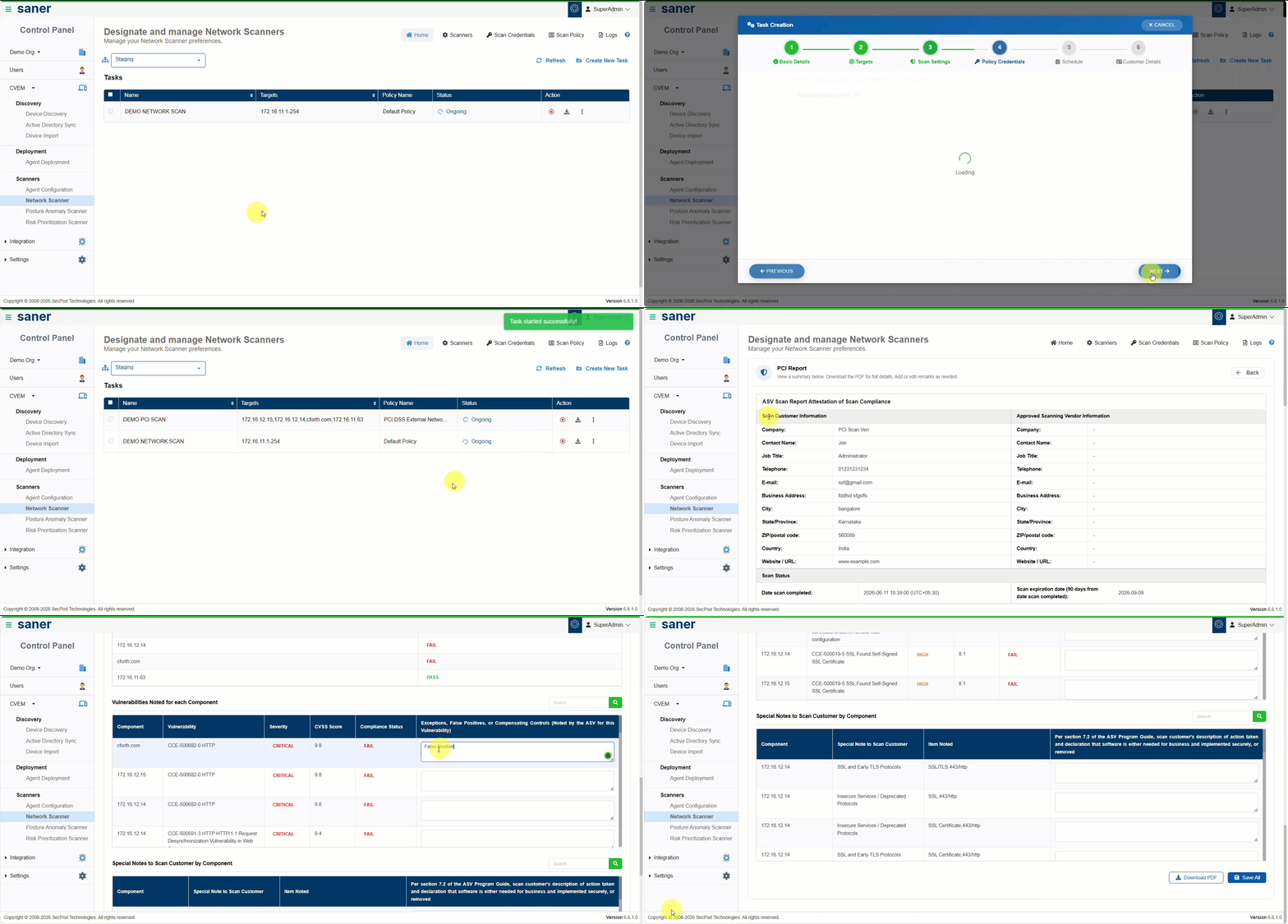
With this release, customers can create a Network Scan task using the new PCI DSS External Vulnerability Scan policy. Once the scan is completed, customers can download the standard Network Scan report or generate the PCI DSS External Vulnerability Scan Report for internal review, remediation planning, and readiness documentation.

The report helps security and compliance teams review external exposure, track scan findings, document exceptions, false positives, or compensating controls, and maintain evidence for PCI DSS External Vulnerability Scan readiness activities.

Key Capabilities

  • Create a Network Scan task using the new PCI DSS External Vulnerability Scan policy
  • Scan internet-facing systems and external IPs that are part of the PCI DSS scope
  • Download the PCI DSS External Vulnerability Scan Report after scan completion
  • Retain up to 24 prior PCI DSS External Vulnerability Scan reports
  • Edit applicable report fields to document exceptions, false positives, compensating controls, and review comments

Benefit
This report reduces manual effort in preparing PCI DSS external vulnerability scan readiness documentation and helps customers review, track, and plan remediation for internet-facing assets.

Important Note
SecPod is currently undergoing PCI ASV certification and is not yet an Approved Scanning Vendor. The PCI DSS External Vulnerability Scan Report is intended for internal assessment and compliance readiness purposes only. It does not serve as an official ASV-certified attestation of PCI DSS compliance.
3. Vulnerability and Misconfiguration Status Tracking

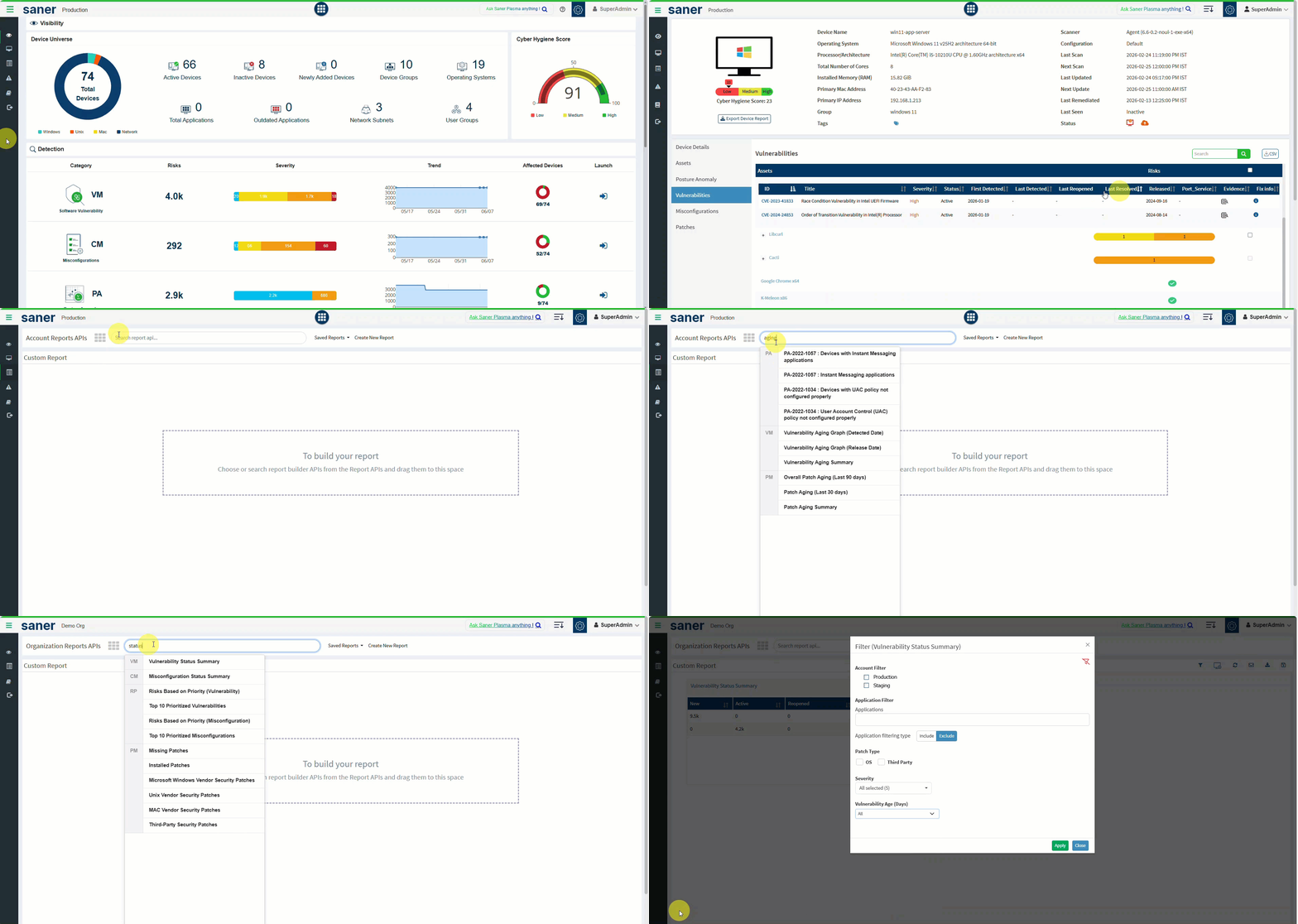
The Vulnerability and Misconfiguration Status Tracking capability provides device-level visibility for vulnerabilities and misconfigurations throughout its lifecycle.

With this enhancement, each vulnerability and misconfiguration is tracked across defined statuses such as New, Active, Fixed, and Reopened. This helps customers understand if a finding is newly detected, still present, resolved, or has reappeared after being fixed.

Security and IT teams can now monitor remediation progress more effectively, identify recurring issues, track vulnerability aging at the device level, and improve reporting for operational and compliance reviews.

Finding statuses include:

  • New: The vulnerability or misconfiguration is detected for the first time on a device
  • Active: The vulnerability or misconfiguration continues to be detected in subsequent scans
  • Fixed: The vulnerability or misconfiguration is no longer detected after remediation
  • Reopened: A previously fixed vulnerability or misconfiguration is detected again

Key Capabilities

  • Track vulnerability and misconfiguration status at the device level
  • View the current status of each vulnerability or misconfiguration, including New, Active, Fixed, and Reopened
  • Review lifecycle dates such as First Detected, Last Detected, Last Resolved, and Last Reopened
  • View vulnerability and misconfiguration status directly from the Individual Device page
  • Use new and enhanced reports to analyze status distribution and remediation progress across accounts/sites and organizations
  • Track reopened findings to identify recurring vulnerabilities or misconfigurations that may require deeper investigation

Benefit
This enhancement improves remediation tracking by helping customers distinguish between newly detected, persistent, fixed, and reopened findings, while supporting compliance and audit reporting with lifecycle dates and status-based summaries.
4. Batch-Based Patch Deployment

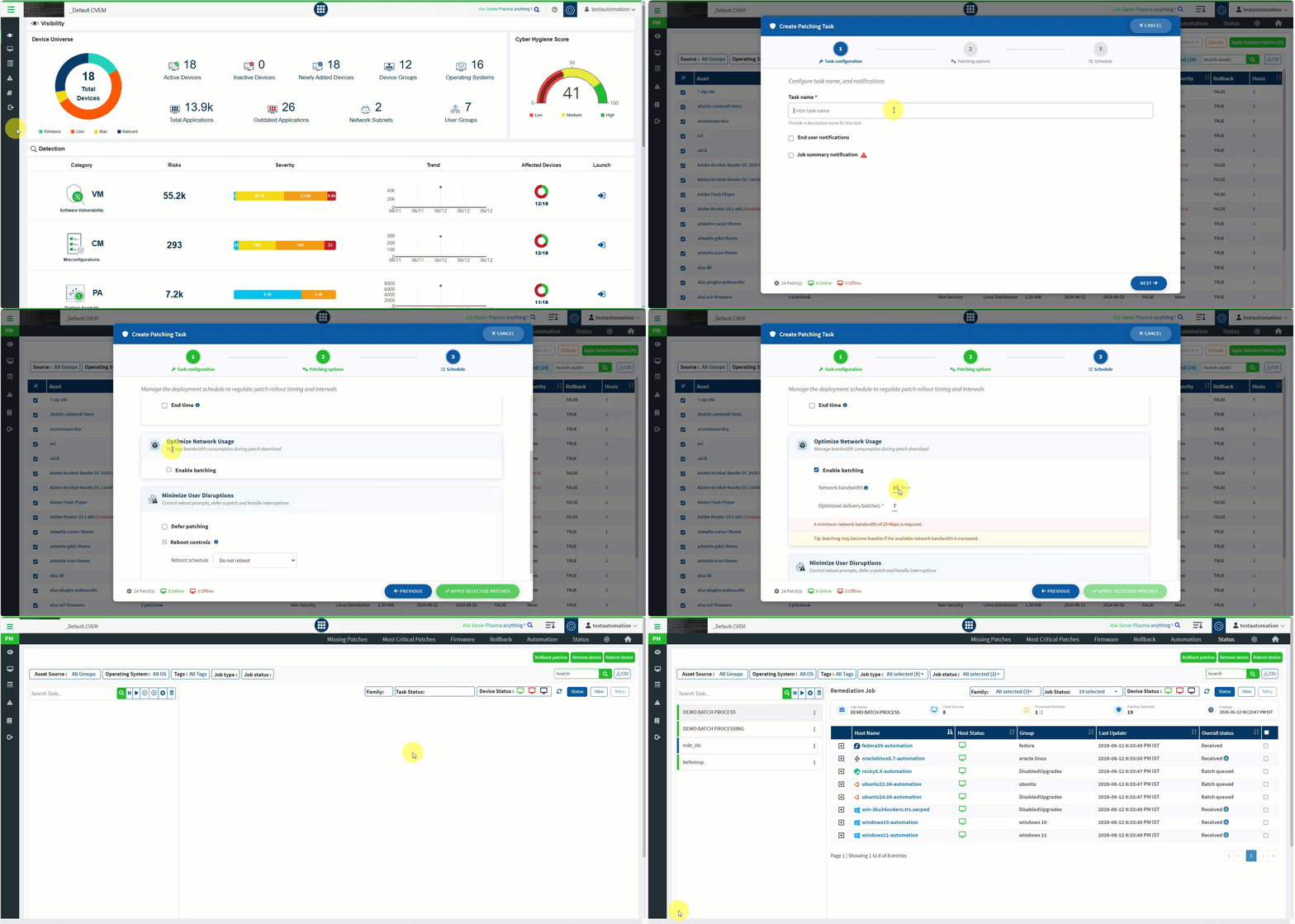
The Batch-Based Patch Deployment capability helps administrators control patch rollout across large-scale environments by distributing patch execution in smaller, optimized batches instead of triggering all endpoints at once.

In large environments, simultaneous patch execution across thousands of endpoints can result in high bandwidth consumption during patch downloads, download failures, retries, and impact on network performance. With batch-based deployment, Saner CVEM sends patching jobs in controlled batches, helping organizations reduce network congestion and improve patch deployment reliability.

Batching is optional and can be enabled while creating patching tasks or automation rules. Existing jobs and rules continue to work as before when batching is not enabled.

When batching is enabled, Saner CVEM evaluates the selected devices, number of patches, patch volume, available network bandwidth, device status, task start window, and end time to calculate an optimized batch distribution.

Devices within a batch proceed in parallel and start patch download, while batches are processed sequentially. This helps ensure that patch downloads stay within the configured network bandwidth and that deployments are spread across the available maintenance window. If a batch is completed earlier than the estimated time, the next batch starts without waiting for the estimated batch duration to complete.

Saner CVEM automatically calculates the batch distribution by default. Administrators can optionally customize the deployment by defining the available Network Bandwidth or specifying the batch size manually. If the bandwidth value or batch size is updated, the batch distribution is
re-calculated accordingly.

Key Capabilities

  • Enable batch-based deployment for patching tasks and automation rules
  • Automatically calculate optimized delivery batches by default based on selected devices, number of patches, patch size, device status, network bandwidth, task start window, and end time, with optional customization for available network bandwidth or manual batch size when administrators need more control
  • Distribute patching jobs across batches instead of triggering all endpoints at once
  • Process devices within each batch in parallel while maintaining controlled sequential batch execution
  • Detect feasibility upfront when the deployment cannot be completed within the configured task window
  • View batch execution progress from the job status page and monitor processed batches against the total number of batches
  • Supported for both Jobs and Rules across Patch Management and Compliance Management

Benefit
This capability helps large enterprises reduce network congestion during patch downloads, improve deployment reliability, and roll out patches in a controlled and predictable manner without manually creating multiple staggered jobs.
5. User Security Policy

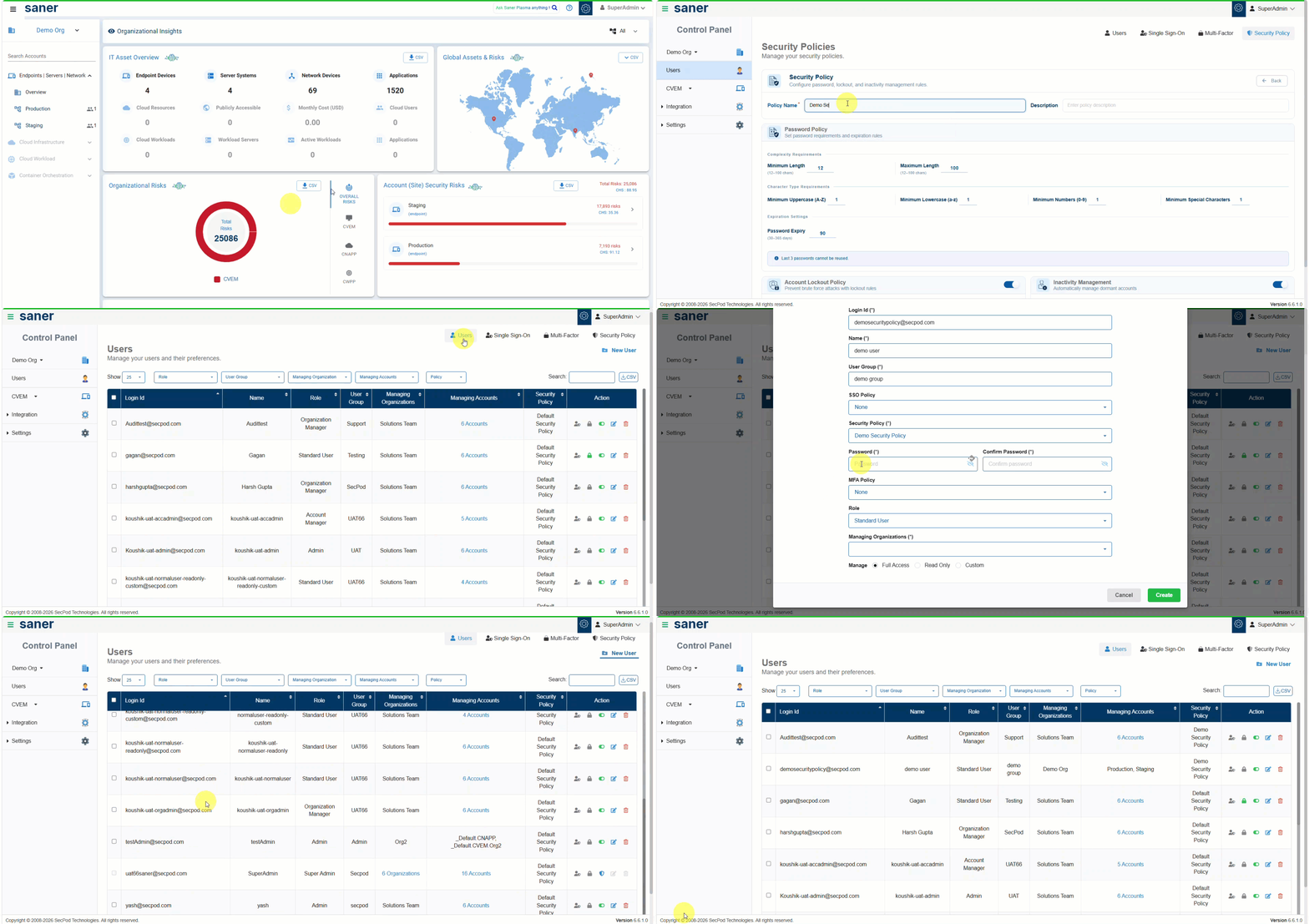
The User Security Policy feature enables administrators to define and enforce account security controls for users across the Saner platform.

With this release, every user is associated with a security policy by default. Administrators can use the default security policy or create custom policies to align user account controls with their organization’s security requirements.

Security policies help organizations strengthen authentication, enforce password standards, reduce brute-force attack risk, and automatically manage inactive accounts.

Key Capabilities

  • Associate every user with a security policy by default
  • Create custom security policies based on organizational requirements
  • Configure password requirements, password expiry, account lockout duration, and inactivity-based account disablement
  • Enforce built-in safeguards such as restriction on reusing the last 3 passwords and account lockout after 3 consecutive failed login attempts
  • Control security policy management based on user roles, where Super Admins and Admins can create, modify, and delete policies, while Organizational Managers and Account Managers can assign existing policies to users
  • Enable or disable user accounts directly from the Users page
  • Display CAPTCHA automatically after the first failed login attempt to add an additional layer of protection against brute force attempts

Benefit
This feature strengthens user account security across the Saner platform by helping organizations enforce password, lockout, inactivity, and CAPTCHA-based protections from a centralized security policy.
6. Active Directory Sync Enhancements

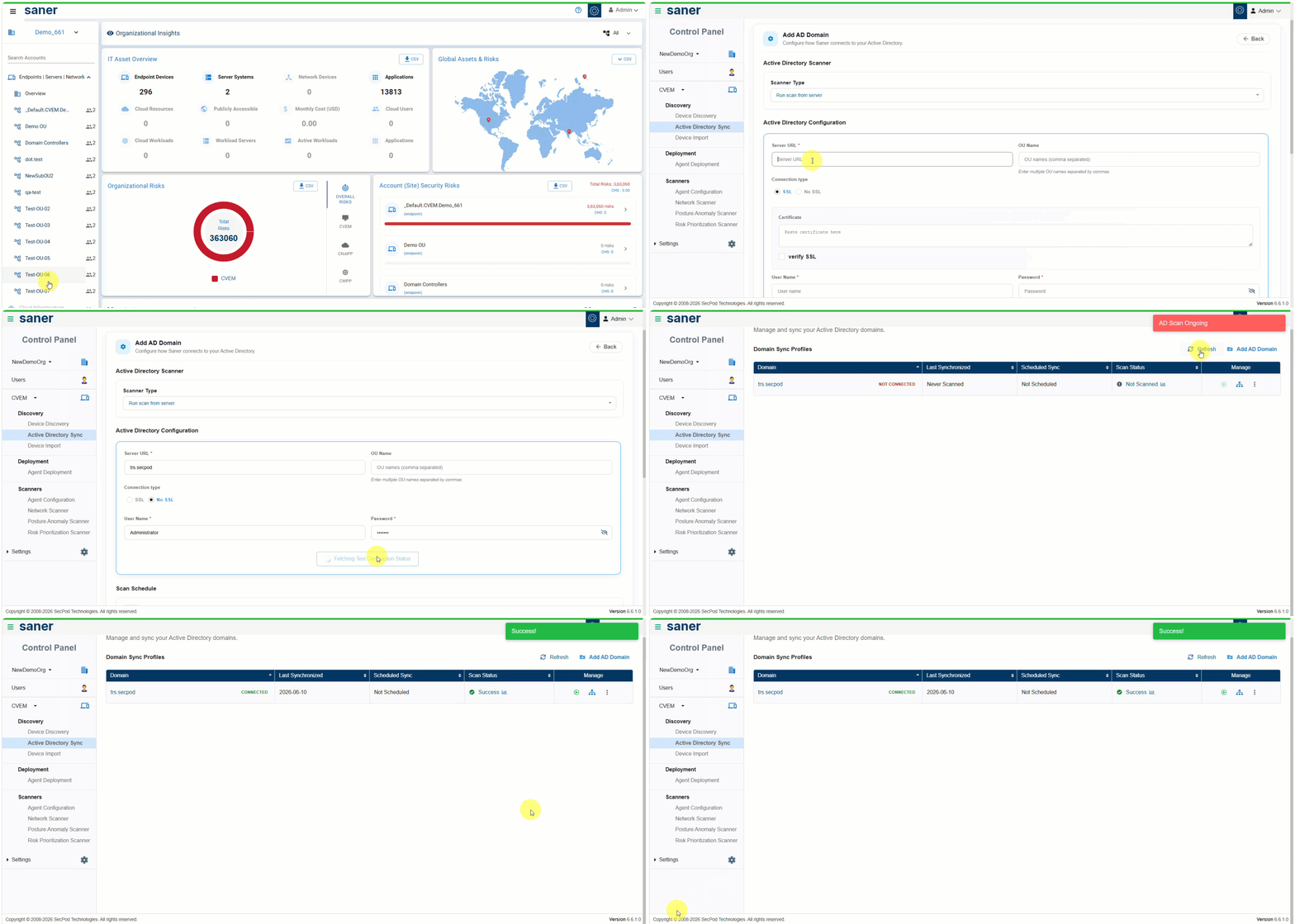
Active Directory Sync has been enhanced to provide greater flexibility for synchronizing large and complex Active Directory environments into the Saner Platform.

With this enhancement, administrators can configure multiple Active Directory domains, define how Organizational Units are mapped to Saner accounts/sites, and use LDAP query-based filtering to control which devices are synchronized. This helps organizations simplify account management, reduce administrative overhead, and better align Active Directory synchronization with their internal organizational structure.

Key Enhancements

  • Configure and manage multiple Active Directory domains
  • Use LDAP query filters to refine the devices synchronized from Active Directory
  • Map multiple Active Directory OUs to a single Saner account/site for centralized device management
  • Add Active Director OU source information as tags on synchronized devices for better traceability
  • Continue to support existing Active Directory Sync capabilities, including one-to-one mapping, custom mapping, include/exclude options, and scheduled synchronization

Benefit
This enhancement simplifies Active Directory Sync management for customers with large and complex directory structures by supporting multiple Active Directory domains, enabling LDAP query-based filtering, and allowing multiple OUs to be managed under a single Saner account/site, while improving synchronization control and flexibility.
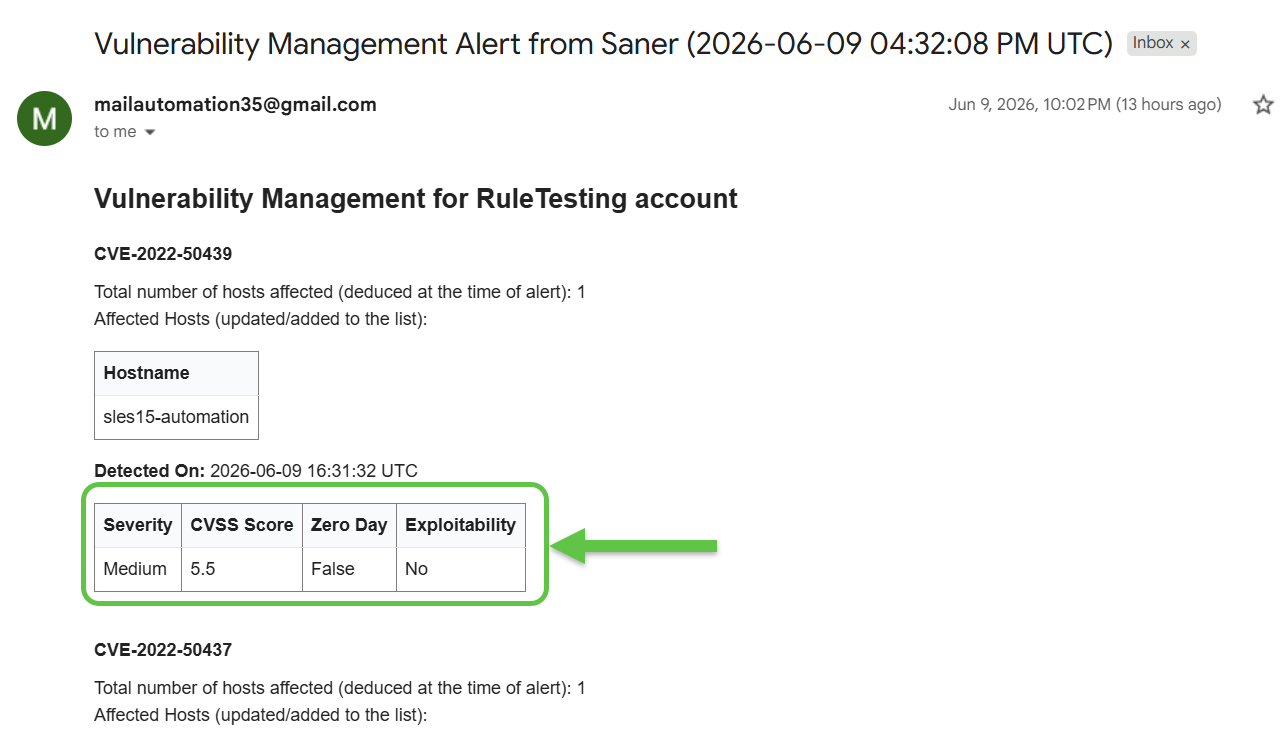
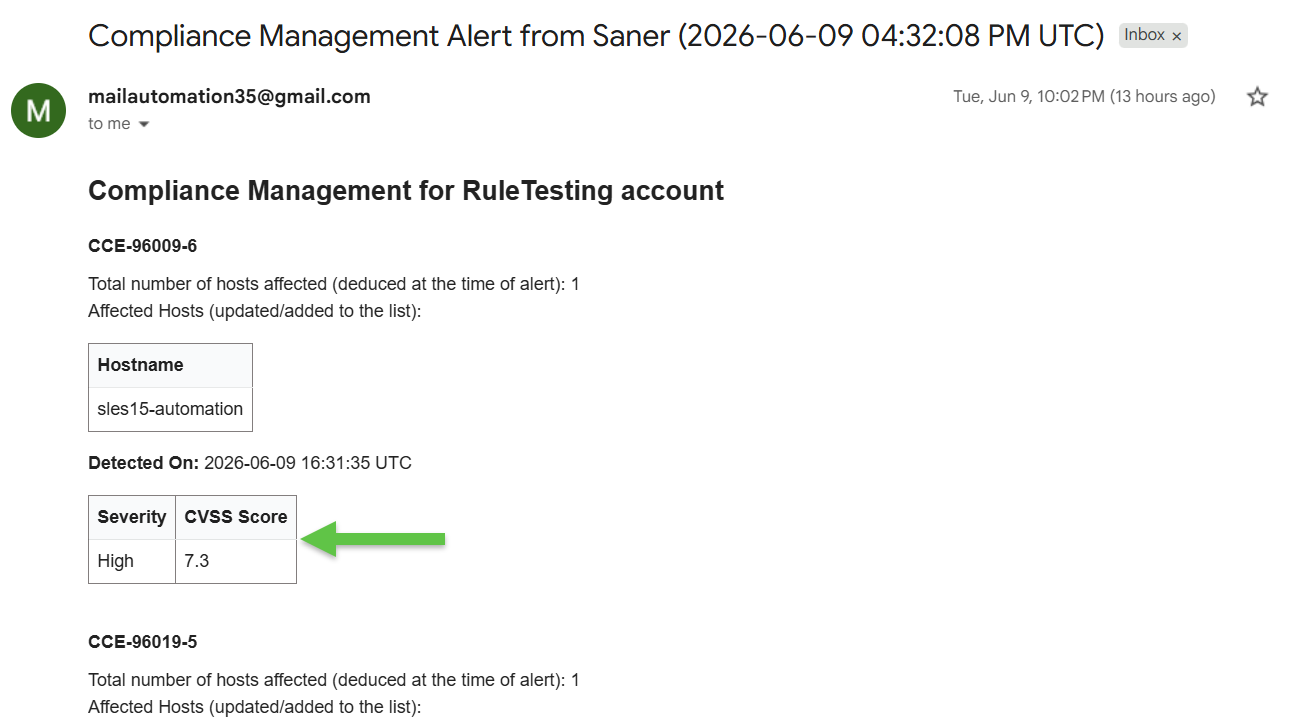
7. Vulnerability Alert Enhancements

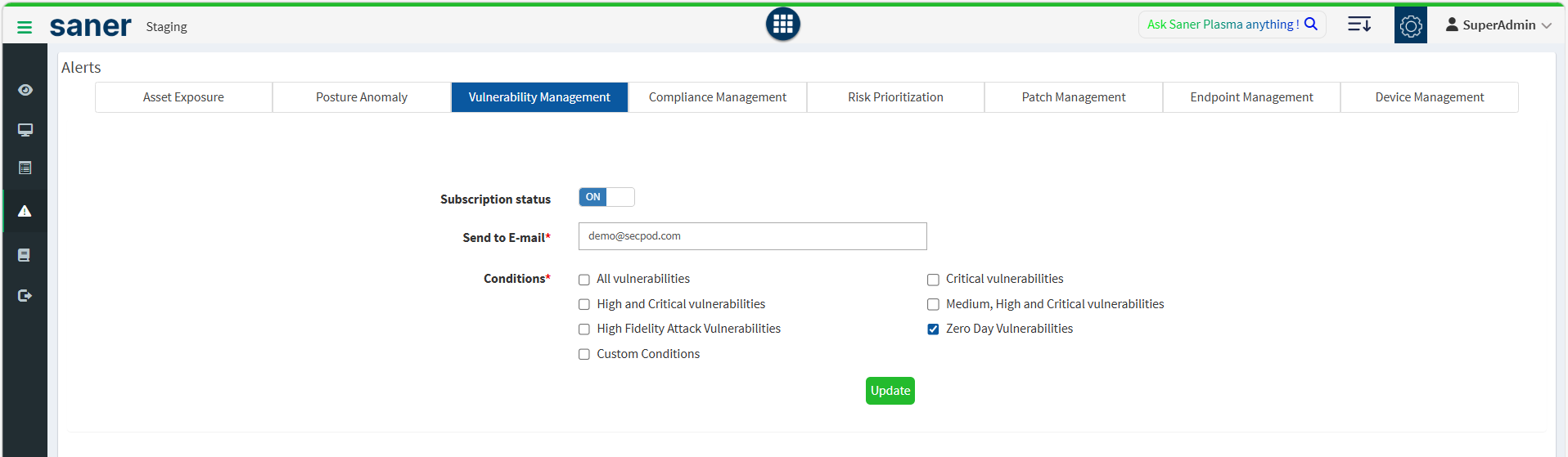
Vulnerability alert emails have been enhanced to include additional risk context such as Severity, CVSS score, Exploitability, and Zero-Day classification.

Alerts can now also be triggered when Zero-Day vulnerabilities are detected, helping administrators quickly assess risk and prioritize response directly from the alert email.

Key Enhancements

  • Include severity, CVSS score, exploitability, and zero-day classification details in vulnerability alert emails
  • Trigger alerts when zero-day vulnerabilities are detected

Benefit
This enhancement helps administrators quickly understand vulnerability risk and prioritize response to critical, exploitable, and zero-day vulnerabilities.
8. Cyber Hygiene Score Enhancements in SanerOne Dashboard

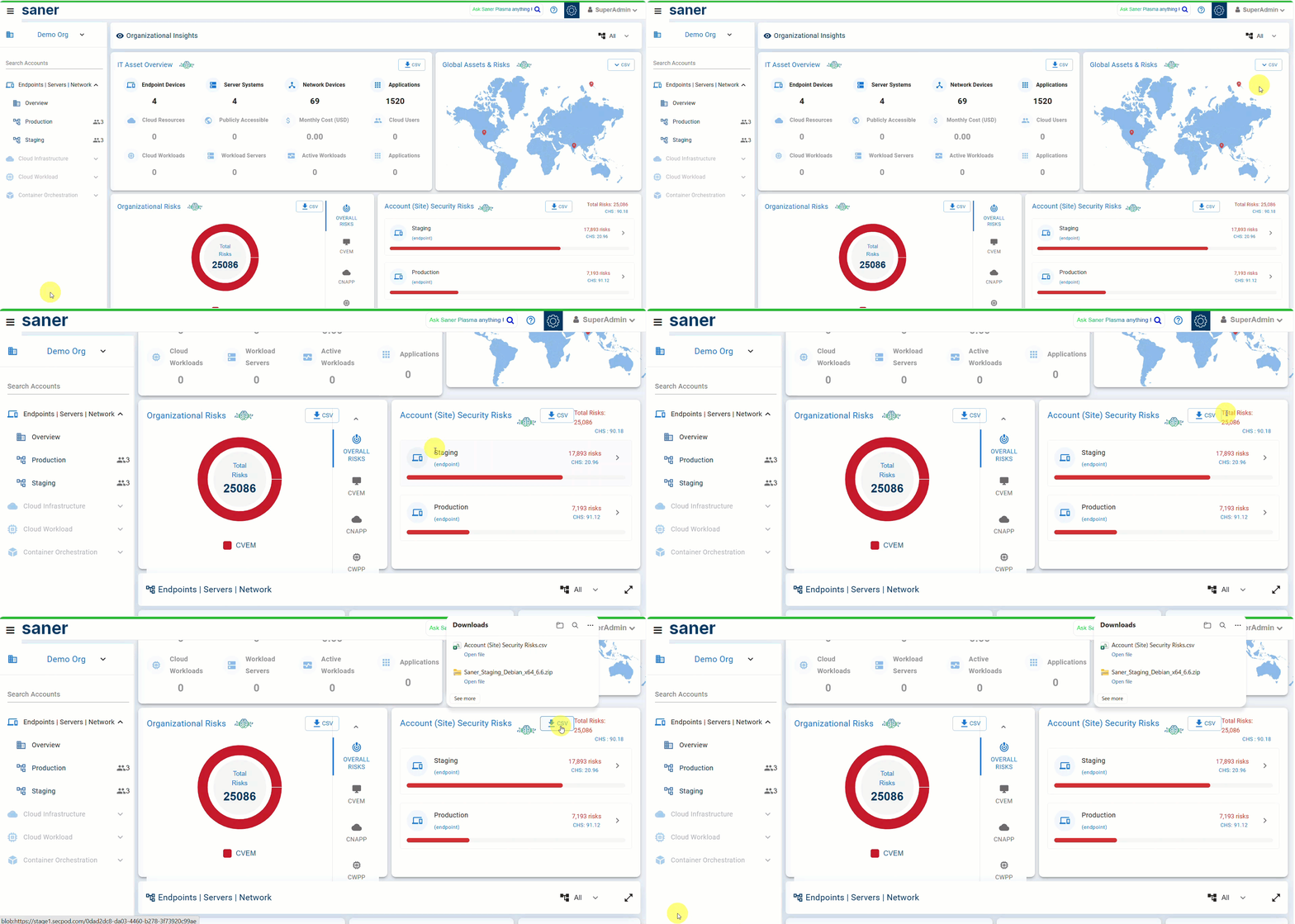
The SanerOne dashboard has been enhanced to provide broader visibility into Cyber Hygiene Score (CHS) across the organization.

With this enhancement, SanerOne now provides an overall CHS view that considers posture across CVEM, Cloud Infrastructure, and CWPP, helping leadership and security teams quickly understand cyber hygiene across endpoints, network devices, cloud infrastructure, and workloads. Customers can also download CHS data in CSV format for reporting, offline analysis, and stakeholder review.
REST and Report API Changes

Modified APIs

  • We have updated the getServiceProvision API to include Organization ID and Account ID in addition to the other service provision details in the response payload
  • We have updated the getAuditLogs API to fetch the User Role associated with each audited action in the response payload

Report APIs

New Canned Report

We have added a new canned report, Cyber Essentials Plus Technical Assessment Report, at the account/site level to help customers assess their security posture against the five key technical control areas of the UK Cyber Essentials Plus scheme and prepare for assessment readiness activities.

The report provides an executive summary, overall compliance status, control-level compliance analysis, group-level and device family-level breakdowns, and detailed findings to help IT and security teams identify gaps and prioritize remediation.

New Custom Reports

We have added new custom reports at the Account/Site and Organization levels to improve compliance assessment, vulnerability status tracking, misconfiguration status tracking, and vulnerability aging analysis.

At the Account/Site level, the following new custom reports are available:

Cyber Essentials Plus Technical Assessment Reports

  • Overall Compliance by Devices
  • Firewalls Compliance by Devices
  • Secure Configuration Compliance by Devices
  • User Access Control Compliance by Devices
  • Malware Protection Compliance by Devices
  • Security Update Management Compliance by Devices

These reports help customers create focused reports for each Cyber Essentials Plus technical control area and review device-level compliance status.

Vulnerability Status and Aging Reports

  • Vulnerability Status by Devices
  • Vulnerability Status Summary
  • Vulnerability Aging Summary

These reports help customers track vulnerability status across New, Active, Fixed, and Reopened findings, analyze remediation progress, and review vulnerability aging by severity and affected host count.

Misconfiguration Status Reports

Misconfiguration Status Reports

At the Organization level, the following new custom reports are available:

  • Misconfiguration Status Summary
  • Misconfiguration Status Summary

These reports help customers review vulnerability and misconfiguration status distribution across accounts within the organization.

New Custom Reports

We have added new custom reports at the Account/Site and Organization levels to improve compliance assessment, vulnerability status tracking, misconfiguration status tracking, and vulnerability aging analysis.

At the Account/Site level, the following new custom reports are available:

Cyber Essentials Plus Technical Assessment Reports

  • Overall Compliance by Devices
  • Firewalls Compliance by Devices
  • Secure Configuration Compliance by Devices
  • User Access Control Compliance by Devices
  • Malware Protection Compliance by Devices
  • Security Update Management Compliance by Devices

These reports help customers create focused reports for each Cyber Essentials Plus technical control area and review device-level compliance status.

Report Enhancements and Modifications

  • Added a new Installation Type filter to the Application Details Custom Report
  • Enhanced Vulnerabilities by Devices Custom Report with a new “Status” column, along with new “Severity” and “Vulnerability Age (Days)” filters.
  • Added Patch Install Date Range and Patch Release Date Range filters to the Patch Compliance Summary by Devices Custom Report

Share This Article :

  • X
  • LinkedIn
Still stuck? How can we help?

Saner Documentation Feedback

Release Notes SanerNow 4.0.0.5Release Notes Saner CVEM 6.6
Table of Contents
  • 1. Cyber Essentials Plus Technical Assessment Report
  • 2. PCI DSS External Vulnerability Scan Report
  • 3. Vulnerability and Misconfiguration Status Tracking
  • 4. Batch-Based Patch Deployment
  • 5. User Security Policy
  • 6. Active Directory Sync Enhancements
  • 7. Vulnerability Alert Enhancements
  • 8. Cyber Hygiene Score Enhancements in SanerOne Dashboard
  • REST and Report API Changes
    • Modified APIs
  • Report APIs
    • New Canned Report
    • New Custom Reports
      • Cyber Essentials Plus Technical Assessment Reports
      • Vulnerability Status and Aging Reports
      • Misconfiguration Status Reports
      • New Custom Reports
  • Report Enhancements and Modifications
Copyright 2026 - SecPod. All Rights Reserved. Privacy Policy.
SanerNow Version 6.5.x